
Find your high-value AI agent opportunities
By analyzing your existing OutSystems applications, Agent Spotter highlights where agentic AI can deliver the most value, taking the guesswork out of what to build and how to scale.
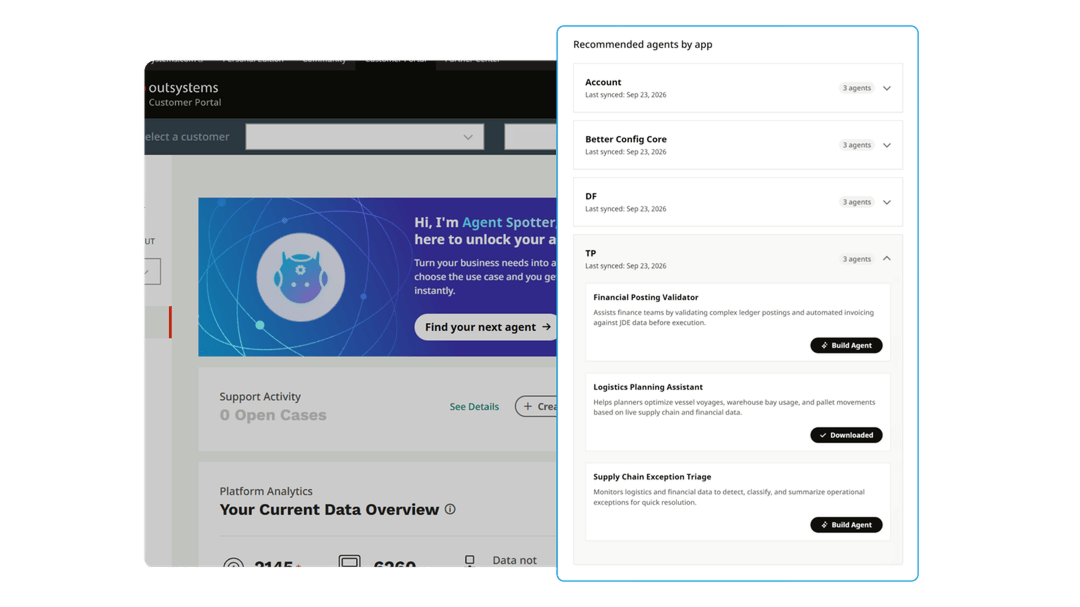
Jumpstart your AI-driven modernization journey today!
Knowing where to deploy AI shouldn’t be a guessing game. Agent Spotter evaluates your existing OutSystems application portfolio to uncover your top AI agent opportunities, giving you complete clarity on where to start.
Receive a prioritized list of agents and then select any recommendation to generate pre-filled prompts and step-by-step instructions for your team.
New to OutSystems?
Fill out the form to schedule an AI discovery session with our experts. We'll analyze your current portfolio and help you map out high-value AI agent use-cases.
Already an OutSystems customer?
Whether you are on O11 or ODC, your team can log into the Customer Portal right now to start using Agent Spotter on your existing applications.
It’s easy to get started!
- Discover agent opportunities: Explore the tailored list of agent recommendations in your Customer Portal.
- Get specs: Select the agent you want to create and click "Build Agent" to access pre-built prompts and starter templates.
- Follow your step-by-step guide: Copy the agent prompt, download the template, and open ODC Studio to start building.
Or, submit the form to schedule a guided deep-dive session with your account team!
Frequently asked questions
OutSystems Agent Spotter is an in-portal tool for agent opportunity discovery. Whether you are an ODC or O11 customer, it scans your existing application portfolio to identify and provide high-value agent recommendations. Because recommendations are based on your existing applications, your team gets a clear path to build and embed agents where they will deliver the most business value.
Knowing where to start, or what project to tackle next, can often be the hardest part of any agentic AI initiative. Agent Spotter helps teams by identifying AI opportunities within your existing application portfolio. It is available directly in your OutSystems Customer Portal. Here’s how it works:
- First, Agent Spotter scans your app portfolio and lists tailored AI agent recommendations directly inside your Customer Portal.
- Then, your team can click "Build Agent" on any recommendation to generate custom prompts, starter templates, and setup guides.
- Finally, teams get a step-by-step guide where they can copy the prompt, download the template, and open ODC Studio to start building.
Yes. Whether your core applications currently run on O11 or ODC, your team can log into the Customer Portal today to get recommendations from Agent Spotter. From there, you can copy a pre-configured prompt, download a starter template, and open ODC to start building right away. Note: If you’re an O11 customer and don’t have access to ODC yet, you can request access to get your free commercial instance.
No. Agent Spotter handles the discovery and specification phase. It provides your teams with pre-configured prompts, templates, and step-by-step instructions so your team can review, customize, and deploy agents safely with full control and visibility.
Agent Spotter is integrated directly inside the OutSystems Customer Portal for current customers. However, if you are exploring OutSystems, you can schedule an AI discovery session with our team! Our experts will help map out high-impact AI agent use cases, and demonstrate how OutSystems can modernize your application portfolio.
Existing OutSystems customers can log into the Customer Portal to explore and view their top agent recommendations right now. Teams looking for a guided walk-through or who are new to OutSystems can schedule a custom AI discovery session with an OutSystems expert—just submit the form on this page!