
Partner Contributions
Partner Program Quick Reference Guide
Updated: Updated: March 6, 2026
Overview
To qualify for a commission payment for a Partner Sourced or OutSystems Sourced opportunity, Partners are asked to validate their contribution to our sales process by submitting “Partner Contributions”. These partner contributions are a systematic way of capturing details about the partner’s specific level of contribution to the opportunity, which are used to better ensure OutSystems and partner team alignment as well as justify the commission payout.
When a Partner is attached to an OutSystems opportunity, they are able to review the opportunity status and add opportunity contributions from their area in Partner Center. OutSystems resources (Account Executives (AEs), Partner Alliance Managers, Solution Architects (SAs), etc.) are able to see these Partner Contributions which helps create full visibility across the combined opportunity team.
To be eligible for a commission, the OutSystem Partner Program requires the Partner to be attached to the opportunity and submit at least one (1) Partner Contribution prior to the close of the opportunity. Failure to submit a contribution prior to the close of the opportunity will result in a non payment of the commission.
Partner Contributions listed as the following:
| Contribution | Description |
|---|---|
|
Presentations delivered to Prospect |
Achieve buy-in within the prospect, which may include developers, executives, practice owners, etc. Activities include but not limited to: present and position the technical and business value of OutSystems to the prospect; initiate introductions with key players within the prospect organization. |
|
Run Demo or Prototype |
Demonstrate general OutSystem capabilities using a standard or custom built demo application. Activities include but not limited to: highlighting key capabilities of the OutSystems platform and how a sample (demo) application can be built and deployed. |
|
Conduct Proof of Concept or Workshop |
Conduct a Proof of Concept or Workshop that demonstrates OutSystems capabilities that address the specific business and technical needs of the prospect. Activities include but not limited to: architecture workshop (partner-led deep dive demonstration of platform capabilities and technology); jump-start workshop (prospect is hands-on and building apps with partner's help); Proof of Concept (scoped and time boxed activity where partner implements platform and builds MVP application for read-out purposes) |
|
C-suite prospect introductions |
Introduce OutSystems to an executive (VP, C-suite) who is previously unknown to OutSystems, or has no prior OutSystems relationship, with the intention of helping OutSystems establish a business relationship with the company. Activities include but not limited to: C-suite advocacy and relationship building, setting expectations with the C-suite and making the introduction to OutSystems field team(s). |
|
Reference calls |
Set-up a call with an existing OutSystems customer to serve as a reference for an opportunity. The individual selected should be someone who can speak to the benefits and value of OutSystems to their organization that is relevant to the prospect opportunity. |
|
Complete RFI or RFP |
Directly respond to an RFI/RFP in support of an OutSystems effort. Activities include but not limited to building a work plan to develop the responses, reviewing and then submitting the responses. |
Each contribution requires a date, the names and roles of the client participants, a detailed description (including the scope and outcome of the contribution), and ideally, the following steps associated with the contribution.
Below are what OutSystems views as valid (reasonable level of detail that validates contribution) and non-valid (insufficient level of detail) examples of each contribution:
| Contribution type | Valid example | Non-valid example |
|---|---|---|
|
Presentation delivered to Prospect |
Date: Participants: Details: Next Steps: |
Date: Participants: Details: |
|
Run Demo or Prototype |
Date: April 25, 2021 Participants: Details: |
Date: Participants: Details: |
|
Conduct Proof of Concept or Workshop |
Date: April 25, 2021 Participants: Details:
|
Date: Participants: Details: |
|
C-suite prospect introductions |
Date: Participants: Details: Next Steps: |
Date: Participants: Details: |
|
Reference Calls |
Date: Participants: Details: Next Steps: |
Date: Participants: Details: |
|
Completed RFI or RFP |
Date: Participants: Details: Next Steps: |
Date: Participants: Details: |
The Details need to be relevant to both the contribution type and the specific opportunity. These details will be used for both justifying compensation as well as providing an audit trail of activity for both the partner and OutSystem account teams. The Next Steps field can be used to record any future looking activities or opportunities.
Entering and Viewing Contributions
Partners can enter and view their contributions within Partner Center.
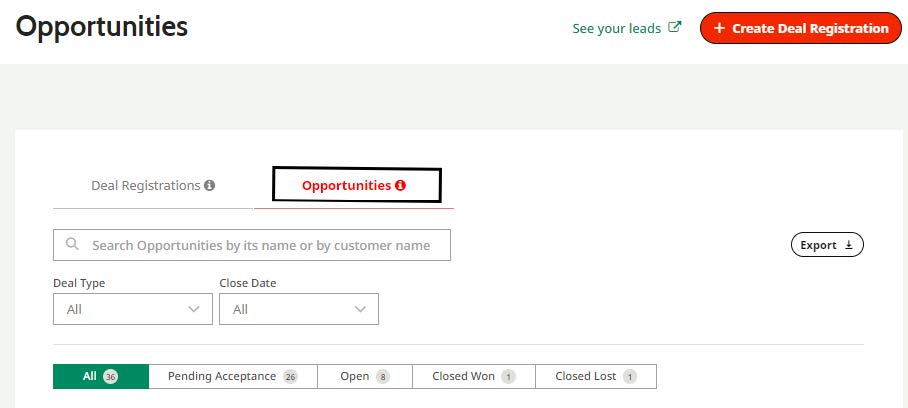
Entering Partner Contributions within Partner Center:
- Locate and open the opportunity within Partner Center
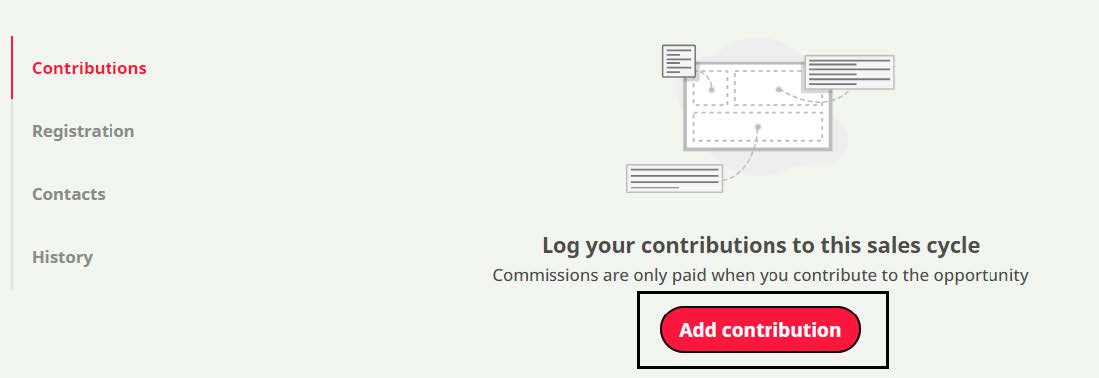
- Select “Add contribution” from the more actions menu
- Enter the contribution details using the “Add Contribution” input form
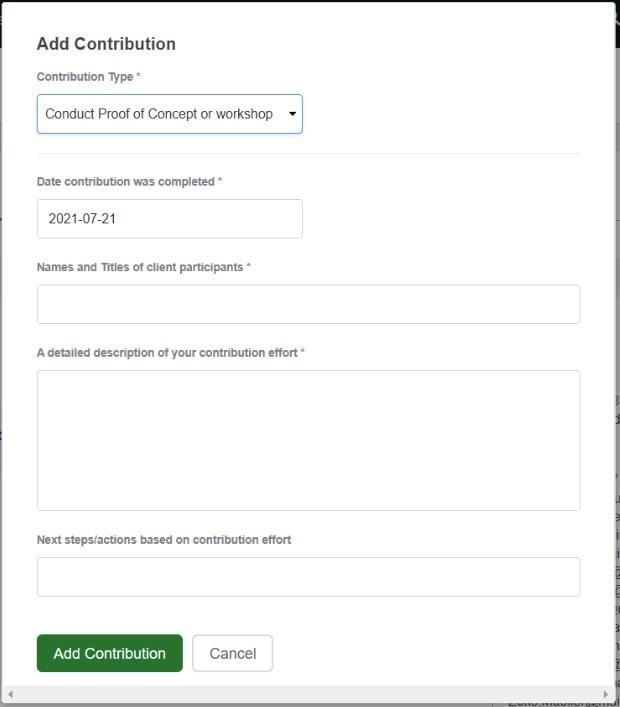
Figure 1: Partner Contribution input form
Details for each field
- Contribution Type
- Mandatory field
- Select from drop-down menu of partner contributions (see list above)
- Date contribution was completed
- Mandatory field
- Date selector field
- Names and titles of client participants
- Mandatory field
- Open text field
- A detailed description of your contribution effort
- Mandatory field
- Open text field
- Next steps/actions based on contribution effort
- Optional field
- Open text field
Viewing Partner Contributions within Partner Center:
- Locate the opportunity within Partner Center and click on the Opportunity name to open
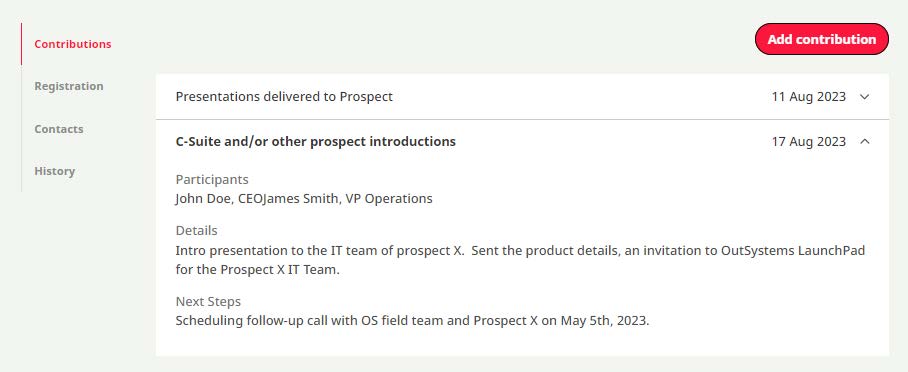
- Within the opportunity, select the contributions tab to see any related contributions
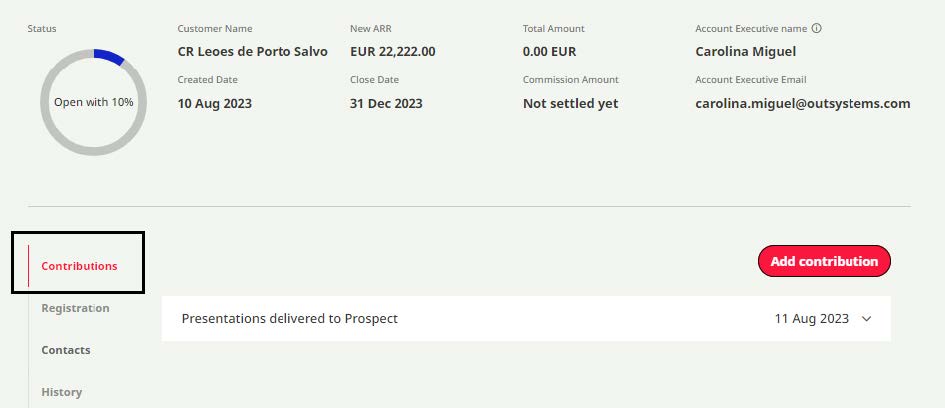
- Click the down arrow at the right of the contribution to see the details of the contribution within the page
Secondary Partners
Partners who may be working on an OutSystems opportunity but have not yet been formally registered and attached to the opportunity cannot record contributions in the system, but they are encouraged to keep track of them for future reference.
Rights to Audit
OutSystems reserves the right to audit Partner contributions, including requesting further proof (documents, emails, presentations, demonstrations) and adjust commissions based on contribution. Contributions not meeting the standard provided in the examples above can result in requests for more information and/or be the basis for denied commission.