
10 best Mendix alternatives for enterprise apps in 2027
TL;DR: Mendix is a capable low-code platform, but some teams start looking elsewhere as applications become more complex, expensive, or difficult to customize and manage long term. We compared the top alternatives across enterprise fit, extensibility, governance, integrations, scalability, and cost.
As more applications, workflows, and data move into Mendix, switching becomes harder—a level of dependence that poses a serious business risk. For enterprise teams, that risk sits alongside cost, scalability, extensibility, and long-term control.
This guide compares 10 Mendix alternatives and where each one fits best.

Why look for an alternative to Mendix?
For some teams, the biggest concern with Mendix is not how quickly they can build, but how much of the business ends up tied to the platform over time.
While the platform worked well for the first few applications, it starts becoming difficult to manage when customization gets deeper, or more teams depend on it.
For one user, complex UI, slow time-to-market, and poorly maintained modules were a major concern.
“The claim that Mendix has fast onboarding for new users is misleading. The UIs are so complex that new users require in-depth training before they can use the software effectively. Additionally, everything is hidden behind some UI submenu entries, which makes it difficult to navigate, understand and find the required functionality.
The claim that Mendix has fast time to market is misleading. We could not even implement a simple “fetch data from source A and display it within Mendix” use case with the guidance of a Mendix architect within one day.
The claim that Mendix is extendable using building blocks from the Mendix market is misleading. While there are building blocks available in the market, finding a module that fits your purpose can be challenging. Additionally, many of these modules have not been maintained for a long time, which makes them unreliable.”
Licensing isn’t worth the cost when you try to scale
Mendix is quite easy to experiment with, but only if that’s your preferred use case. Production requirements alone can shrink your budget, especially if you plan to use it long term.
For reference, the low cost entry tier jumps to $1,090/month on the standard plan, and requires a custom quote if you want more capability on the premium.
As an enterprise building a broad portfolio, you have to factor what the platform costs once users, environments, applications, and infrastructure grow with it.
“License costs for single users can be a bit high. I understand that this isn’t the primary focus for Mendix, but there’s a huge market that would use Mendix if the licensing were a bit more affordable (in my opinion).”
“Additionally, licensing costs and platform dependency can be a consideration for organizations scaling their solutions long-term. That said, these are common trade-offs for enterprise low-code platforms and can usually be mitigated with proper architecture and governance.”
Simple development gets harder as the logic gets deeper
The ‘visual model’ is one of Mendix’s strengths, partly because it lowers the barrier for teams that want to ship quickly without writing everything by hand.
However, the learning curve changes when developers move beyond straightforward workflows and into more advanced logic, integrations, state management, or performance-sensitive operations.
“The main downside of Mendix is that the platform can become complex for very large or highly customized applications. While the low-code approach is great for speed, advanced features sometimes require coding knowledge, which can slow down development for non-technical users.”
Recent G2 and Capterra reviews point to a clear difference between getting started and handling more sophisticated applications, where deeper technical knowledge becomes increasingly important.
So the platform may still be low-code, but the problem being solved is no longer necessarily low-complexity.
“Although it is classified as "low code", there is still a learning curve for new developers.”
Highly customized requirements push teams back toward code
Mendix’s low-code model only covers standard patterns. Once requirements become more specialized, your developers would need custom widgets, Java actions, JavaScript, external integrations, or other extensions to get the behavior they want.
This becomes a trade-off on how far you can use the platform before working around it.
“UI flexibility is good, but truly custom UX can still require some workarounds. Licensing pricing clarity for certain enterprise scenarios could be simpler, and the AI features of the platform should really be improved if low-code can still remain faster.”
Another G2 user shared:
“While the low-code approach is very powerful, certain use cases still require deeper technical knowledge or custom development, which can reduce some of the initial speed benefits.”
Performance needs more attention as applications become more complex
Performance is rarely the first concern when you’re building a prototype or a relatively simple application.
But when the application starts accumulating more data, integrations, microflows, custom logic, and concurrent users, you now have more architecture to think about.
And with Mendix, this becomes a problem, as one Capterra user describes it:
“Because of development speed, every change in requirements is twice as painful.”
The software developer added: “While developing a simple application is really easy using Mendix, when the logic is more complex and the operations are more sophisticated, the process gets harder. The platform is also not the best when it comes to performance - some operations are impossible to be developed optimally without usage of java code. Also Mendix Academy courses have errors which makes it hard to train newcomers in the technology.”
For teams building mission-critical systems, this makes scalability difficult.
The UI is not flexible enough for tailored experiences
No doubt that Mendix can handle a broad range of web and mobile applications. However, trying to get a specific user experience or interaction model is another area where your team may need to test the edges of the platform.
“The support service is slow and inefficient, and the documentation service is not efficiently updated. Customization options are limited and, in my opinion, require further development by the manufacturer to include more automation. Connecting to external devices is a complex process; in my opinion, improvements to simplify this would be greatly appreciated by developers.”
“At times it feels like some of the documentation can be inconsistent, which makes it harder to troubleshoot at times. Also, a few integrations and advanced features feel a bit limited without customer development.”
Some users claim to have some “ways” around those limits. But the issue is how much extra work those exceptions introduce.
What should businesses look for in a Mendix alternative?
Fit for the application you need to build
The first huddle is the ‘workload’ the platform is expected to handle. Some platforms are strongest for internal workflows and departmental apps, while others are built for customer-facing systems, complex enterprise applications, or large portfolios that span several business units.
Knowing what you’re trying to develop helps you pick the right choice. For example, a platform that works well for a lightweight approval workflow may not be the right foundation for a high-traffic customer portal, or a core operational system.
A rule of thumb is to opt for a platform that matches the kinds of apps the organization plans to build. This way, your team is less likely to spend time working around its limitations later.
Development flexibility and extensibility
When you opt for low-code, ensure it accelerates development without trapping developers inside the visual layer.
For this, look at how easily developers can extend the platform with APIs, custom code, reusable components, external libraries, and advanced front-end work when needed.
You should also check how the platform handles requirements that don’t fit neatly into standard low-code patterns. That includes custom UX, complex business logic, specialist integrations, and services that may need to run outside the platform itself.
Enterprise governance and lifecycle management
As more teams and applications move onto the platform, governance becomes a bigger part of the decision.
Evaluate how the platform handles environments, permissions, deployment controls, CI/CD, testing, monitoring, auditability, and release management across multiple teams.
Ideally, your preferred enterprise platform should help central IT maintain standards without slowing every development team down.
Integration capabilities
Most enterprise apps do not operate on their own. They need to connect to SaaS platforms, databases, APIs, ERP and CRM systems, identity providers, legacy applications, and sometimes custom internal services.
So you need to look beyond its prebuilt connectors. Consider how the platform handles custom APIs, complex integration logic, event-driven architecture, legacy systems, and data that sits across different environments.
Scalability and deployment flexibility
The platform needs to work just as well after the application becomes important. That means handling larger user bases, more transactions, growing data volumes, and increasingly complex business logic without becoming a problem.
Deployment options are also important considerations. Some organizations are comfortable with a fully managed cloud platform, and others need private cloud, on-premises, or hybrid environments because of regulation, data residency, or existing architecture.
Your preferred Mendix alternative should fit those requirements without forcing the organization into an infrastructure model that does not work for the business.
Total cost as adoption grows
Compare licensing, users, application count, environments, infrastructure, premium features, support, and any additional services required as adoption expands.
Then, factor in maintenance: a platform that’s inexpensive to start with can become much more costly if complex applications require more custom development, specialist skills, or additional tooling to keep them running.
For example, in Mendix’s case, there’s a significant price jump when you move from entry to the Standard plan going for $1,090/month.
10 best alternatives to Mendix
1. OutSystems
Best for: Enterprises building complex applications that need strong governance, deep integrations, and room for developers to customize beyond visual development.
OutSystems is an agentic systems platform for building, deploying, and managing enterprise software.
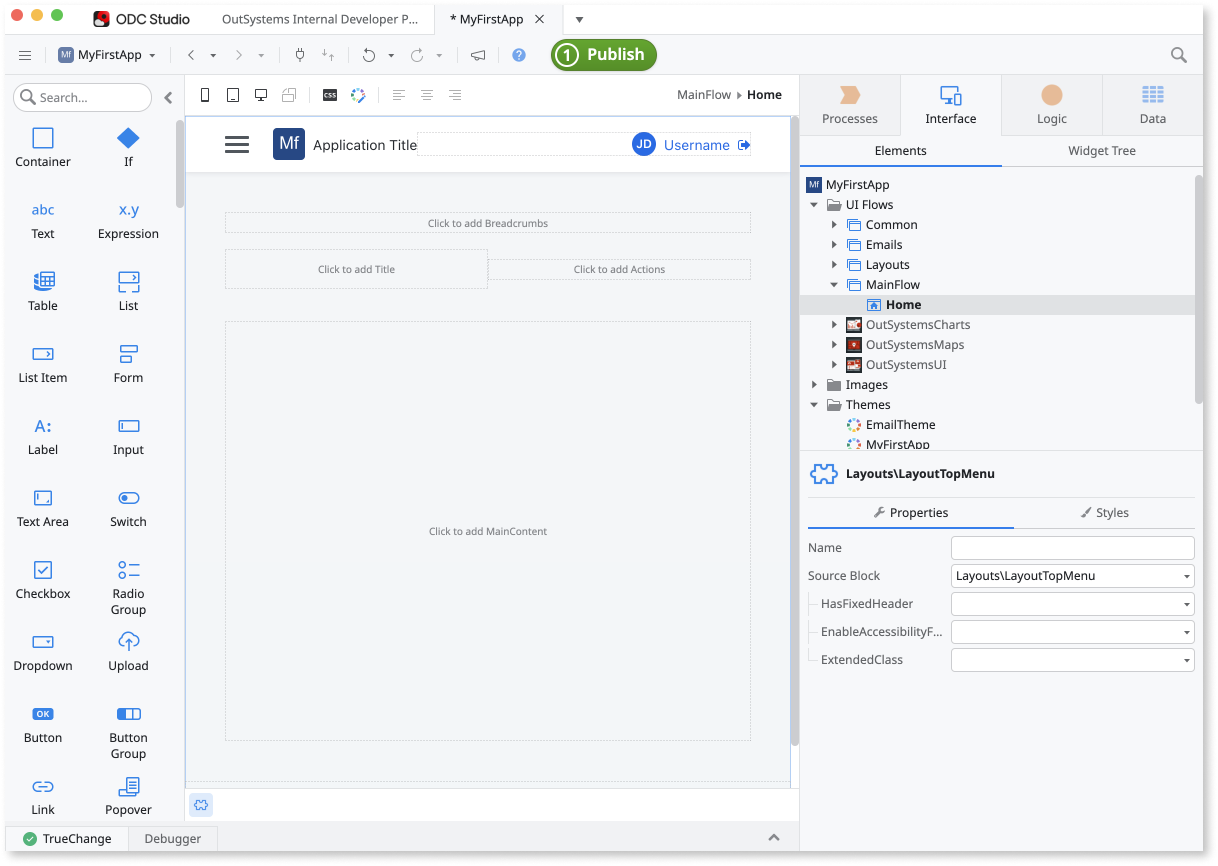
It combines visual development with full-stack application capabilities, reusable components, integrations, DevSecOps, observability, and AI-assisted development through OutSystems Mentor.
“Working with Mentor is like having an expert programmer by your side. It doesn’t just offer recommendations to ensure our apps follow OutSystems best practices; it acts as a true partner that helps me break through technical impasses whenever I hit a wall.” — Erik Looi, CDO, AllianceCorp Manufacturing (ACM)
For teams comparing it with Mendix, the main difference is how far the platform can stretch.
OutSystems can support internal tools, customer-facing web and mobile apps, legacy modernization, core business systems, and high-volume applications in the same environment.
Professional developers can also extend applications with APIs, custom logic, services, and integrations when requirements become more complex.
Key features of OutSystems
- OutSystems Mentor: Uses AI to help developers create and modify interfaces, data models, logic, and application behavior from natural-language instructions.
- Enterprise Context Graph: Gives Mentor context about existing applications, dependencies, data, and architecture so generated changes fit the wider environment.
- ODC Studio: The main development workspace for building interfaces, data models, business logic, integrations, and reusable components.
- Integration Builder: Helps teams connect OutSystems applications with systems such as SAP, Salesforce, Microsoft Dynamics 365, Dataverse, SharePoint, and external databases.
- OutSystems Forge: A marketplace of reusable connectors, components, applications, tools, and other assets that teams can add to their projects.
- Agent Workbench: Lets teams build, connect, deploy, and govern AI agents alongside applications and workflows, with guardrails, evaluations, human oversight, and observability.
Enterprise use case: Mendix vs. OutSystems
Advantages of using OutSystems
- It can handle more complex applications without forcing teams into another stack: OutSystems covers front-end, back-end logic, data, APIs, integrations, security, and deployment in one platform. As requirements grow, teams can keep building in the same environment instead of moving the application elsewhere.
- One platform can support a wider range of enterprise applications: Teams can use OutSystems for internal workflows, employee tools, customer portals, and core business systems. Governance, security, observability, and portfolio management can stay consistent across that application estate.
- Developers still have room to customize: Visual development handles much of the routine work, while APIs, reusable services, custom integrations, and extensions give professional developers more control when standard patterns are not enough.
- It fits well in integration-heavy environments: OutSystems can connect with systems such as SAP, Salesforce, Microsoft Dynamics, legacy databases, and custom services. This makes it useful for modernization projects where existing systems need to stay in place.
- AI development stays inside the same governed environment: Mentor supports AI-assisted application development, while Agent Workbench adds tools for building and managing AI agents. Teams can keep AI development, security, observability, and governance within the broader OutSystems platform.
OutSystems is named a leader in three major G2 AI categories
What are real users saying about OutSystems?
- Butler Plus: “We wanted to implement AI throughout our processes. That comes with security requirements and guardrails to make sure that we’re maintaining the right level of privacy for our clients while still moving quickly. OutSystems ticked all the boxes. It was a no-brainer.” — Ricky Rodriguez, Senior Director of Business Operations and Systems
- Yesco: “Before OutSystems, DevOps was incredibly challenging. We needed to clear everyone scheduled for one or two weeks and go all-hands-on-deck just to release a new version. With OutSystems, it is much easier and allows us to remain a small, tight-knit team that’s really cross-functional.”— Mike Neyman, Director of Software Integration and Operations
- Honda Motor Co., Ltd: “When integrating AI into enterprise applications, governance is the most critical factor. You need the right balance between AI’s convenience and control. The design philosophy of OutSystems aligns perfectly with that. That’s why we’re taking the leap and choosing OutSystems as a platform for AI integration with our business applications.” — Takuya Abe, Assistant Chief Engineer, AI Platform & Data Mgmnt Dept., AI Innovation Division, Digital Unit, Corporate Administration Operations
- HEINEKEN: “Every time I share a difficult requirement with our developers, the answer is always the same: everything is possible with OutSystems. The integrations, the flexibility, the speed of delivery, it’s what allows us to keep up with what the business demands.” — Jakub Strojek, Business Analyst at OutSystems Delivery Team
Deliver real enterprise value with AI using an open platform for building, orchestrating, and governing agentic systems.
2. Appian
Best for: Workflow-based enterprise applications and complex process automation.
Appian is a low-code platform for building applications around business processes, BPM, case management, and automation.
It’s a good option when work needs to move across several teams, systems, and approval steps. Common use cases include claims processing, onboarding, regulatory workflows, service operations, and case management.
Appian also features Data Fabric, which helps connect information across enterprise systems without requiring everything to move into one database.
Key features of Appian
- Process Modeler: A visual environment for building workflows with human tasks, approvals, events, integrations, and automated steps.
- Process HQ: Helps teams analyze process performance, identify bottlenecks, and track opportunities for improvement.
- Composer: Uses AI to turn business requirements into an initial application design covering workflows, users, data, and interfaces.
- AI Copilot: Adds AI assistance to application development, reporting, and natural-language exploration of governed business data.
- AI Document Center: Classifies documents and extracts structured information from files so the data can flow directly into Appian records and processes.
Advantages of using Appian
- “You can start with something as simple as a form and grow it into a full enterprise application with process orchestration, AI, and external integrations, all within one cohesive environment.”
- “The visual workflow builder simplifies and streamlines process design, with everything automatically connected.”
Limitations of Appian
- “It gets expensive as your team grows there is no define cost bracket. And integration of few application are complicated.”
- “SAIL expressions can become verbose quickly, and debugging process models is slow because the error messages don't always point to the real problem.”
Learn more → OutSystems vs. Appian
3. Microsoft Power Apps
Best for: Organizations already built around Microsoft tools and infrastructure.
Microsoft Power Apps is a low-code platform for building business applications connected to Microsoft 365, Dynamics 365, Dataverse, SQL Server, SharePoint, and other services.
The platform supports two main development approaches: Canvas apps give teams more control over the interface, while model-driven apps build structured applications around data stored in Dataverse.
Developers can also extend applications with APIs, Azure services, custom components, and connectors when low-code tools are not enough.
Another advantage is the connection to the Power Platform ecosystem. Power Apps connects closely with Power Automate for workflows, Power BI for analytics, Copilot Studio for agents, and Dataverse for shared business data.
Key features of Microsoft Power Apps
- Microsoft Dataverse: Stores and manages business data with security, business rules, process flows, and developer extensibility built in.
- Power Fx: An Excel-style expression language for adding formulas, logic, and application behavior.
- Copilot in Power Apps: Uses natural language to help makers create apps, generate data models, write formulas, and add AI-assisted features.
- Plans: Turns business requirements, screenshots, or process diagrams into a proposed Power Platform solution across apps, workflows, data, pages, and agents.
- Power Platform connectors: Prebuilt and custom connectors link Power Apps with Microsoft services, SaaS tools, databases, APIs, and on-premises systems.
- Environment management: Gives IT centralized control over environments, security, sharing, governance, and operations across Power Apps deployments.
Advantages of using Microsoft Power Apps
- “The drag-and-drop interface is easy to use, and the integration with services like SharePoint and Excel makes it even more practical.”
- “Easy to build low-code web applications where multiple screens can be customized and created with little to no code.”
Limitations of Microsoft Power Apps
- “The platform is easy to get started with, but building more advanced solutions often requires learning Power Fx and referring to documentation or community forums.”
- “Due to high power tools sync and link, the speed gradually reduces when we are dealing with huge data or running which connecting a huge number of tools into one.”
4. Pega Platform
Best for: Applications with complex rules, cases, and decision logic.
Pega Platform is an enterprise low-code platform for building and automating complex business workflows.
It works well when a process spans multiple teams, systems, decisions, and approval stages. For example, Pega takes a case-based approach to development. Teams define the business outcome, map the stages needed to reach it, connect existing systems, and automate the work where possible.
The platform also brings process mining, RPA, AI decisioning, and generative AI into the same environment.
Key features of Pega Platform
- Case Management: Structures work as cases that move through different stages, with each next step based on data, rules, decisions, or human input.
- App Studio: A low-code environment for building applications, workflows, data models, integrations, and user experiences.
- Pega Blueprint: Uses generative AI to turn business requirements into an initial application design covering workflows, data, personas, and requirements.
- Robotic Process Automation: Uses software bots to automate repetitive work in systems that are difficult to connect through APIs.
- Constellation: Builds responsive workflow applications with reusable, consistent interface patterns.
Advantages of using Pega Platform
- “Makes sense when you need to handle complex decisioning logic across legacy systems.”
- “I can easily send data to and from Pega using their API. I like the AI formula creator. I only wrote about 30 lines of code on our side.”
Limitations of Pega Platform
- “Attempting to make the display pixel-for-pixel and customized to the consumer's appearance means battling the structure. You are frequently forced to accept poor interfaces in lieu of what your design team really wanted.”
- “I’ve noticed that the learning curve for some of the more advanced features, will take time to master. Also there is a limitation in terms of documentation.”
5. ServiceNow App Engine Studio
Best for: Organizations using ServiceNow for core business workflows.
ServiceNow App Engine Studio is a low-code environment for building custom applications on the ServiceNow platform.
It’s best suited to workflow-heavy use cases such as service requests, approvals, onboarding, operations, and case management.
The primary advantage of the App Engine Studio is consolidation. If ServiceNow already runs important IT, employee, or operational processes, new applications can use the same data, security, governance, and workflow infrastructure.
Business users can build with low-code tools in App Engine Studio, while developers can move into ServiceNow Studio, scripting, APIs, source control, and CI/CD when they need more control.
Key features of ServiceNow App Engine Studio
- Flow Designer: Lets teams create triggers, approvals, notifications, and multi-step workflows without writing everything in code.
- IntegrationHub: Connects ServiceNow workflows to external systems through prebuilt integrations, reusable actions, APIs, and other integration methods.
- UI Builder: Helps teams create custom workspaces, pages, and application experiences on top of ServiceNow data.
- CI/CD and source control: Supports Git-based source control and structured deployment workflows for scoped applications.
- Workflow Data Fabric: Connects data across enterprise systems so workflows, applications, analytics, and AI can use it without moving everything into one new data store.
Advantages of using ServiceNow App Engine Studio
- “The platform performs reliably for enterprise-scale application development and handles heavy workloads with ease.”
- “The UI is clean and intuitive, which makes it simple to design workflows and manage tasks efficiently.”
Limitations of ServiceNow App Engine Studio
- “The application has a lot of features, which adds complexity. While building, it sometimes feels somewhat clumsy and not as smooth as I’d expect.”
- “Licensing and setup can be very expensive, which can be tough on smaller teams and organizations.”
6. Salesforce Agentforce 360 Platform
Best for: Applications built around Salesforce data, CRM workflows, and customer processes.
Salesforce Agentforce 360 Platform is the application development layer behind Salesforce’s CRM, data, automation, and AI ecosystem.
Teams can use it to build custom applications, workflows, portals, and AI agents around Salesforce data and processes with a mix of low-code and traditional development tools.
Admins and business teams can handle much of the configuration visually, while developers can use Apex, Lightning Web Components, APIs, and MuleSoft when they need more control.
Key features of Salesforce Agentforce 360 Platform
- Lightning App Builder: A visual environment for creating Salesforce applications and pages with reusable components.
- Salesforce Flow: Builds workflows, forms, approvals, guided processes, and other business automations.
- Agentforce: Lets teams create AI agents that use Salesforce data, workflows, business logic, and external systems to complete tasks and take action.
- Agentforce DevOps Center: Supports version control, testing, environment management, and controlled deployment across applications and agents.
- AppExchange and AgentExchange: Provide prebuilt apps, components, integrations, templates, and agent capabilities that teams can add without building everything from scratch.
Advantages of using Salesforce Agentforce 360 Platform
- “It helps users work more efficiently by assisting with sales, service, and marketing processes while still keeping humans in control.”
- “The reporting and dashboard features remain valuable for tracking business performance and supporting decision-making.”
Limitations of Salesforce Agentforce 360 Platform
- “The learning curve can be steep, debugging distributed integrations can take time, and licensing for certain advanced capabilities can increase costs.”
- “The native debugging tools for decoupled environments are somewhat limited, making it time-consuming to isolate integration bottlenecks.”
7. Oracle APEX
Best for: Data-heavy applications built around Oracle Database.
Oracle APEX runs directly on Oracle Database. It’s a suitable low-code platform for operational dashboards, reporting tools, approval systems, workflow apps, and replacements for spreadsheet or legacy database applications.
Organizations can build directly on existing data, SQL, PL/SQL, and security without moving that data into a separate application platform.
APEX can run on-premises, in Oracle Cloud Infrastructure, or in other cloud environments. It also gives developers room to move beyond low-code with SQL, PL/SQL, JavaScript, and CSS.
The platform now includes more AI-assisted development through features such as the AI Application Generator, APEXlang, natural-language reporting, and AI Agents.
Key features of Oracle APEX
- APEXlang: Represents application definitions as structured metadata that developers and AI tools can review, version, and validate.
- Interactive Grids and AI Interactive Reports: Give users editable data views, filtering, sorting, and natural-language exploration of application data.
- REST Data Sources: Connects applications to APIs, Oracle and MySQL databases, OData services, and external JSON sources.
- Universal Theme: Provides responsive templates, components, accessibility support, and Progressive Web App capabilities across desktop and mobile.
- APEX AI Agents: Lets developers create agents that can work with application context and call approved tools, data, or actions.
Advantages of using Oracle APEX
- “You don’t need to be an expert in many languages to create a functional application. Most features are available out-of-the-box, which is great for fast delivery.”
- “I love the Quick SQL function; it’s an awesome feature that enables me to build the model of the business logic that I’m implementing in the design.”
Limitations of Oracle APEX
- “It is less flexible when it comes to highly customized, modern UI requirements compared to other low-code development platforms.”
- “PWA features for offline use are still not great. If you need a serious offline-first mobile app, other frameworks are probably better.”
8. Quickbase
Best for: Operational teams replacing spreadsheets and disconnected tools.
Quickbase is a no-code/low-code platform for building data-driven business applications. It’s commonly used for project tracking, inventory, field operations, approvals, resource planning, and other operational processes that have become too complex for spreadsheets.
Business teams can model data, create forms and dashboards, automate workflows, and connect information from other systems without relying heavily on developers.
It’s less focused on highly customized customer-facing applications and better suited to flexible operational tools that need to evolve with the business.
Key features of Quickbase
- Visual Builder: Lets teams map tables, fields, and relationships visually before building the rest of the application.
- Smart Builder: Uses generative AI to create an initial application from a description of the business process, including tables, forms, reports, dashboards, and sample data.
- Form Builder: Provides a visual environment for creating role-based forms with fields, rules, sections, reports, and other components.
- Quickbase Pipelines: Automates workflows and moves data between Quickbase and external systems through a visual designer.
- Connected Tables: Brings data from external systems or other Quickbase apps into a shared view without manually maintaining separate copies.
Advantages of using Quickbase
- “I like that Quickbase is a low-code tool, but allows for as much customization and automation as you want.”
- “Quickbase has been a solid tool for us because it allows us to centralize all of our data and make it accessible to the people who need it.”
Limitations of Quickbase
- “Quickbase is very limited with what branding features they let you customize in your app. For example, you cannot change the font size, font color, font type, and background color of records.”
- “When building more specific workflows or integrations, you sometimes need extra configuration to get exactly the behavior you want.”
Compare OutSystems and Quickbase
9. Retool
Best for: Engineering teams building internal tools on top of existing systems.
Retool is a developer-focused platform for building internal applications, admin panels, operational tools, and data-connected workflows.
It’s another good option when teams need a faster way to build interfaces for databases, APIs, and internal services without creating every frontend from scratch.
Retool is also less focused on broad enterprise application portfolios, and more on helping technical teams build internal software quickly.
Key features of Retool
- Retool Apps: Lets developers build internal web applications connected to existing data and services, with both visual development and direct React and TypeScript editing.
- Resources: Connects Retool to databases, REST APIs, GraphQL endpoints, SaaS tools, and other services while keeping credentials on the server side.
- Retool Mobile: Extends internal applications to native iOS and Android experiences for field and operational teams.
- Retool Database: Provides a built-in PostgreSQL database when teams need a backend data store for an application.
- Source Control and Retool CLI: Connects Retool with Git-based workflows for versioning, reviewing changes, and managing application development.
Advantages of using Retool
- “It cuts out a huge amount of boilerplate work especially for admin panels, workflows, and integrations.”
- “It allows me to create low-code apps quickly, which are visually appealing and connect with various platforms.”
Limitations of Retool
- “When complex logic is spread across queries, components, and transformers, it can get messy over time, especially with larger teams working in the same app.”
- “The price escalates so fast, more so when advanced controls are required.”
10. Zoho Creator
Best for: Teams building simple internal and departmental applications.
Zoho Creator is a low-code platform for building custom business apps, workflows, portals, and internal tools.
The platform combines visual development, workflow automation, analytics, integrations, AI-assisted app creation, and custom scripting through Deluge. It also fits closely with the wider Zoho ecosystem, while still supporting APIs and third-party systems.
Key features of Zoho Creator
- CoCreator: Uses AI to help generate applications, workflows, data structures, and other starting components from natural-language instructions.
- Smart Import: Helps bring data from spreadsheets, databases, and legacy systems into Creator and organize it for application use.
- Deluge: Zoho’s scripting language for adding custom logic, automation, validations, API calls, and other advanced behavior.
- Integration Flows: Connects Creator with Zoho products and third-party systems through built-in integrations, APIs, and connectors.
- BI and Analytics: Supports dashboards, reports, KPIs, alerts, and analysis across data from multiple sources.
Advantages of using Zoho Creator
- “It’s easy to create adaptive solutions to our specific needs. Even though I'm not an IT person, I can create fields and reports on my own.”
- “The drag-and-drop interface is simple, but the platform doesn’t compromise on depth. I could add workflows, integrate with Zoho CRM, and even connect external APIs in just a few clicks.”
Limitations of Zoho Creator
- “Since it is a low code platform, the UI look and feel seems a bit basic and at times is not user friendly with navigations on the browser.”
- “Facilitating connections between fields and reports without programming is challenging. It takes a lot of internal effort to understand our needs and plan solutions.”
Which Mendix alternative is right for your use case?
- Choose OutSystems if you’re building complex, business-critical applications and need one platform that can support customer-facing systems, internal apps, integrations, governance, and a broader application portfolio as requirements grow.
- Choose Appian if your priority is workflow and case management, especially for processes such as claims, onboarding, investigations, approvals, or other operations that move across multiple teams and systems.
- Choose Microsoft Power Apps if your business already runs heavily on Microsoft, and you want to build apps around Microsoft 365, Dynamics, Azure, Dataverse, and the wider Power Platform.
- Choose Retool if your developers mainly need to build internal tools quickly, such as admin panels, operational apps, and interfaces on top of existing databases, APIs, and backend services.
What to consider before migrating from Mendix
Before moving away from Mendix, first understand what depends on it and what actually needs to change.
A full migration may not be necessary. Some applications may be better rebuilt, some retired, and others left in place while higher-priority systems move first.
Use this checklist to scope the work:
- Map your current applications: Identify which Mendix apps are business-critical, which can be retired, and which should stay where they are for now.
- Document integrations and dependencies: Review the APIs, databases, identity systems, SaaS tools, legacy platforms, and other services each application depends on.
- Review custom components: Flag custom widgets, Java or JavaScript actions, marketplace components, and other extensions that may need to be rebuilt.
- Plan the data migration: Decide what data needs to migrate, where it will live, and how you will preserve quality, permissions, and access during the transition.
- Estimate the rebuild effort: Standard workflows may be relatively easy to recreate. Complex logic, integrations, and custom user experiences can take much more work.
- Set up governance early: Define environments, permissions, deployment controls, CI/CD, monitoring, and application ownership before development starts.
- Test before moving users: Business-critical applications need functional, integration, performance, and security testing before cutover.
- Account for team training: Developers, admins, and business users may need training on the new platform, tooling, and release process.
- Consider a phased migration: Start with the applications where moving delivers the clearest technical or commercial benefit, then expand from there.
For teams moving away from Mendix, OutSystems supports a phased migration.
You can start with the applications causing the most friction, rebuild those first, and expand across the wider portfolio over time.
Leaving Mendix? Move to a modern platform where you own what runs.
Build and scale complex enterprise apps with OutSystems
As applications become more important to the business, speed alone isn’t enough.
Teams also need the flexibility to handle complex requirements, the controls to manage what reaches production, and a platform that can support a growing application portfolio over time.
OutSystems brings those capabilities into one development environment.
- Build different types of enterprise applications: Use the same platform for internal tools, customer-facing apps, core systems, and modernization projects.
- Give developers more control when they need it: Visual development handles much of the routine work, while APIs, integrations, reusable components, and custom logic support more complex requirements.
- Manage governance as the portfolio grows: Keep environments, security, testing, deployment, monitoring, and application lifecycle controls connected as more teams start building.
- Work with the systems you already have: Connect applications to SaaS tools, databases, APIs, legacy software, and core enterprise systems without rebuilding the entire stack.
- Bring AI into the same environment: OutSystems Mentor supports AI-assisted development, while Agent Workbench gives teams a governed way to build and manage AI agents alongside existing applications.
That flexibility was one of the reasons Tysers chose OutSystems:
“We selected OutSystems because it suited the background of our technical team, and we felt it would not box us in.” — Angus Kennedy, CTO, Tysers
Learn the fundamentals of modern development


Frequently asked questions on Mendix alternatives
OutSystems is one of the strongest options for enterprises that need a broad application development platform.
It can support internal apps, customer-facing systems, modernization projects, integrations, governance, and larger application portfolios in one environment.
Appian and Pega are strong choices for workflow automation, case management, and BPM. Both are built for complex processes that move across people, systems, data, and business rules.
Yes. Platforms such as OutSystems can support legacy modernization, process digitization, system integration, and broader application development across the business.
Many do, including OutSystems, Power Apps, Appian, and Zoho Creator.
The difference is usually how much control the platform gives developers over UX, integrations, business logic, deployment, and lifecycle management as the application becomes more complex.
It can be. The platform must support the architecture, security, integrations, and development practices the application requires.