

Product Releases
and Updates


We're excited to announce Managed File Storage for ODC, which enables developers to work with large files in their applications without having to manage the storage infrastructure.
ODC now offers developers a new option for storing files. Alongside the existing Binary Data type, which stores file content in the database, the new storage option stores files in a secure cloud-based storage managed by OutSystems and located in the same region as your applications. The database only stores a reference to each file, keeping queries fast and the database lean, and files are accessed through secure, time-limited links (signed URLs).
In order for organizations to handle real-world workloads such as document processing, media management, and large-scale file uploads, developers can now configure their ODC applications to store and manage files up to 2GB using the new File data type.
This capability integrates seamlessly with the upload, download, image widgets, and external logic functions for file processing and visualization, enabling developers to process and display files within their applications.
ODC automatically manages the complete lifecycle, cleaning up when its associated records are deleted, with no additional storage management required from developers.
We're pleased to introduce store upload in the ODC Portal. Once your mobile app build is complete, you can send it directly to Apple TestFlight or the Google Play Console internal testing track without leaving OutSystems.
This release introduces:
- No manual file handoff — Send builds from the ODC Portal without manually downloading and uploading package files.
- Flexible iOS uploads options—Upload builds to TestFlight directly from the Portal from PCs and Macs.
- One-time credential setup — Configure App Store Connect or Google Play once per app, then reuse for future uploads.
- Upload progress and history — Track each upload as a separate operation, with its own status and history, independent of the build
- Built-in governance — Control uploads with role-based permissions and maintain a full audit trail.
OutSystems Developer Cloud (ODC) has officially achieved Level 2 compliance with the Texas Risk and Authorization Management Program (TX-RAMP). This Level 2 certification, the program’s highest level, validates that ODC meets the stringent security and continuous monitoring standards required by Texas state agencies for systems handling confidential and regulated data, ensuring rigorous data protection and governance for heavily regulated public-sector organizations.
For developers and IT leaders, this compliance significantly reduces the overhead of internal security validations and accelerates time-to-market. Teams can now fully leverage ODC’s cloud-native architecture and built-in security guardrails to build, deploy, and scale mission-critical custom apps and agents, shifting their focus from complex compliance management to delivering innovative digital experiences.
TX-RAMP compliance requires an add-on subscription. Please contact your OutSystems account team for more information.
Leverage generative AI and leading LLMs directly in your OutSystems 11 applications with the newly updated, OutSystems-supported Amazon Bedrock Connector.
This release (v1.0.0) modernizes how your apps interact with Amazon Bedrock foundation models. Developers can now natively implement conversational chat experiences and agentic behaviour that specify system prompts, use grounding data and keep memory across interactions leveraging models like Anthropic Claude, Amazon Nova, and Meta Llama. The connector also adds native support for image generation powered by Stability AI.
Use the visual logic flows your team already knows to integrate multi-turn conversations and contextual app data. To accelerate delivery, the connector includes a ready-to-use template and demo application showing how to ground AI responses in your business data while maintaining conversation history.
Enterprise governance and data privacy remain fully in your hands: all API calls execute directly within your own AWS account and chosen region. Support for regional inference profiles ensures data residency across the US, EU, and APAC, while US public sector teams can deploy within AWS GovCloud (US).
Available today on OutSystems Forge and fully supported by OutSystems for all O11 customers.
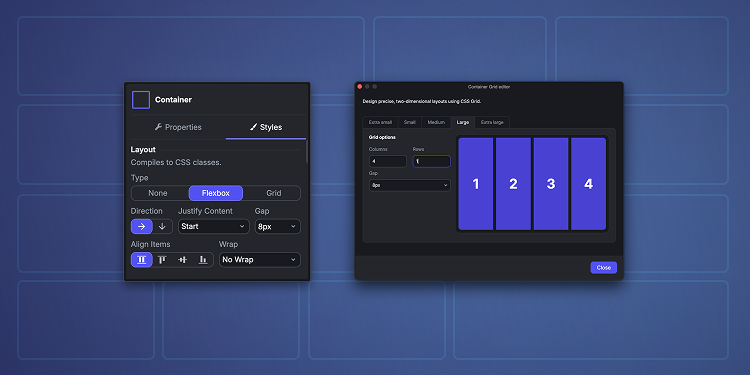
Building screens that look right on every device just got easier. Flexbox and Grid layouts are now available for Containers, Placeholders and Forms, configured from the Styles tab with a live preview on the canvas.
Because they compile to standard CSS classes instead of inline styles, your layouts are easier to read, maintain and extend as your app grows, whether you build them yourself or with Mentor.
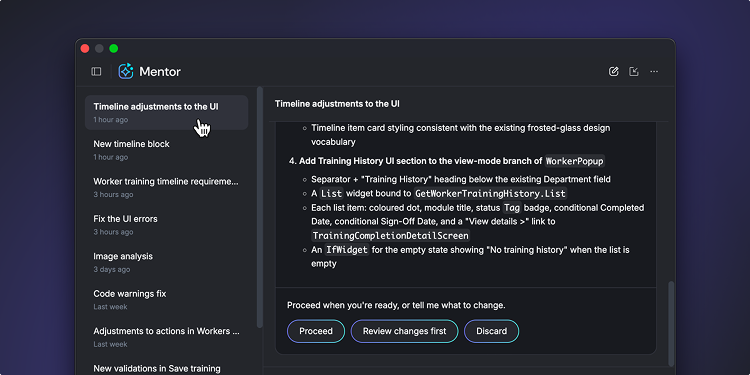
A good Mentor conversation is an asset: the requirements you gave, the plan Mentor proposed, the decisions you made and why. Until now that asset was fragile. Close ODC Studio or the app you were working on and the conversation was gone, and coming back to a half-finished feature meant re-explaining it from scratch.
Mentor conversations in ODC Studio are now saved. Open your conversation history to see previous chats for an app, reopen any of them, and continue exactly where you stopped, with Mentor retaining the context of what was discussed and built.
- Resume any conversation. Return to yesterday's session, or last week's, and keep iterating without re-establishing context.
- Start fresh when you need to. Begin a new conversation for a new task, and find the earlier ones in your history whenever you need them.
Mentor becomes a persistent collaborator on your app rather than a one-off assistant.
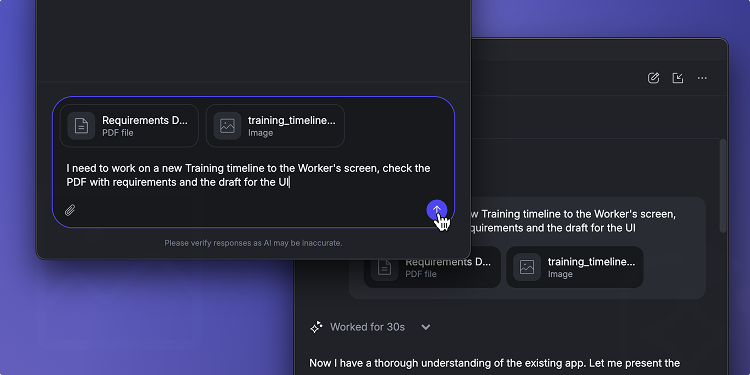
Real development work rarely starts from a blank prompt. It starts from a user story, an acceptance-criteria list, an API response sample, or an error log someone pasted into a ticket. Until now, getting that material into Mentor in ODC Studio meant copying it into the chat, trimming it to fit, and losing structure along the way.
You can now attach files directly to a Mentor prompt in ODC Studio, both text and images. Mentor reads it as part of your request — so "Implement the validation rules in this file" or "Create the entity for this sample data" just works.
- Show, don’t describe. Attach a mockup, a screenshot, or a photo of a whiteboard sketch, and Mentor works from what it sees rather than from your description of it.
- Richer context, less retyping. Hand Mentor the source material instead of a summary of it. Field names, edge cases, and exact error text reach the prompt intact.
- Works with the files you already have. Images in .png, .jpg, and .jpeg, plus text-based formats such as .txt, .md, .json, and .csv.
Mentor already understands what you have open and selected in ODC Studio. Now it can understand what you're building toward, too.
Organizations in regulated industries are required to retain database backups for several years to satisfy strict audit, legal, and compliance requirements. To simplify this process, we are introducing Long-Term Backup Retention for OutSystems 11 Cloud.
O11 now lets you configure database backup retention for up to 10 years directly within your production environment. These backups are stored as immutable, audit ready archives - no custom infrastructure to build or maintain on your side.
Available today for OutSystems 11 Cloud using SQL Server.
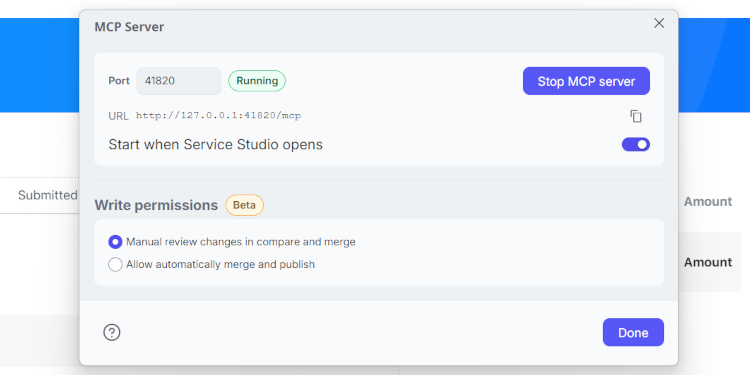
Your developers already use AI coding agents. Now those agents can work on your OutSystems 11 apps too. OutSystems 11 MCP adds a local MCP server to Service Studio, letting agents like Claude Code, Cursor, GitHub Copilot and Kiro read your application models and propose changes, governed by the O11 lifecycle you already run.
Everything runs on the developer's machine, in your own environment: cloud, on-premises or air-gapped. By default, agent changes arrive as a copy that a developer reviews in Service Studio's Compare-and-Merge before anything is applied.
Read scenarios for Reactive and Mobile apps are generally available. Write and edit, plus Traditional Web apps, are in Beta. Available to all O11 customers.
.png)
OutSystems Model Context Protocol (MCP) is now generally available on every ODC tenant. It's the integration layer that connects the coding agent you already use, such as Claude Code, Codex, Cursor, or AWS Kiro, to OutSystems. From a single conversation, you can build, ship, and operate your ODC portfolio, with the same governance you get in the ODC Platform.
Build more than apps. Describe what you need, and your agent hands the work to Mentor, our platform-native coding agent, which produces the same OutSystems app model as ODC Studio.
- Web apps – Create an app from a standard template or evolve an existing one, from data model to screens and logic.
- AI agents – Describe what an agent should do and get a complete configuration, including prompts, tools, and model settings, grounded in your app's data and logic.
- Workflows – Generate and change workflows that coordinate people and automated steps across your apps.
- Libraries – Build reusable libraries, or upload and publish C# external libraries when you need custom code.
Operate your portfolio.
- Understand your estate – Query the live enterprise context layer to search your tenant, inspect screens, data models, logic, and roles, and map dependencies and integrations between apps.
- Ship with confidence – Publish, see what's deployed in each stage, check the impact on dependent apps before you deploy, promote between stages, and roll back when needed.
- Keep apps healthy – Check app and environment health, logs, and traces to find and diagnose issues.
Every action runs as you, with your existing ODC roles, approvals, and audit trail.
Part of your toolchain. Your agent combines OutSystems MCP with the other tools it already connects to. Pick up a story from Jira, build the feature, deploy it to a test stage, run Playwright tests against it, and post a summary to Slack, all in one conversation.
Previously available through our early access program, OutSystems MCP is now ready for production use. Thank you to the early access developers whose feedback shaped this release.
Get started in one step. Copy this into your coding agent:
Install the OutSystems MCP from https://github.com/OutSystems/outsystems-mcp