
Product Releases
and Updates
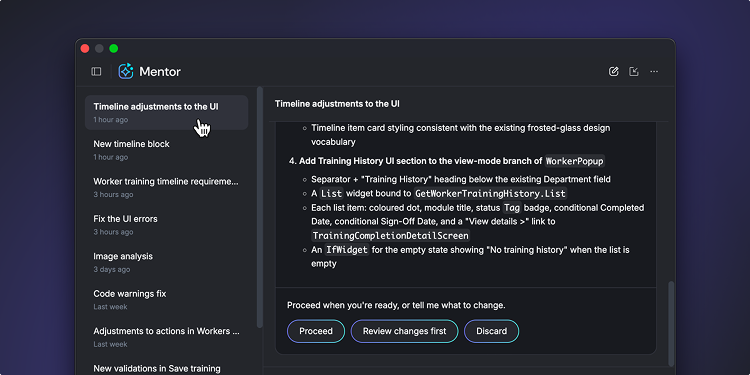
Mentorとの会話は、ユーザーが入力した要件、Mentorが提案した計画、そしてユーザーが下した判断とその理由が詰まったアセットといえるものです。これまで、このアセットは脆弱でした。ODC Studioや作業中のアプリを閉じると、会話は消えていたのです。そのため、また初めから説明し直す必要がありました。
今後は、ODC StudioでのMentorとの会話が保存されるようになります。会話履歴を開くと、あるアプリについての過去のチャットが表示されます。そこから希望するものを開き、中断した地点から再開することができます。Mentorはそれまでに話された内容や作成されたもののコンテキストを保持しています。
- あらゆる会話が再開可能。昨日のセッションか先週のセッションかを問わず、コンテキストを再構築することなくイテレーションを続けられます。
- 必要に応じて一から始めることも可能。新規タスクについて新たな会話を始め、必要に応じて履歴から過去の会話を参照することもできます。
Mentorは、アプリに関する一回限りのアシスタントではなく、継続的なパートナーとなったのです。
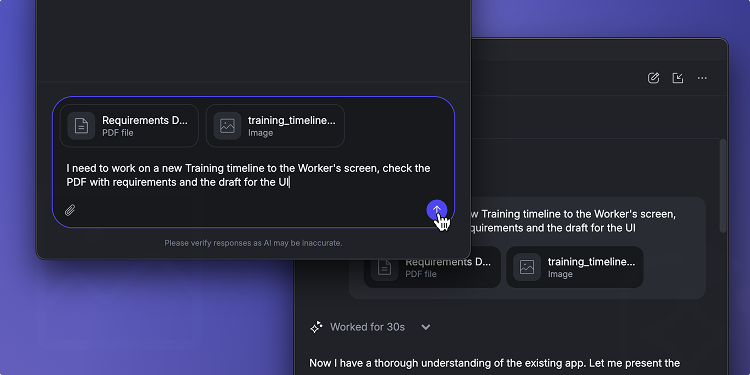
開発現場では、空のプロンプトから作業が始まることはまずありません。ユーザーストーリーや受け入れ基準のリスト、APIレスポンスのサンプル、チケットに付随するエラーログなどが開始地点となります。これまで、こうした素材をODC StudioでMentorに提供するには、チャットにコピーしたうえで適切なサイズになるようトリミングする必要があり、その過程で構造が失われてしまっていました。
このたび、ODC StudioでMentorのプロンプトにテキストファイルや画像ファイルを直接添付できるようになりました。YMentorはそれをリクエストの一部として読み込みます。あとは「このファイルの検証ルールを実装してください」、「このサンプルデータ用のエンティティを作成してください」と伝えるだけで十分です。
- 説明せずに見せるだけ。モックアップ、スクリーンショット、またはホワイトボードに書いたものの写真を添付すると、Mentorはユーザーの説明ではなくその内容を見て作業を進めます。
- リッチなコンテキストで、再入力の手間を削減。資料の概要ではなく、資料自体をMentorに渡せます。そのため、フィールド名、エッジケース、正確なエラーテキストを、プロンプトにそのまま落とし込めます。
- 既存のファイルを活用。.png、.jpg、.jpeg形式の画像や、.txt、.md、.json、.csvといったテキストベースの形式を使用できます。
現時点でMentorは、ユーザーが開いたり選択したりしているものをすでに認識できますが、今度はユーザーが開発しようとしているものを認識できるようになっています。
規制の厳しい業界では、厳格な監査、法規制、コンプライアンスの要件を満たすために、データベースのバックアップを数年間保持する必要があります。このプロセスを簡素化するために登場したのが、Long-Term Backup Retention for OutSystems 11 Cloudです。
現在O11では、データベースバックアップの保持期間を最大10年に設定できるようになっています。設定は本番環境で直接行えます。このバックアップはイミュータブルな監査対応のアーカイブとして保存されます。ユーザー側でカスタムインフラを構築・保守する必要はありません。
本機能はSQL Serverを使用してOutSystems 11 Cloudですぐにご利用いただけます。
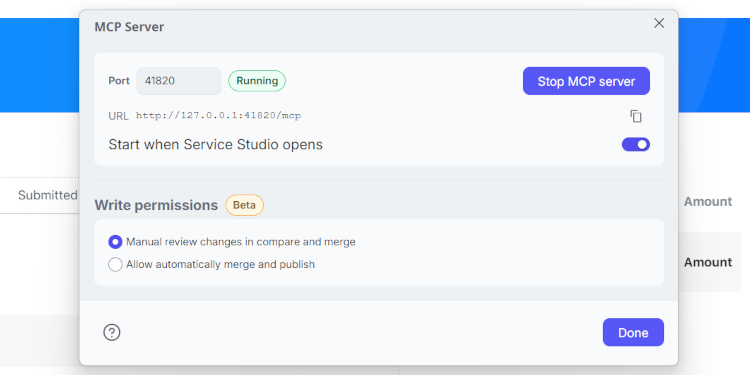
すでにAIコーディングエージェントを利用されている開発者の皆様に朗報です。このたび、こうしたエージェントをOutSystems 11アプリでも活用できるようになりました。OutSystems 11 MCPは、ローカルMCPサーバーをService Studioに追加することで、Claude Code、Cursor、GitHub CopilotやKiroなどのエージェントが自社のアプリケーションモデルを読み込み、変更を提案できるようにします。これは、現在実行しているO11のライフサイクルで管理されます。
実行には、常にユーザー独自の環境(クラウド、オンプレミス、またはエアギャップ型)と開発者のPCを使用します。デフォルトでは、エージェントによる変更はコピーとして開発者に届き、Service StudioのCompare and Merge機能でレビューしてから適用するようになっています。
リアクティブ/モバイルアプリ向けの読み取りシナリオはすでに一般提供を迎えています。書き込み・編集機能のほか、従来のWebアプリ向けの機能についてはベータ版にて提供中です。O11ユーザーであれば、どなたでもご利用いただけます。
.png)
OutSystemsのModel Context Protocol(MCP)が、あらゆるODCテナントで一般提供を迎えました。MCPは、Claude Code、Codex、Cursor、AWS Kiroといった現在使用中のエージェントをOutSystemsに接続するための連携レイヤーです。会話を1回行うだけで、ODC プラットフォームで作成したものと同レベルのガバナンスを備えたODCポートフォリオを作成、リリース、運用することができます。
MCPはアプリ開発を進化させます。必要なものを説明すると、エージェントはOutSystemsプラットフォームのネイティブコーディングエージェントであるMentorに作業を引き継ぎます。これを受けて、MentorがODC Studioで作成するのと同等のOutSystemsアプリモデルを作成します。
- Webアプリ – 標準的なテンプレートを使用したり、既存のものを進化させたりして、アプリのデータモデルから画面やロジックまでを作成できます。
- AIエージェント – どのような動作をするエージェントが必要かを説明すると、アプリのデータやロジックに基づいて、プロンプト、ツール、モデル設定などがすべて構成されます。
- ワークフロー – 複数のアプリ間でユーザーの調整やステップの自動化を行うワークフローを生成・変更できます。
- ライブラリ – 再利用可能なライブラリを作成したり、カスタムコードが必要な場合はC#の外部ライブラリをアップロードしてパブリッシュしたりすることができます。
ポートフォリオも自由に運用できます。
- アセットを把握 – エンタープライズコンテキストレイヤーにリアルタイムでクエリを行い、テナントの検索、画面やデータモデル、ロジック、ロールの確認、そしてアプリ間での依存関係や連携のマッピングを行うことができます。
- 自信を持ってリリース – パブリッシュ後は、各ステージに何がデプロイされているかを確認して、依存関係のあるアプリに及ぼす影響を把握してから、デプロイ、ステージの昇格、必要に応じたロールバックを行えます。
- アプリの健全性を維持 – アプリや環境の健全性を評価し、ログに記録して追跡することで、問題を検出・診断することができます。
既存のODCロール、承認、監査証跡を活かし、自社に適したアクションを実行できます。
ツールチェーンの一部となります。エージェントは、OutSystems MCPとすでに接続済みのツールを組み合わせることができます。Jiraのストーリーをベースに機能を構築し、テストステージにデプロイしてからPlaywrightテストを実行して、まとめをSlackに投稿するという作業を1回の会話で指示できるのです。
これまで早期アクセスプログラムとしてご利用いただいていたOutSystems MCPは、現在本番での利用が可能になっています。早期アクセス期間中に今回のリリースを支えるフィードバックを提供してくださった開発者の皆様に、心よりお礼申し上げます。
1ステップで始められます。 以下のテキストをコーディングエージェントにコピーしてください。
Install the OutSystems MCP from https://github.com/OutSystems/outsystems-mcp
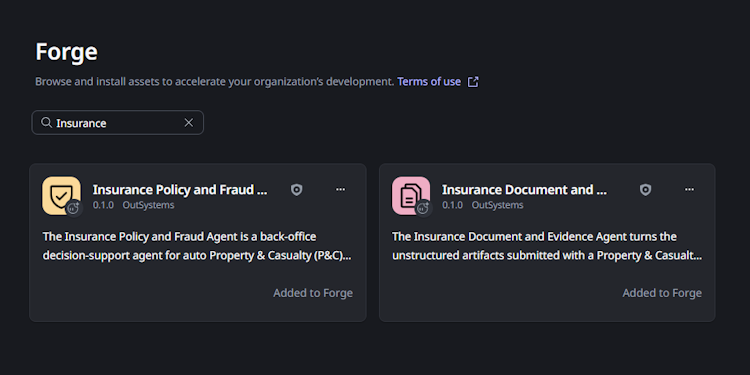
このたび、OutSystems Agentic Industry Solutionsポートフォリオを拡充する保険業界向けの機能として、保険代理店キットが登場しました自社の保険請求プラットフォームやワークフローに含まれる事故受付(FNOL)プロセスを支える、統制の利いたエージェント2つをインポート、適用、連携できるようになっています。
これらのエージェントは、商品、保険契約、システム、リスク閾値といった企業の運用コンテキストにおいて、 エビデンスに基づいたインサイトを提供します。ただし、FNOL評価はユーザーが管理することになります。
機能:
- エビデンスに基づいた補償と不正の審査: Insurance Policy and Fraud Agentは、保険契約の文言、請求の事実関係、証拠、リスクシグナルを分析し、JSONの意思決定支援パケットを1つ作成します。これには、損害のあった各項目についての補償判断、算出された確定免責額、不正スコア(0~100、監査証跡のインジケータ付き)、深刻度の評価(1~4)、リザーブ範囲、異常検知、バイアスチェックが含まれます。いずれも、具体的なエビデンスに裏付けられたものです。
- 構造化されていない事故受付を構造化された証拠に: Insurance Document and Evidence Agentは、構造化されていない事故受付(FNOL)から得られた車両の写真、スキャン済みの書類、音声の書き起こしを、構造化された1つのJSON Evidence Packageにまとめます。また、あらゆる情報を分類し、較正しつつ確実にフィールドを抽出して、画像の品質を評価します。そのうえで、整合性に関する懸念を(判断を行うことなく)観測事項として知らせ、チェックリストと照らし合わせながら完全性を評価します。
- 実行可能なショーケースで両方のエージェントを確認: Insurance AI Agents Showcaseは、各エージェント向けの専用ページ、マルチモーダルな書類アップロード、すべて可視化されたパラメータ、エージェントの構成管理、事前に用意されたデモデータの入った付属アプリです。これにより、自社のFNOLワークフローに統合する前に、エージェントの動作を確認することができます。
保険代理店キットはOutSystems Forgeで入手できます。保険アプリやエージェントを作成するための構成要素はOutSystemsプラットフォームに用意されています。
必要に応じて自分のペースでO11アプリをODCに変換。
モダナイゼーションの取り組みを加速させ、変換のスケジュールをしっかりと管理できるよう、O11 to ODC App Conversion Kitを一新し、今度はベータ版でリリースしました。
このエンドツーエンドのツールキットは、Forgeで入手可能な、移行の評価と計画を支援するr Conversion Assessment Tool(CAT)をベースに作成されており、エクスペリエンスを完全なものにします。アプリの評価が終わった段階で、新たに登場したCode Conversion機能とData Transfer機能により、手間のかかるコードストラクチャの変換や運用データのODCへの移動が自動化されます。
すでにODCテナントやO11インフラをお持ちの場合、CodeツールとDataツールには自動でアクセスできます。ODCテナントでManagement > OutSystems O11 > App Conversionに移動してオプトインすると、CATで準備した計画を変換できるようになります。
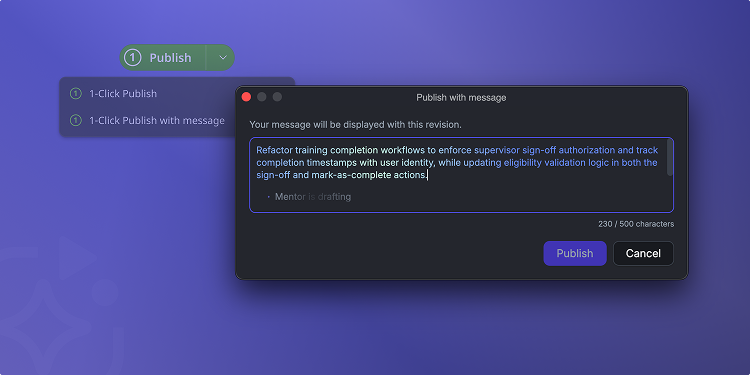
ODC Studioで1-Click Publishを行うたびに、変更箇所とその理由を記録できるようになりました。現場では、こうした記録は省略されるか、「修正」や「アップデート」といった言葉でまとめられるケースが多くあります。その結果、後でリビジョンを比較したり、ロールバックを行ったり、リグレッションの追跡を行ったりする際に、コードから意図を読み取る手間が生じることになります。
そこで、Mentorが代わりに1-Click Publishメッセージを作成するようにしました。メッセージありでのパブリッシュを選択すると、ユーザーがコミットしようとしている変更(画面、ロジック、データ、依存関係の新規作成や修正)をMentorが分析し、わかりやすくまとめたものを提案します。ユーザーはそれをそのまま受け入れるか、パブリッシュ前に編集を加えるか、Mentorに書き直しを依頼します。
こうすることで、誰でも活用できるリビジョン履歴ができあがります。この明確で一貫したメッセージがあることで、バージョンの比較や変更のロールバック、他のメンバーの作業のレビューを行いやすくなります。
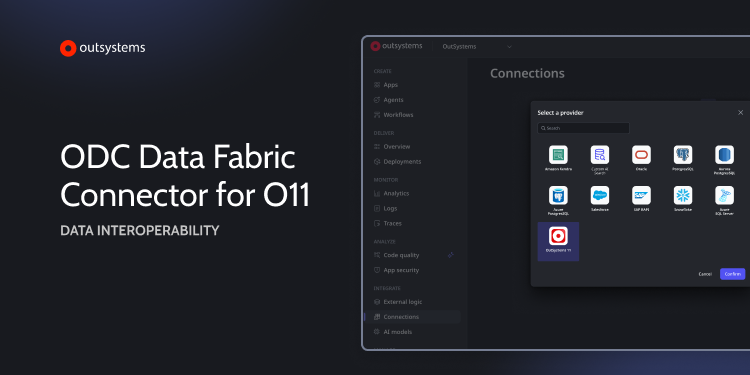
ODC Data Fabric Connector for O11が、O11のセルフマネージドインフラで複数データベースカタログをサポートするようになりました。今回のアップデートは、ストレージ管理や規制対応、パフォーマンス分離などのためにデータベースレベルでのデータ分離を実施するエンタープライズユーザーを対象としています。
変更点は以下のとおりです。
- 一貫性のあるデータ分離: コネクタが自動的に適切なデータベースカタログへとルーティングするため、ODCにデータをブリッジする際に既存のO11データの分離ルールを保持できます。
- 運用の柔軟性: O11データベースの構成とアクセスポリシーが変更されることはありません。コネクタが既存の設定に適応します。
- AOに影響を及ぼさない利用: データベースカタログの構成にかかわらず、ODCでのO11エンティティの利用がAOに影響を及ぼすことはありません。
今回のアップデートにより、複雑なデリバリーアーキテクチャを持つ組織が、既存のデータ境界を崩すことなく、孤立した複数のカタログに保存されているビジネスデータをODCベースのAIエージェントのグラウンディングとすることが可能になります。
このたび、OutSystemsは英国政府の取り組みであるCyber Essentials Plusフレームワークへの完全準拠を果たしました。OutSystems11とOutSystems Developer Cloudの両プラットフォームが対象となります。この極めて厳格で独立的に検証されたセキュリティ管理を導入することで、OutSystemsは幅広いサーバー脅威に備えてインフラの守りを固め、組織のデジタルトランスフォーメーションイニシアチブを支える非常にセキュアな環境を提供できるようになりました。
この認証は調達プロセスの迅速化に直結し、英国の公共事業、医療、金融サービスをはじめとする規制の厳しい組織でのガバナンスを簡素化します。こうした厳格な標準に沿った基盤を使用して開発することで、開発チームは複雑なコンプライアンスへの対応に苦慮することなく、エージェント型システムの構築に集中できるようになります。