
Rapid application development: An agile software approach
In software development, speed and adaptability are non-negotiable. Rapid application development (RAD) is an approach that uses fast prototyping, short feedback loops, and iterative releases to deliver working software faster. In this guide, you’ll learn what RAD is, how it compares to traditional software development, its advantages and disadvantages, and when it’s the right choice for your team.
What is rapid application development?
Rapid application development (RAD) is an agile-leaning software development approach that prioritizes rapid prototyping, continuous user feedback, and short iteration cycles over exhaustive upfront planning. Instead of locking requirements early, teams quickly build working prototypes, validate them with users, and refine the solution in successive iterations.
RAD is often confused with a single model, but it’s better understood as a family of adaptive, prototype-driven methods. Teams treat software like clay rather than steel: something to be shaped, tested, and refined as they learn more, instead of following rigid design phases associated with traditional development models.
Compared with more plan-driven approaches in the software development lifecycle (SDLC), RAD shifts effort from documentation to learning through working software.
For a broader comparison of RAD and traditional SDLC models, see our software development guide.
A (very) brief history of RAD
How did RAD programming come about?
In the 1980s, software engineers like Barry Boehm and James Martin recognized that software was not a fixed, physical asset. It was malleable and could be iterated quickly as teams learned more about user needs.
- Barry Boehm’s Spiral model introduced a risk-driven, iterative process that blended elements of waterfall, prototyping, and incremental development. Each cycle focused on understanding risks, building a prototype, gathering feedback, and then refining the solution.
- James Martin’s RAD model formalized rapid application development as a lifecycle designed to deliver faster, higher-quality software through intensive user workshops, time-boxed iterations, and continuous prototyping. His book Rapid Application Development helped bring RAD into mainstream enterprise IT.
Initially, RAD adoption focused on client-server and UI-heavy business systems where users could quickly react to prototypes. Over time, RAD influenced agile methods and modern development practices that emphasize iterative delivery, collaboration, and adaptability. Today, RAD principles show up in low-code platforms, DevOps pipelines, and AI-assisted development, where teams can prototype, test, and evolve applications even more quickly.
RAD methodology: An overview
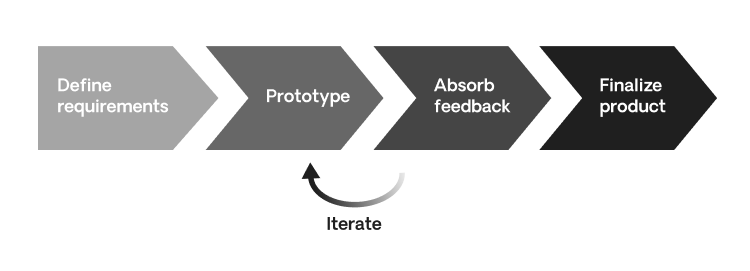
Though exact practices and tools vary between teams, most rapid application development methods follow a similar phase-based cycle: define requirements, build a prototype, gather feedback, and then finalize and harden the product. These cycles are intentionally short—often measured in days or a few weeks—so teams can learn and adjust quickly.
1. Define Requirements
RAD typically starts with a lightweight requirements phase. Instead of spending months perfecting a specification, stakeholders and developers agree on a “good enough for now” scope and prioritize the core use cases to tackle first.
The goal is to capture the product’s gist:
- What problem are we solving?
- Who are the primary users?
- Which workflows or features must be validated early?
This phase is intentionally flexible. Requirements are expected to evolve as the team learns from prototypes and user feedback.
2. Prototype
In the prototyping phase, the team quickly builds a working model of the application or a slice of its functionality. That could mean:
- A clickable UI prototype,
- A thin end-to-end workflow backed by stubbed data, or
- A simplified version of a core feature.
The emphasis is speed and learning, not perfection. Teams may cut technical corners early on, knowing they’ll refactor and harden the solution in later cycles. In many organizations, prototypes can be built in days using low-code tools, reusable components, and visual designers.
3. Absorb Feedback
Once a prototype is ready, the team brings it to stakeholders and end-users. They gather feedback on everything from usability and workflows to performance expectations and integration needs.
User and client feedback can trigger:
- Changes to requirements,
- Adjustments to the UX, and
- Reprioritization of the backlog.
The team then loops back to prototyping, incorporating this feedback into the next iteration. This loop—prototype, validate, refine—continues until the solution is good enough to move into finalization.
4. Finalize Product
In the finalization phase, developers shift their focus from experimentation to stability, maintainability, and production readiness. This often includes:
- Refactoring prototype code into production-grade architecture,
- Implementing robust integrations with live systems,
- Strengthening security, performance, and observability, and
- Completing documentation, training, and deployment procedures.
At the end of this phase, the team delivers a production-ready application—usually with much higher confidence that it fits user needs, because those users have been involved throughout.
Rapid application development advantages
A rapid application development methodology uses this phase-based, feedback-driven cycle to help teams reduce risk and build better products. Beyond the core loop, RAD offers several concrete advantages:
- Faster time-to-market
RAD compresses the distance between idea and working software. Instead of waiting for a big bang release, users get something they can click through early—unlocking value sooner and reducing the chance that the solution is outdated by the time it ships.
Global beauty leader Clarins adopted OutSystems low-code to modernize and standardize its back-office landscape, rolling out 10 applications across 15 countries and developing apps 60% faster while saving about $140,000 on a single app.
Learn more about how Clarins streamlined global operations with low-code - Better alignment with user needs
Because users interact with prototypes throughout the lifecycle, teams build what people actually need instead of what looked good in a requirements document. This reduces rework and drives higher user satisfaction at go-live. - Lower risk and less wasted effort
In traditional waterfall projects, teams can spend months building features that later get trimmed or replaced. RAD favors small experiments and incremental validation, so low-value features are surfaced early and never make it into the production backlog. - Long-term cost efficiency
By avoiding “zombie features” that nobody uses, RAD helps keep development budgets focused on high-impact functionality. While early iterations may seem more intensive, the reduced rework and tighter scope can significantly lower total cost of ownership. - Higher product quality through incremental hardening
Each iteration gives the team a chance to test, fix, and improve a smaller slice of the product. Over time, this leads to more robust architecture, better performance, and fewer surprises at launch.
Oceaneering, a leader in subsea engineering, rebuilt its aging inventory management system on OutSystems in just four months, improving inventory accuracy by about 70% and reducing downtime and errors for offshore technicians managing more than $60 million in parts.
Dive into how Oceaneering modernized a mission-critical inventory system with low-code - Happier, more engaged teams
Developers and designers get frequent feedback and visible wins instead of working in a vacuum for months. This creates a stronger sense of ownership and reduces the frustration that comes from delivering something the client doesn’t want. - A natural fit for low-code platforms
Low-code platforms like OutSystems amplify RAD by providing visual development, reusable components, automation, and built-in integrations. Teams can move even faster while still maintaining governance, security, and performance.
Dutch supermarket chain PLUS used OutSystems to build a robust, composable e-commerce platform expected to handle around 25 million visitors a year and generate approximately €180 million in online sales, while improving stability, scalability, and security.
See how PLUS built a future-proof e-commerce platform with low-code
Rapid application development disadvantages
Those advantages are compelling, but RAD is not a silver bullet. There are trade-offs teams need to understand before adopting it.
- Scale and coordination
RAD works best with small, cross-functional teams that can communicate frequently. As projects grow in scope or involve multiple teams, keeping everyone aligned across rapidly changing prototypes and requirements becomes harder. - Ongoing stakeholder commitment
RAD depends on frequent feedback from users and business stakeholders. If they can’t commit time for workshops, reviews, and testing, the process breaks down and decisions get made in a vacuum. - Interface-driven bias
Because stakeholders mostly see the UI, teams can end up over-investing in visual polish while under-investing in architecture, security, or scalability. If not managed carefully, this leads to brittle back-ends that are expensive to fix later. - Constant user involvement can be hard to sustain
Subject matter experts (SMEs) and power users are often in high demand. RAD requires them to stay involved throughout the project—not just during requirements and UAT—so organizations need to plan for that time investment. - Documentation and governance gaps
With a strong focus on speed, teams may under-document decisions, architecture, and non-functional requirements. In regulated or highly audited environments, this can create compliance and maintainability issues. - Challenging for tightly coupled or legacy environments
Where systems are highly integrated, hard to mock, or dependent on fragile legacy infrastructure, creating realistic prototypes can be slow or risky. RAD still can work here, but teams must invest in test harnesses, synthetic data, and robust integration patterns. - Not ideal where change is tightly controlled
Some organizations need strict, up-front approval for every change (for example, heavily regulated industries with fixed requirements). In those cases, RAD’s fluid requirements and iterative design can conflict with governance models.
When should you use a RAD methodology?
With the pros and cons of RAD in mind, the key question becomes: when is it the right fit?
RAD is most effective when:
- Speed matters more than exhaustive early documentation,
- Requirements are likely to evolve,
- You have regular access to users and stakeholders, and
- Your team can iterate quickly on prototypes and releases.
Before you commit to RAD, walk through the following questions.
1. Is my product mission-critical?
If end-users are placing their lives or critical safety directly in your software’s hands—such as flight control systems or implant firmware—you have little room for error. In these cases, RAD’s tolerance for change and experimentation can be inappropriate or even irresponsible.
However, if you can safely simulate scenarios or build non-critical adjunct tools (e.g., a monitoring dashboard rather than the control system itself), RAD may still be useful.
2. Do I have access to end-user and client feedback?
RAD requires buy-in from both clients and end-users. They must be willing to:
- Participate in frequent demos and usability tests, and
- Provide clear, timely feedback on each iteration.
If your subject matter experts are unavailable or stakeholders prefer “see you at go-live,” you won’t get the full benefit of RAD.
3. Can I divide my deliverable?
RAD shines when you can deliver value in pieces. You should be able to break the solution into modules, flows, or features that can be prototyped and validated independently (for example, separate screens for onboarding, approvals, and reporting).
Where tight integrations or complex back-end orchestration make this hard, teams may use synthetic data or stubs to simulate external systems while still prototyping the user experience.
4. Can my team iterate quickly?
RAD assumes your team can:
- Build and refine prototypes in short cycles,
- Switch context between discovery, design, and delivery, and
- Incorporate feedback without major slowdowns.
If your toolchain, processes, or culture makes change expensive, you may need to invest in automation, testing, and collaboration practices before RAD pays off.
Example: Deciding whether RAD fits
Imagine you’re an app dev manager at a financial services company, tasked with building an internal customer-service dashboard:
- Mission-critical? The tool is important but not life-critical, and you can roll it out gradually.
- User and client feedback? Support agents and supervisors are available weekly for prototype reviews.
- Divisible deliverable? You can prototype login, customer search, and ticket views as separate modules.
- Iteration speed? Your team uses a low-code platform with CI/CD and can release changes weekly.
In this scenario, RAD is a strong fit. If any of those answers were “no”—for example, if agents couldn’t spare time for feedback—you’d need to adjust the approach or consider a more traditional model.
Where RAD works best
RAD is particularly effective in scenarios like:
- MVPs and proof-of-concepts where the primary goal is to test viability and gather user feedback quickly.
- Internal enterprise apps such as dashboards, workflow tools, and self-service portals, where users are accessible and requirements can evolve.
- Modular, service-oriented systems where you can prototype individual services or micro-frontends without touching the entire stack.
- Continuous improvement of existing apps where teams ship incremental enhancements instead of large, infrequent releases.
Recent app-development research highlights that organizations adopting iterative, user-centric practices like RAD are better positioned to respond to changing business needs and technological shifts in 2025 and beyond.
For more on how teams are modernizing their app portfolios, explore our State of Application Development Trends report.
Is RAD the same as agile?
RAD and agile are closely related but not identical.
- RAD is a specific family of methods focused on rapid prototyping, user workshops, and fast iteration cycles.
- Agile is a broader philosophy and set of principles (e.g., the Agile Manifesto) that can be implemented through many frameworks, including Scrum, Kanban, XP, and even RAD-style approaches.
In other words, RAD can be one way to practice agile, but not all agile teams use RAD.
A simple way to think about it: agile tells you what to value (collaboration, adaptability, working software); RAD gives you a concrete way to deliver on those values through prototype-driven development.
Key overlap between RAD and Agile
To clarify the relationship, here’s how RAD and agile compare at a high level:
Similarities
- Both favor iterative delivery over big-bang releases.
- Both value frequent stakeholder and user feedback.
- Both prioritize working software over comprehensive documentation.
- Both embrace changing requirements, even late in the process.
Differences
- Agile is a philosophy and umbrella for many methods; RAD is a specific, prototype-heavy approach within that umbrella.
- Agile frameworks like Scrum often organize work into fixed, time-boxed sprints; RAD may use more fluid, prototype-driven cycles.
- Agile emphasizes ceremony (standups, retros, sprint reviews) and team practices; RAD focuses more explicitly on tools, user design workshops, and rapid prototyping.
- Agile is used across a wide range of project types; RAD tends to be applied where UI, workflows, and user experience are central.
Teams often combine both, using agile ceremonies and backlogs while employing RAD techniques to speed up design and delivery.
How agile principles map to RAD
Rapid application development tools
As you’ve now learned, RAD is primarily a methodology—not a specific language or UI builder. That said, the right tools can make or break a RAD initiative.
Modern RAD toolchains typically include:
- Visual design and prototyping tools for quickly creating and iterating on user interfaces,
- User testing and feedback tools for gathering input early and often, and
- Application platforms (often low-code) that support automation, integrations, and fast deployment.
Common features of RAD-enabling tools and platforms include drag-and-drop UI design, reusable components, integration connectors, automated testing, and even AI-assisted development and refactoring.
Design and prototyping tools
These products help teams craft interactive designs quickly. Some, like Webflow, can also export functional prototypes that run in the browser.
User testing and feedback tools
RAD depends on frequent feedback from clients and end-users. These tools help teams capture that feedback asynchronously, without requiring everyone in the same room.
Rapid application development platforms
Individual tools can speed up parts of the RAD process, but platforms bring everything together.
A RAD platform does more than provide a visual designer. It also supports:
- Scalability and performance for enterprise workloads
- Governance and security across teams and environments
- Workflow and process automation
- Visual development and reusable components
- Integration with existing systems and DevOps pipelines
Here are some platforms commonly associated with RAD-style development:
How OutSystems enables rapid application development
OutSystems is a high-performance low-code application platform that aligns naturally with RAD principles. It goes beyond simple visual builders by combining: hosting, dynamic scaling, release automation, performance monitoring, user management, version control, and more in a single platform.
Here’s how OutSystems maps to the key steps of RAD:
- Define Requirements and Prototype quickly
Use the OutSystems low-code platform to visually model data, logic, and UI. Pre-built components, templates, and connectors accelerate early prototypes so stakeholders can react to working screens instead of static documents. - Absorb Feedback with fast iterations
OutSystems supports multi-environment pipelines and one-click publishing, so teams can push updates to dev, test, and staging environments rapidly. This makes it easier to incorporate feedback from end-users and business stakeholders on a frequent basis. - Automate workflows and integrate systems
With built-in workflow automation, teams can quickly model and automate business processes that span multiple systems. Connectors, integration builders, and reusable modules help reduce the effort required to wire up complex back-ends—critical for realistic RAD prototypes. - Finalize and harden the product with CI/CD and monitoring
OutSystems includes governance, performance monitoring, dependency analysis, and support for CI/CD practices, helping teams move from prototype to production without rewriting the application from scratch. - Leverage agentic AI for modern RAD
The Agentic AI Workbench lets teams infuse applications with AI agents and use AI to speed up development tasks such as generating boilerplate logic, refactoring, or suggesting tests. This extends the original RAD goal of “building faster with feedback” into an AI-accelerated future—while preserving control, security, and enterprise standards.
Together, these capabilities make OutSystems a modern evolution of RAD: teams can prototype quickly, iterate safely, and scale to enterprise-grade production without abandoning the speed that RAD promises.
Useful resources
Related resources

Learn the fundamentals of modern development


Frequently asked questions
Rapid application development (RAD) is used for building software that needs to evolve quickly—such as internal business apps, portals, dashboards, and user-facing applications where fast feedback, iterative design, and frequent releases are more important than rigid, up-front specifications.
Rapid prototyping is an iterative approach used in the design stage of an application or website, where teams quickly build and refine working models based on user feedback. It’s closely associated with RAD and often used in agile software development.
The Spiral model is an iterative software development approach that combines elements of waterfall and prototyping. Each cycle focuses on understanding risks, building a prototype, gathering feedback, and refining the solution.
Agile software development is a flexible, iterative approach to managing and delivering software projects. It emphasizes collaboration, working software, and responsiveness to change over heavy documentation and rigid plans.
RAD should generally be avoided when you’re building mission-critical or safety-critical systems that must be nearly error-free at first release, when you lack sustained access to users and stakeholders, or when governance and regulatory requirements demand highly detailed up-front specifications and tightly controlled change processes.