
Full-stack development for everyone
With the OutSystems platform, people take on new roles. Back-end devs build front ends, front-end devs build back ends, and all devs automate workflows. There’s no wall, no sticking point, no tool switching. Just well-built, cross-platform apps that are easy to extend.










1 million hours to give back to the organization
80+ operating companies to be digitized
One central team for managing and providing development platforms to 25+ potential decentralized teams

.svg)
Front ends made easy
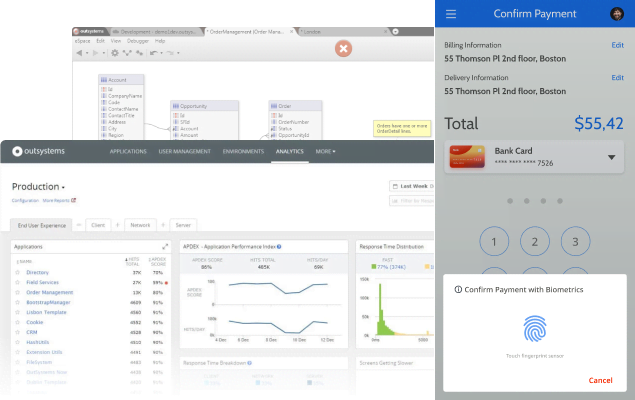
The OutSystems low-code platform makes front ends easy, even if no one on your team has built one before. The platform connects designers with developers, integrates with Figma, and offers pre-built templates. The result? Beautiful apps and smooth-as-butter user experiences.

Back-end development for any skill level
New and professional devs can use the OutSystems low-code platform to build your back end, including APIs, web services, data models, workflows, and business rules. Creating and structuring databases and queries, business logic, and integrations is also simple.
Automate, don’t duplicate
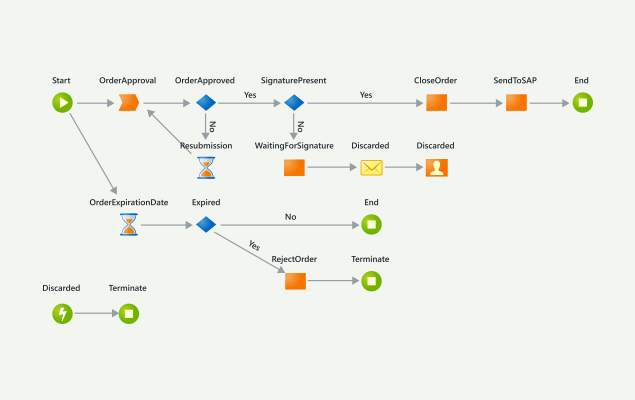
The OutSystems platform enables new, proficient, and professional developers to build and deploy custom applications that automate and orchestrate your unique cross-functional workflows, eliminating inefficiency and repetitive tasks.
Need to extend an app? No problem
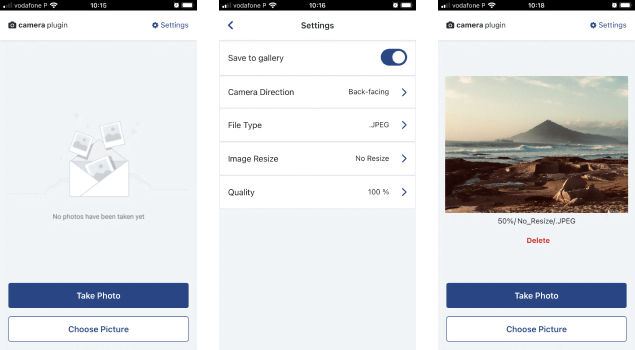
Extending or changing an app is a snap with the OutSystems low-code platform. Developers can add widgets, facial recognition plug-ins, pricing engine algorithms, and more as built-in visual elements in the OutSystems environment that you can easily add to your applications.
Application
development FAQ
Yes. OutSystems supports team development with built-in versioning, merge, and conflict resolution capabilities. Developers can work on the same application, compare changes, resolve conflicts, and publish updates through governed workflows. This helps teams collaborate without losing visibility or control across shared application development projects.
OutSystems generates standard backend and frontend code using widely adopted frameworks and languages. The backend is based on .NET and C#, while the frontend uses JavaScript, HTML, CSS, and React. Developers build visually, but the platform produces enterprise-grade application code aligned with modern web development practices.
Developers don’t directly edit generated code in the OutSystems IDE. However, OutSystems provides a detachment process that allows customers to export applications as standard .NET and React applications if they choose to leave the platform. This helps address code ownership and vendor lock-in concerns while preserving long-term flexibility.
Yes. OutSystems supports custom C#, JavaScript, and CSS when teams need capabilities beyond visual low-code development. Developers can also create .NET extensions for specialized requirements. This gives teams the speed of visual development while preserving flexibility for complex logic, integrations, and AI development use cases.
OutSystems supports many types of software, including AI agents, web apps, mobile apps for iOS and Android, progressive web apps, APIs, and microservices. Teams can build simple CRUD tools, enterprise workflows, customer portals, and complex mission-critical systems on one platform.
The default OutSystems database size is 100GB and can be increased at an additional cost. For document-heavy applications or very large datasets, teams can integrate with dedicated storage services such as AWS S3. This helps keep application data scalable while using the right storage model for each workload.
You don’t need specialized AI developers or a single mandated coding tool to build with OutSystems. Teams can use developers with object-oriented, database, and web experience, while tools such as Claude, Copilot, Koda, or Codex can support upstream work. OutSystems provides the governed AI development platform for building, integrating, and managing apps and agents.
OutSystems supports accelerated development by helping teams build applications up to 10 times faster than traditional coding. Simple applications can be delivered in days or weeks instead of months. OutSystems AI further speeds delivery with AI-assisted development, app generation, recommendations, and automation across the software development lifecycle.
OutSystems offers free online training, guided learning paths, certification programs, community forums, technical documentation, professional services, and technical support. Customers can also work with partners or Technical Success Managers for hands-on guidance. This support model helps teams ramp faster and build the skills needed for long-term platform success.
Yes. OutSystems is built for code reuse through modular architecture, reusable components, shared services, and UI elements that can be used across multiple applications. Reused components only count once in the licensing model, helping teams improve consistency, reduce duplication, and accelerate development across an application portfolio.
OutSystems handles complex business logic through visual workflows, conditional logic, data transformations, complex queries, and workflow orchestration. Developers can also extend logic with custom code when needed. This gives teams a structured way to build sophisticated enterprise applications without losing flexibility or control over business rules.
OutSystems includes app testing capabilities such as built-in debugging, visual step-through debugging, and support for behavior-driven development testing. Teams can also integrate with external testing tools such as Selenium and TestIM. This helps QA and development teams validate functionality throughout the development lifecycle.
Yes. OutSystems supports automated testing through its behavior-driven development framework and integration with third-party testing tools. Teams can use app testing, automation, and automated testing practices to validate functionality, reduce manual QA effort, and maintain quality as applications evolve across environments.


Build what’s in your backlog
The broadest range of use cases, templates, and powerful partner solutions help you tackle everything in your application backlog.

See how OutSystems stacks up
Get the latest research on low-code platforms from global industry analysts and see why OutSystems is known as the #1 low-code platform.

Go deeper into the platform
Get more details about how your team can build mission-critical applications fast. Browse our evaluation guide.