
8 AI agent development platforms for enterprise use cases
TL;DR:
Building an AI agent is relatively easy. Moving it into production is much harder, especially when agents need to work reliably with enterprise data, systems, and business processes. Enterprise AI agent platforms are designed to close that gap, but they differ significantly in how much control, flexibility, and production readiness they provide.

What are enterprise AI agent development platforms?
An enterprise AI agent development platform is a unified environment for building, running, and governing intelligent agents alongside the applications and data those agents depend on.
Think of it the way you already think about your application platform. You don’t hand-code every deployment pipeline, permissions model, and monitoring dashboard for each new app.
Instead, you use a platform that handles the shared infrastructure so your team can focus on the business logic.
An agent platform does the same job for agents. It gives you one place to design, govern, and watch them run.
This is also why they’re different from standalone LLM wrappers or code-first orchestration frameworks. A framework can help developers create agents and connect them to LLMs, while an enterprise platform must also manage how those agents access company data, call APIs, collaborate with other agents, and take action across production systems.
At minimum, an enterprise-grade platform should provide:
- Full lifecycle management: Build, test, deploy, monitor, update, and manage agents within a consistent development environment.
- Built-in governance and guardrails: Apply role-based access controls, security policies, data protections, and evaluations that keep agent behavior within defined boundaries.
- Enterprise context awareness: Give agents reliable access to the applications, data models, workflows, and dependencies they need to make grounded decisions.
- Unified orchestration: Coordinate agents, foundation models, enterprise systems, and human approvals across multi-step workflows.
- Accelerated development: Reduce repetitive engineering work with visual development, reusable components, AI-assisted generation, and automated development tasks.
Why enterprises need a dedicated AI agent development platform
Once an AI agent moves beyond a controlled pilot, it becomes part of the production architecture. It may access company data, call APIs, trigger workflows, interact with other agents, or take actions on a user’s behalf.
That means engineering teams have to solve the same reliability, security, integration, and lifecycle problems they manage across the rest of the enterprise stack.
They also have to account for the less predictable behavior of AI models. A dedicated development platform gives teams a common foundation for managing those requirements as agent adoption grows.
Move from prototype to production faster
A prototype proves that an agent can perform a task. As such, production requires more testing, state management, error handling, deployment controls, monitoring, scaling, and reliable execution across real workloads.
A dedicated platform provides much of that infrastructure within the development lifecycle.
Teams can spend more time improving the application and agent logic instead of assembling the supporting stack required to run it.
Keep development speed under enterprise control
Developers need enough freedom to experiment and ship quickly. Security, architecture, and platform teams also need visibility into what agents can access, which actions they can take, and how those actions are audited.
Centralized governance gives teams a shared way to apply role-based access controls, data policies, guardrails, compliance requirements, and human approval where an action carries more risk.
These controls become increasingly important as agents move across departments and business systems.
Prevent fragmented AI tool sprawl
AI adoption can quickly produce separate agent builders, model providers, integration layers, monitoring tools, and governance processes across different teams.
That fragmentation creates duplicate infrastructure and makes agents harder to operate consistently.
A shared platform gives teams a common environment for building, deploying, monitoring, and governing custom agents as their use expands across the organization.
Connect agents to the systems where work happens
An enterprise agent becomes useful when it can work with the systems that hold business context and execute real processes.
That may include CRM, ERP, ITSM, internal databases, APIs, and legacy applications.
A dedicated platform should make those connections easier to build and govern, while controlling what data an agent can read and which actions it can perform.
Keep the architecture flexible as models change
Foundation models are evolving quickly across capability, cost, latency, and deployment options. The best model for a workflow today may not be the best choice a year from now.
Enterprise platforms can reduce that dependency by separating agent orchestration and business logic from the underlying model.
This gives architecture teams more freedom to change providers, route different tasks to different models, and adopt new models without rebuilding the entire application around them.
How to choose the right AI agent development platform for your enterprise
The right platform depends on more than how quickly a team can build its first agent.
IT leaders also need to understand how that platform behaves once agents are connected to sensitive data, embedded in business processes, scaled across departments, and maintained over several years.
For this, we recommend evaluating each platform against five areas that affect whether an agentic system can operate safely and reliably in production.
1. Security, compliance, and data governance
Start with what an agent can access, where that data goes, and how every action is controlled.
Look for enterprise-grade security controls such as;
- role-based access control,
- least-privilege permissions,
- encryption, sensitive data masking, and
- clear separation between development and production environments.
The platform should also provide audit trails that show which agent took an action, what information it used, which model processed the request, and what happened next.
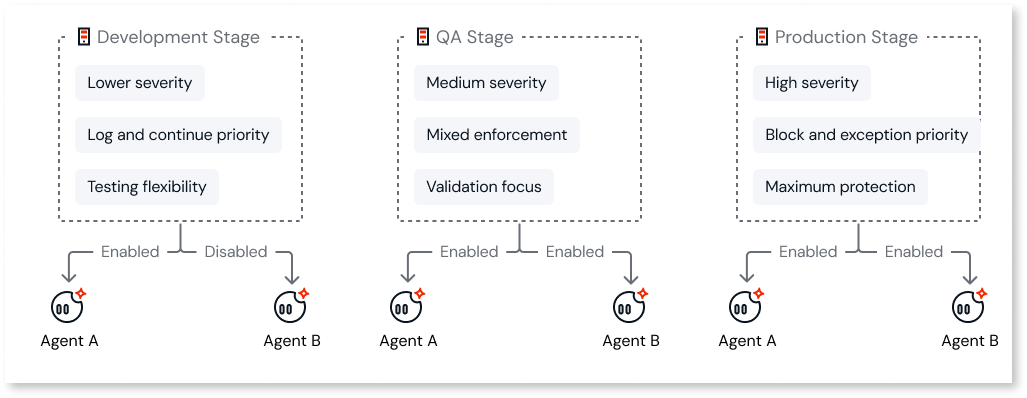
This is important because agent permissions can extend beyond simply reading information. An agent connected to a CRM, for example, may be able to update customer records, trigger an account workflow, or send information to another system.
You should also evaluate compliance requirements in the same context. Certifications and support for standards such as ISO 27001 and SOC 2, along with controls that help teams meet GDPR obligations, are important starting points.
IT teams should understand how the platform handles prompt leakage, model-provider data retention, personally identifiable information, and data residency.
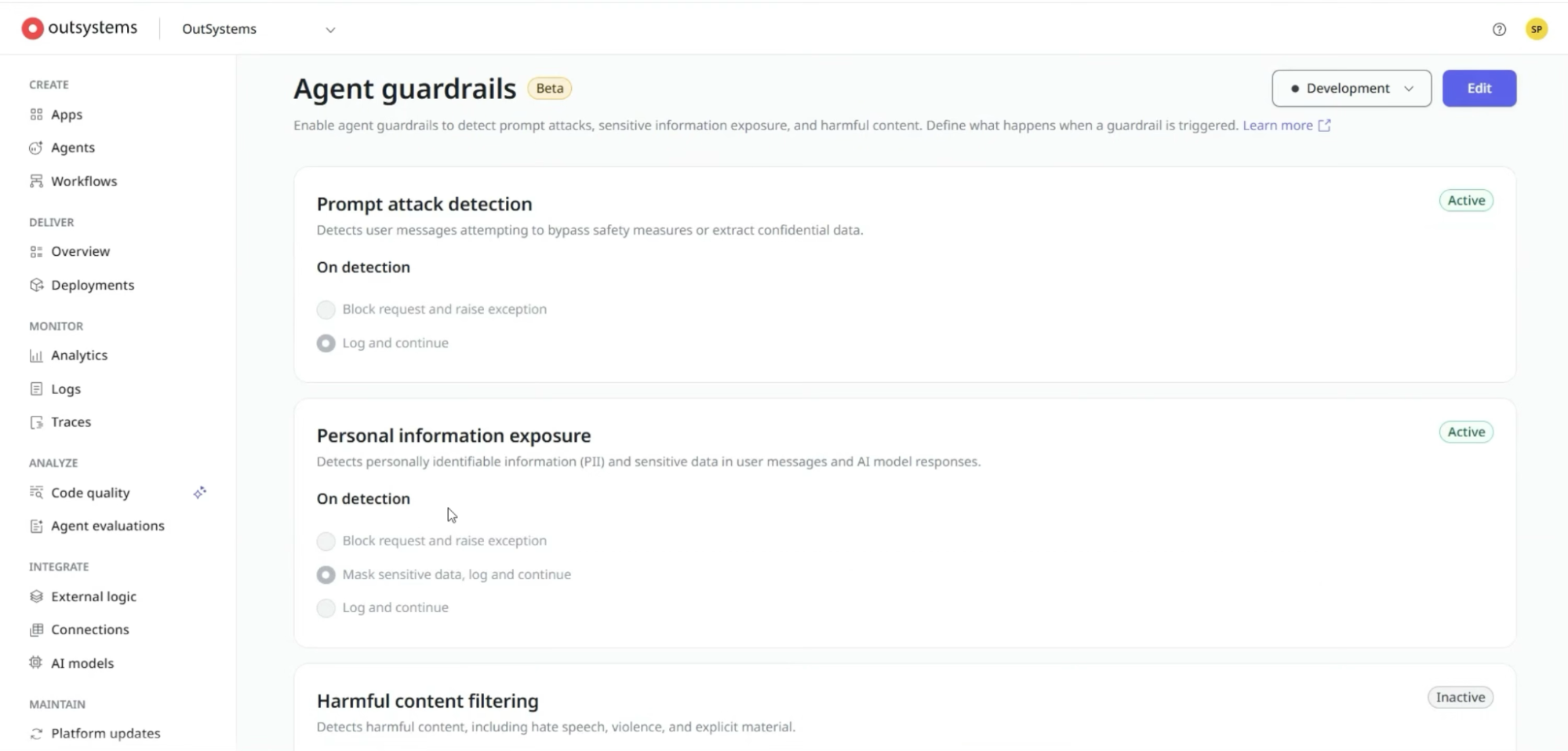
New Release: We’ve deployed configurable Agent Guardrails to ensure you’re safe at all times.
2. Orchestration and collaboration capabilities
Enterprise workflows rarely fit ‘neatly’ inside a single prompt. For example, a claims-processing workflow might use one agent to classify a request, another to retrieve policy information, and another to prepare a recommendation. The system may then require a human-in-the-loop approval before any payment is released.
The platform should be able to coordinate those steps without disconnecting the workflow.
Evaluate how it handles:
- Agent-to-agent communication and task delegation
- Shared context and memory
- Sequential and parallel workflows
- Model selection and routing
- Tool and API calls
- Human approvals and escalation
- Failures, retries, and exception handling
A central orchestration layer also gives teams greater control over how agents interact. If one agent hands work to another, developers should be able to trace that handoff and understand how the final result was produced.
3. Full-lifecycle management across the SDLC
Agents need the same engineering discipline as other production software, with additional controls for model behavior.
Look at how much of the software development lifecycle the platform supports within one environment.
Ideally, teams should be able to design, build, test, deploy, monitor, update, and roll back agentic applications without stitching together separate tools for every stage.
In addition, testing needs to go beyond checking whether the code runs. Teams need ways to evaluate how an agent responds to different inputs. This includes:
- whether its outputs remain within defined guardrails,
- how reliably it calls tools, and
- what happens when a model produces an unexpected response.
Once deployed, observability should make it possible to trace agent activity across models, tools, APIs, and other agents.
Teams should be able to identify failures, inspect execution history, measure latency and cost, and determine whether behavior has changed after a model or prompt update.
4. Enterprise integration flexibility and extensibility
An agent cannot do much useful enterprise work if it cannot reach the systems where business data and processes live.
Assess the platform’s support for enterprise integration across systems such as Salesforce, SAP, ServiceNow, Microsoft 365, Workday, internal databases, REST APIs, and legacy applications.
Pre-built connectors can reduce development time, but they should not become the default. Developers will eventually encounter a proprietary system, unusual workflow, or internal API that the platform does not support out of the box.
That makes extensibility just as important as connector volume.
Look for support for custom APIs, reusable components, custom code, external services, and open integration standards. Developers should be able to extend the platform where necessary without having to move the entire agent outside the governed environment.
5. Developer experience and delivery velocity
A good platform should remove repetitive engineering work while giving experienced developers enough control over architecture, integrations, and business logic.
Capabilities such as visual workflow design, reusable components, AI-assisted development, automated testing, code generation, and pre-built integrations can shorten delivery cycles.
They can also make it easier for platform teams to establish patterns that other developers can reuse.
You also need to look at developer experience. Consider how easy it is to debug an agent, inspect generated logic, manage dependencies, collaborate across teams, and maintain the system after the original developer has moved on.
8 Enterprise AI agent platforms to consider for your vendor shortlist
The platforms below solve different enterprise AI needs. Some provide a broader development and governance layer, while others specialize in specific ecosystems, automation models, or developer workflows.
Here’s how they compare:
1. OutSystems
Best for: Enterprises that want to build AI agents and the applications around them on one governed platform, with deep integration and control over the full lifecycle.
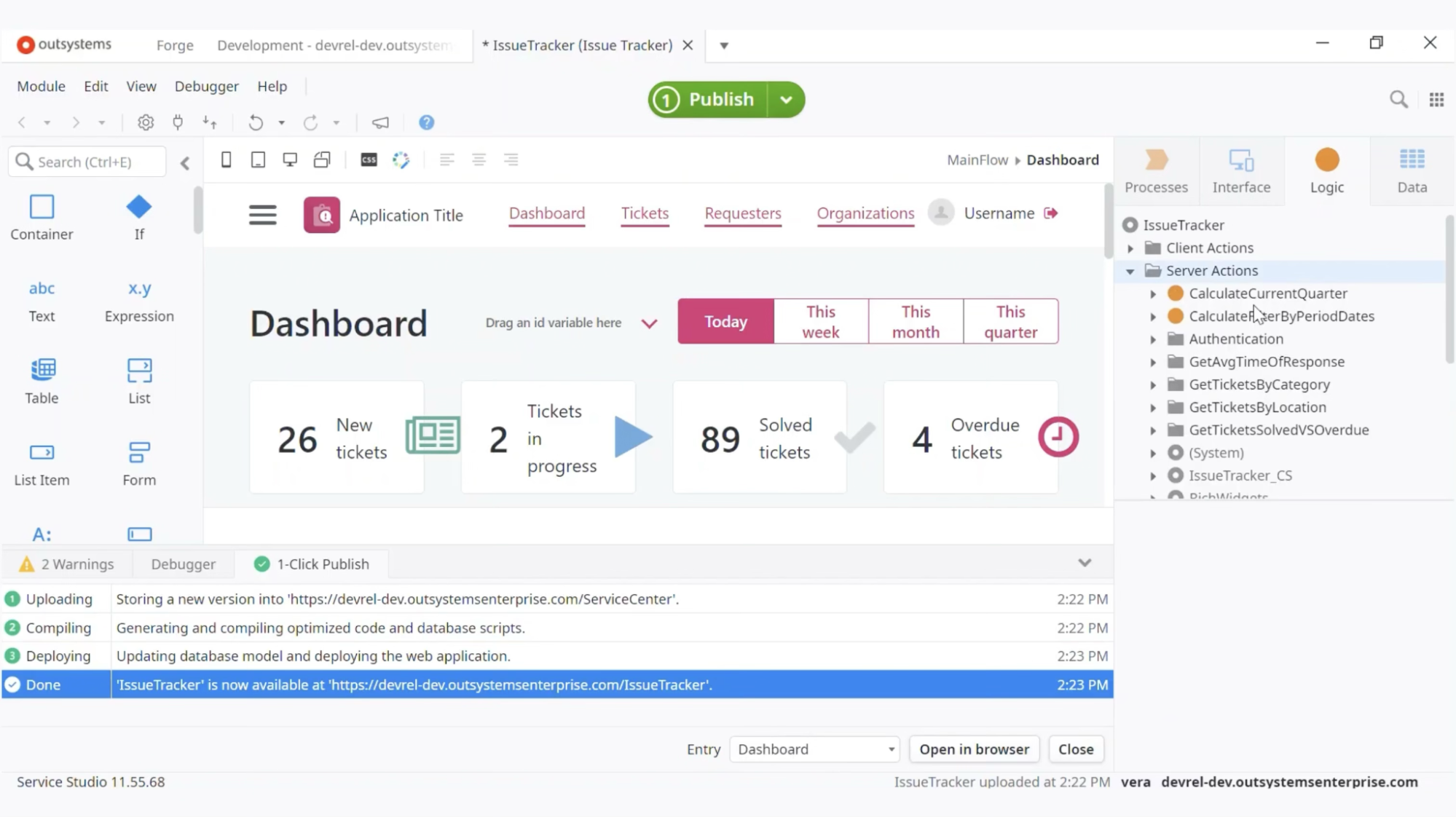
OutSystems is an agentic systems platform for building, running, and governing enterprise applications and AI agents in the same environment.
With OutSystem, development teams can create the application an agent works inside, connect that agent to enterprise data and business logic, manage the models behind it, and govern how the whole system moves through development and production.
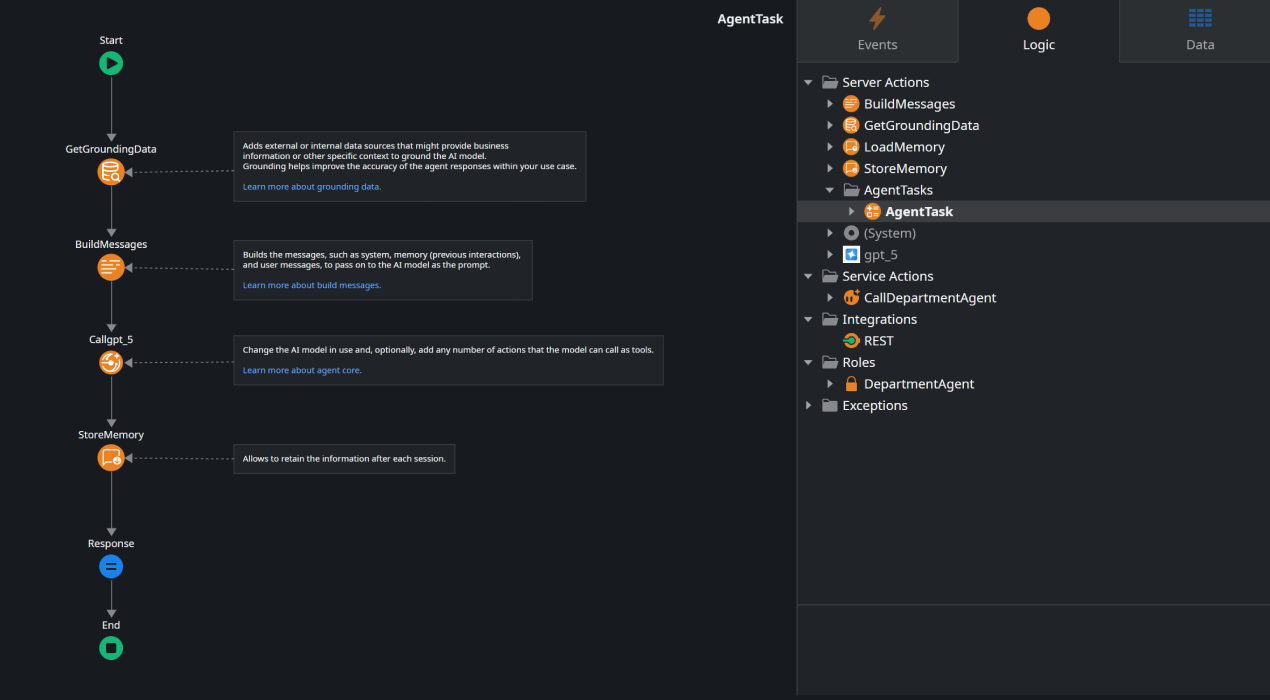
For complex agentic systems, OutSystems features the Agentic Enterprise Orchestration to handle agent design, orchestration, and governance. And on the software side, you have the OutSystems Mentor, using conversational AI and specialized agents across the SDLC.
Both draw on the Enterprise Context Graph, which gives AI a live model of applications, data, business logic, dependencies, and governance policies in the OutSystems environment.
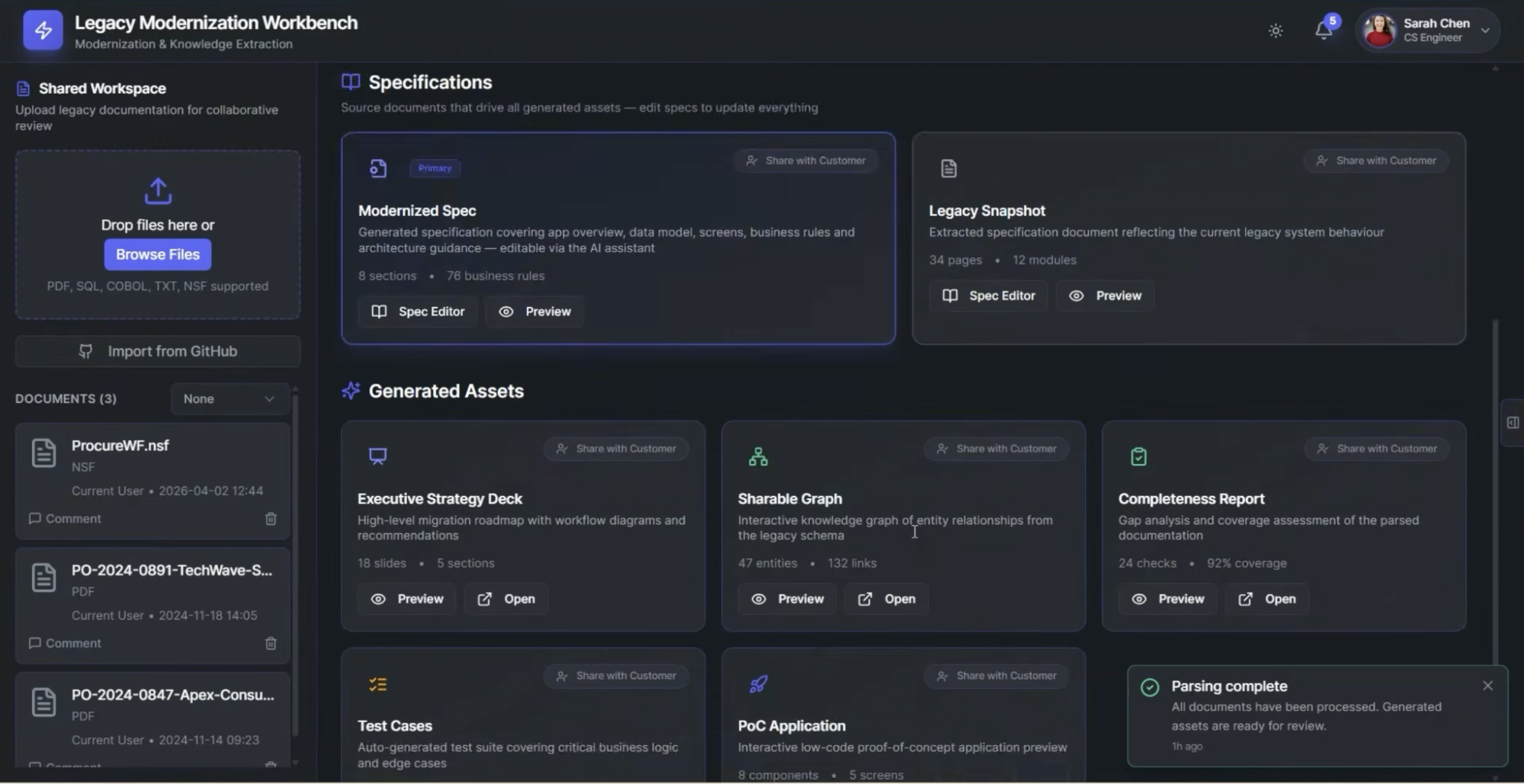
This helps agents work with the architecture around them rather than operating with only the context placed into a prompt.
Key features
- Agent Workbench: Provides the central environment for designing, deploying, orchestrating, and governing AI agents. Teams can visually create multi-agent workflows, assign tools, coordinate sequential or parallel work, add human approvals, and monitor reasoning and tool use.
- OutSystems Mentor: An agentic development experience embedded in the OutSystems SDLC.
- Mentor App Generator can turn a natural-language description into an application with its data model, logic, and UI.
- Mentor in IDE works inside ODC Studio, where developers can ask it to explain or modify existing screens, entities, server actions, and application logic.
- Enterprise Context Graph: Maintains an understanding of applications, data, business logic, dependencies, reusable components, and governance policies. This gives development agents architectural context when they create or modify systems.
- Agent Guardrails: Applies reusable safety and compliance controls to agent inputs and outputs. Teams can use guardrails to filter personally identifiable information, detect unsafe content, reduce prompt-injection risk, and enforce internal AI policies.
- Agent Evaluations: Gives development teams a structured way to test agent behavior before and after deployment. Evaluation datasets can contain expected inputs, outputs, and tool calls.
- OutSystems Data Fabric: Creates a virtual data layer across structured and unstructured enterprise data. Agents can use that layer to access context from systems such as Salesforce, SAP, databases, existing OutSystems applications, and other enterprise sources while preserving centralized access controls.
- AI Agent Builder: Provides a simpler route for creating agents that combine LLMs, retrieval-augmented generation, enterprise knowledge, and function calling.
Advantages of OutSystems
- Faster time to production: Teams can build applications and AI agents in the same environment, reducing the amount of custom infrastructure needed to move from prototype to production.
- Built-in enterprise governance: Security controls, guardrails, evaluations, and role-based access help teams govern how agents access data and take action.
- Strong enterprise integration: OutSystems connects agents to existing applications, APIs, databases, and core business systems so they can work with real enterprise context.
- Multi-agent orchestration: Agent Workbench gives teams a central place to coordinate agents, workflows, models, tools, and human-in-the-loop approvals.
- Greater model flexibility: Enterprises can use different foundation models and change providers as requirements, costs, and capabilities evolve, reducing dependence on a single model vendor.
What are real users saying about OutSystems?
2. Salesforce Agentforce
Best for: Enterprises already invested in Salesforce that want AI agents grounded in CRM data and embedded directly into customer, employee, sales, and service workflows.
Salesforce Agentforce is an enterprise platform for building and deploying autonomous AI agents across the Salesforce ecosystem.
These agents can answer questions, retrieve business data, update records, trigger workflows, call approved actions, and complete multi-step tasks for customers or employees.
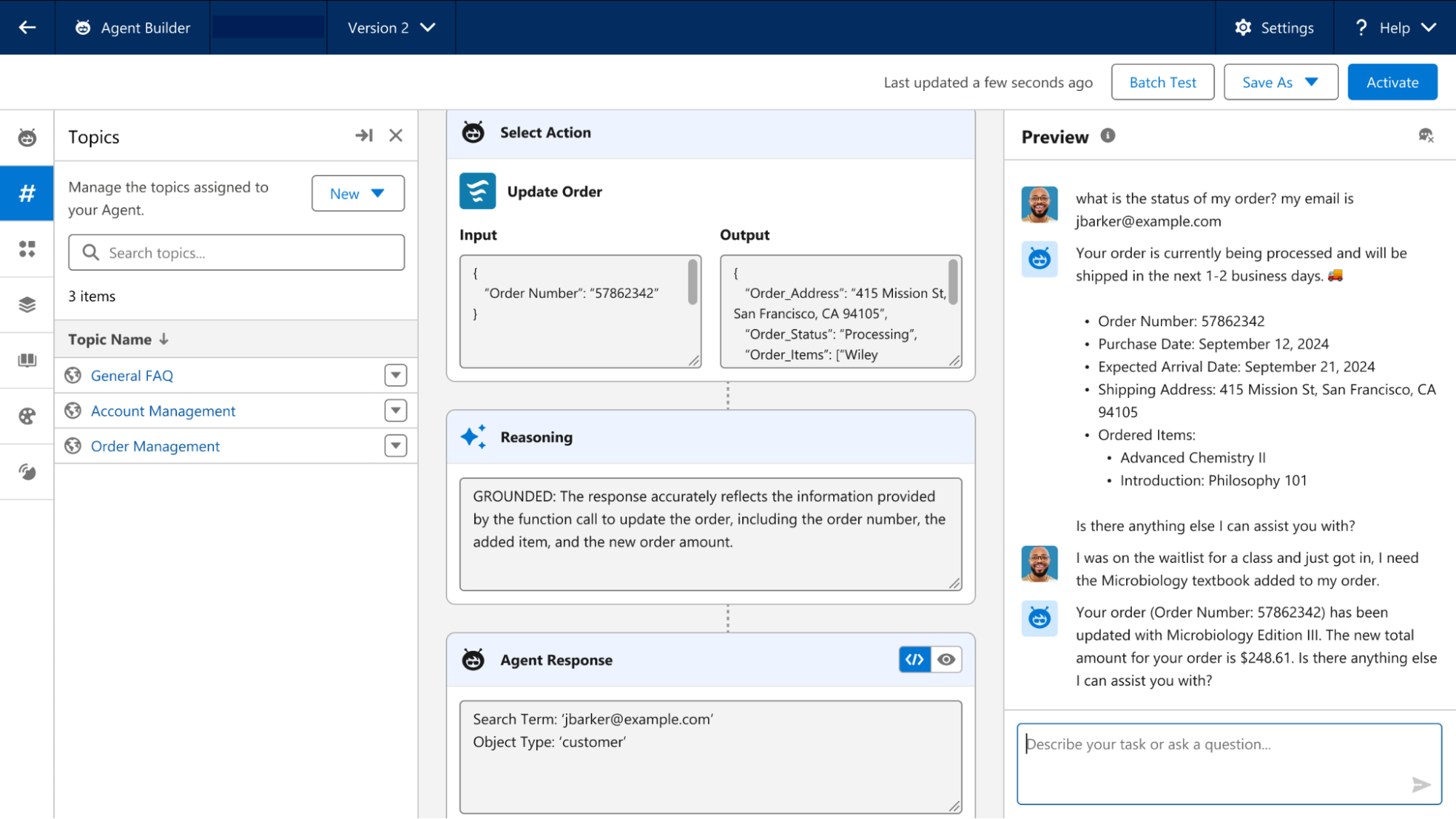
To make all of this work is the Atlas Reasoning Engine, which determines how an agent responds to a request and which actions it should take.
Then you have the Agentforce Builder, where teams can define agent behavior visually or through Agent Script, while existing Salesforce Flow, Apex logic, CRM data, and MuleSoft integrations can become actions the agent is allowed to use.
Key features
- Agent Script: A Salesforce scripting language for defining agent behavior. Developers can use it to add conditions, variables, routing logic, and deterministic steps when a business process should not be left entirely to LLM interpretation.
- Data Library: Teams can index Salesforce Knowledge content, uploaded files, fields, and web sources, while Data 360 handles the underlying search index and retrieval infrastructure.
- Testing Center: Provides a sandbox environment for systematically testing agents before deployment.
- MuleSoft for Agentforce: Extends agents beyond Salesforce through MuleSoft APIs and connectors. Agents can retrieve context from third-party applications and execute approved actions in external systems of record.
- Einstein Trust Layer: Adds security controls between Salesforce data and the LLM. Its protections include sensitive-data masking, CRM grounding, toxicity detection, audit trails, and zero-data-retention agreements.
- Agentforce Observability: Provides runtime visibility into agent behavior and performance.
Advantages
- “The tight integration between Agentforce, Data Cloud, and native Salesforce objects is really a powerful combination.” (Read full review)
- “Agentforce is the most easiest path to leveraging AI in an enterprise landscape with Salesforce involved.” (Read full review)
- “We are implementing Lead Scoring in our org and currently also looking into using the Einstein Prediction Builder.” (Read full review)
Limitations
- “One area that could be improved is the initial setup and configuration process. Building effective agents can take some customization and a solid understanding of the workflow.” (Read full review)
- “..when an agent doesn't behave as expected, tracing back through why it made a particular decision or which topic/action it routed to isn't always straightforward” (Read full review)
- “Setting up more advanced AI agents and workflows can require technical know-how or help from an admin.” (Read full review)
3. Microsoft Copilot Studio
Best for: Microsoft-centric enterprises that want to build and govern AI agents across Microsoft 365, Power Platform, and connected business systems.
Microsoft Copilot Studio is Microsoft’s low-code environment for building AI agents and the workflows they execute.
You can define an agent in natural language, ground it in enterprise knowledge, connect it to business applications, give it tools, and publish it across channels such as Microsoft Teams or external experiences.
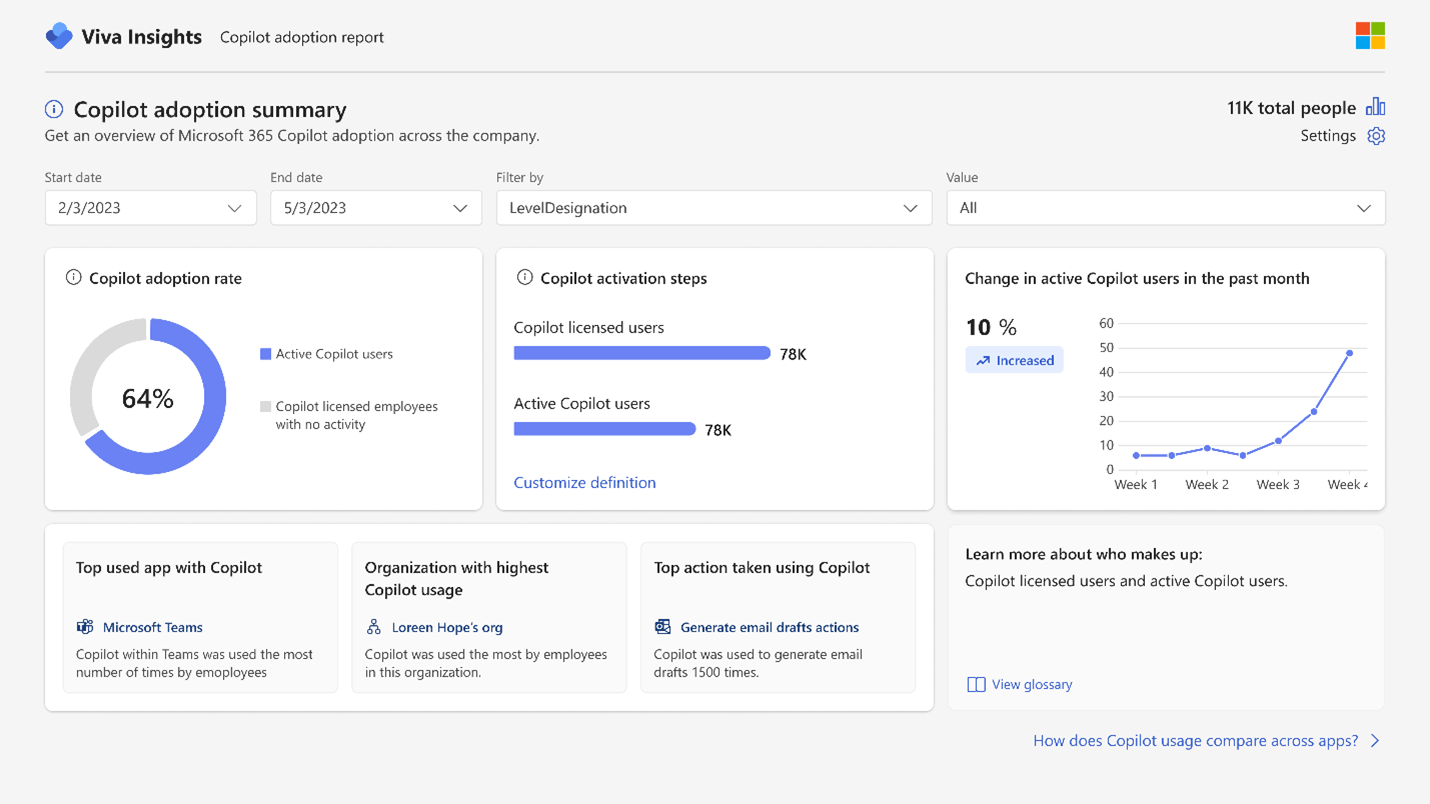
The platform uses Generative orchestration to interpret a request, break it into steps, select the right knowledge, tools, topics, or other agents, and execute the plan. You can also mix that reasoning with Agent flows, which use deterministic rules when a process needs predictable execution.
Key features
- Connected agents: Lets a primary agent delegate tasks to specialized agents with their own instructions, knowledge, and tools. The orchestrator evaluates the request, selects the appropriate specialist, passes relevant context, and returns the result through the primary agent.
- Computer use: Allows agents to interact with websites and Windows desktop applications through virtual mouse and keyboard actions.
- Work IQ: Grounds agents in workplace context from Microsoft 365, including email, meetings, chats, files, organizational information, and connected business systems.
- Copilot connectors: Extend agent knowledge beyond native Microsoft sources by bringing external enterprise information into the Microsoft 365 ecosystem.
- Agent evaluations: Lets teams build test sets, run repeatable evaluations, inspect individual conversations, compare results across versions, and export scores.
Advantages
- “The fact that it is plugged directly into live web search results gives it a massive edge over traditional static AI models.” (Read full review)
- “It integrates well with Microsoft 365 applications and helps streamline tasks such as drafting professional emails, summarizing reports, and organizing data.” (Read full review)
- “I also use it in PowerPoint to turn rough ideas into a presentation that I can edit, instead of creating every slide from scratch.” (Read full review)
Limitations
- “The chat session limits can be incredibly annoying when you are in the middle of a deep research workflow and it suddenly forces you to clear the topic and start over.” (Read full review)
- “Sometimes the suggestions are too generic or require several prompts before producing the desired result.” (Read full review)
- “While Copilot can save a significant amount of time when drafting content, analyzing data, or summarizing information, there are occasions when the output requires further editing or fact-checking to ensure accuracy.” (Read full review)
Recommended → Low-Code AI Agent Development: The Ultimate Guide
4. IBM watsonx Orchestrate
Best for: Regulated and hybrid enterprises prioritizing data governance, bias mitigation, and compliance.
IBM watsonx Orchestrate is another platform for building, and governing AI agents across business workflows.
With the Agent Builder, you can create agents visually, develop them in Python with the Agent Development Kit (ADK), or bring in agents built with frameworks such as LangGraph.
Those agents can then call APIs and enterprise tools, collaborate with other agents, use company knowledge, and execute workflows through the same platform.
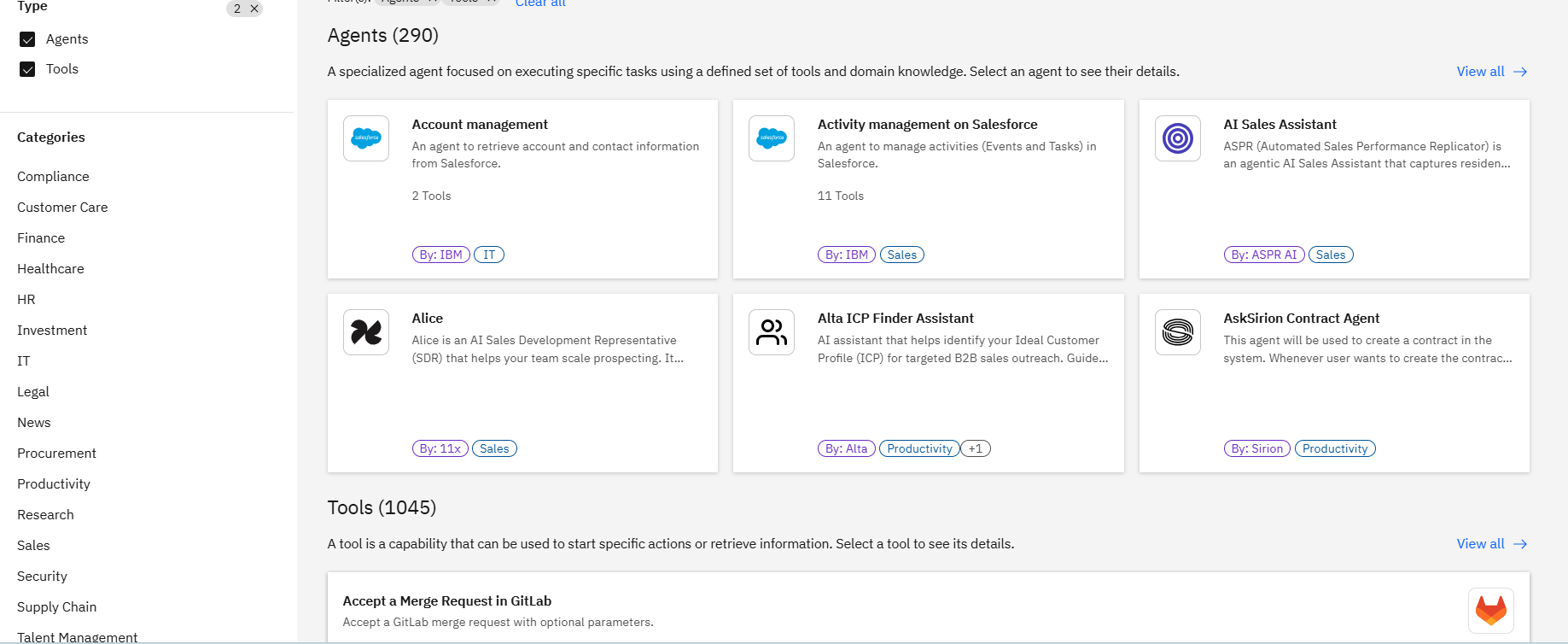
watsonx Orchestrate can also coordinate native IBM agents, external agents, tools, workflows, and different foundation models from a central layer.
You can use ReAct for more open-ended reasoning, Plan-Act for structured work, or deterministic execution when a process requires tighter control. Through AI Gateway, individual tasks can also run on models from IBM Granite, OpenAI, Anthropic, Google Gemini, Mistral, Llama, and other supported providers.
Key features
- Multi-agent orchestration: Agents can share context, delegate work, and route tasks to the appropriate collaborator.
- Workflow Builder: Workflows can include generative prompts, document classification and extraction, business logic, and defined start and end conditions.
- Agentic Control Plane: Provides centralized governance and observability across agents, including agents developed outside watsonx Orchestrate.
- Agent Catalog: A governed catalog where teams can discover and reuse IBM, partner, and custom agents and tools.
- Orchestrate Chat: Gives employees a common interface for interacting with deployed agents. Users can select the appropriate agent, ask questions, request actions, and move between specialized agents.
Advantages
- “The seamless integrations with the tools we already use mean no heavy custom coding is required for most cases.” (Read full review)
- “The AI-based task orchestration is a standout feature, efficiently managing multiple steps in the automated process.” (Read full review)
- “IBM Watson x orchestrate is impressive because it takes the complexity out of automation and makes it feel intuitive.” (Read full review)
Limitations
- “The initial setup and workflow configuration can be more complex than expected, especially for organizations trying to automate processes across multiple enterprise systems” (Read full review)
- “The initial onboarding and setup for custom skills can be slightly technical, which might be a bit of a hurdle for non-technical users.” (Read full review)
- “Sometimes integrations with various tools can be a challenge and not very smooth.” (Read full review)
5. Gemini Enterprise Agent Platform (formerly Vertex AI)
Best for: Cloud-native enterprises that want flexible, code-first or low-code agent development on Google Cloud.
Gemini Enterprise Agent Platform is Google Cloud’s developer platform for building and deploying enterprise AI agents.
Google launched it in April 2026 as the evolution of Vertex AI. It then carries over its model development and deployment capabilities while adding a much stronger agent layer for orchestration, runtime management, security, and observability.
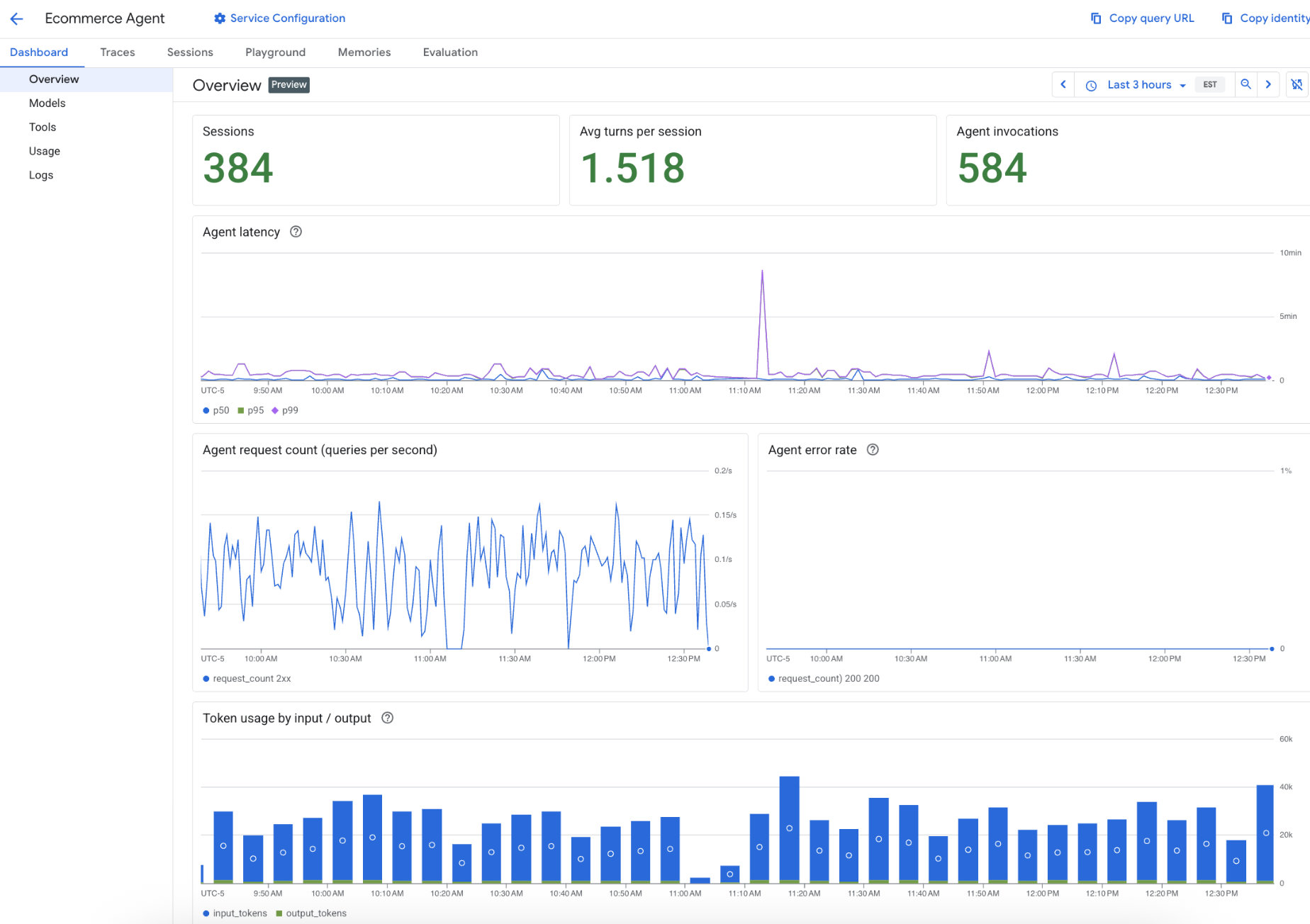
Developers can build visually in Agent Studio or use the code-first Agent Development Kit (ADK) for more complex agent and multi-agent systems.
For example, an operations agent could reason over data in BigQuery, respond to events from Pub/Sub, call enterprise applications, delegate work to specialist agents, and keep context across a long-running workflow.
Key features
- Model Garden: Gives teams access to more than 200 first-party, open, and third-party models. Developers can use Gemini and Gemma alongside models such as Anthropic Claude.
- Agent Runtime: A managed environment for deploying stateful agents without operating the underlying runtime infrastructure. It also supports long-running workflows that can continue for up to seven days.
- Agent Memory Bank: Provides managed long-term memory for agents. It can extract useful information from previous user interactions and persist it for later conversations.
- Agent Registry: Gives platform administrators a central inventory for registering, versioning, managing, and monitoring agents.
- Agent Gateway and Model Armor:
- Agent Gateway provides a central control point between agents, models, and tools where teams can enforce IAM conditions and runtime policies.
- Model Armor adds protection against risks such as prompt injection, tool poisoning, and sensitive data leakage.
Advantages
- “It lets our team build, test, and launch AI agents without having to wrestle with complicated setup work.” (Read full review)
- “It’s easy to build agents in Vertex AI, with high accuracy and no latency.” (Read full review)
- “It made building and testing AI agents much faster than I expected, and I could focus more on the use case instead of the setup.” (Read full review)
Limitations
- “While the platform is powerful, getting started can feel overwhelming especially if your team isn’t already familiar with Google Cloud Platform or with setting up complex permissions.” (Read full review)
- “Some advanced features require additional learning, and pricing can become expensive as usage grows.” (Read full review)
- “The low-code interface is fine for straightforward prototypes, but once you start building more complex, multi-turn dialogue trees, the visual editor can become cluttered and harder to navigate, leading to frustration” (Read full review)
6. LangChain
Best for: Engineering teams that want code-level control over agent architecture, model choice, orchestration, and production infrastructure.
LangChain is an open-source framework for building AI agents in code. It provides standardized interfaces for models, tools, memory, structured output, and agent loops.
This way, developers can assemble agentic applications without writing every model integration and execution pattern from scratch.
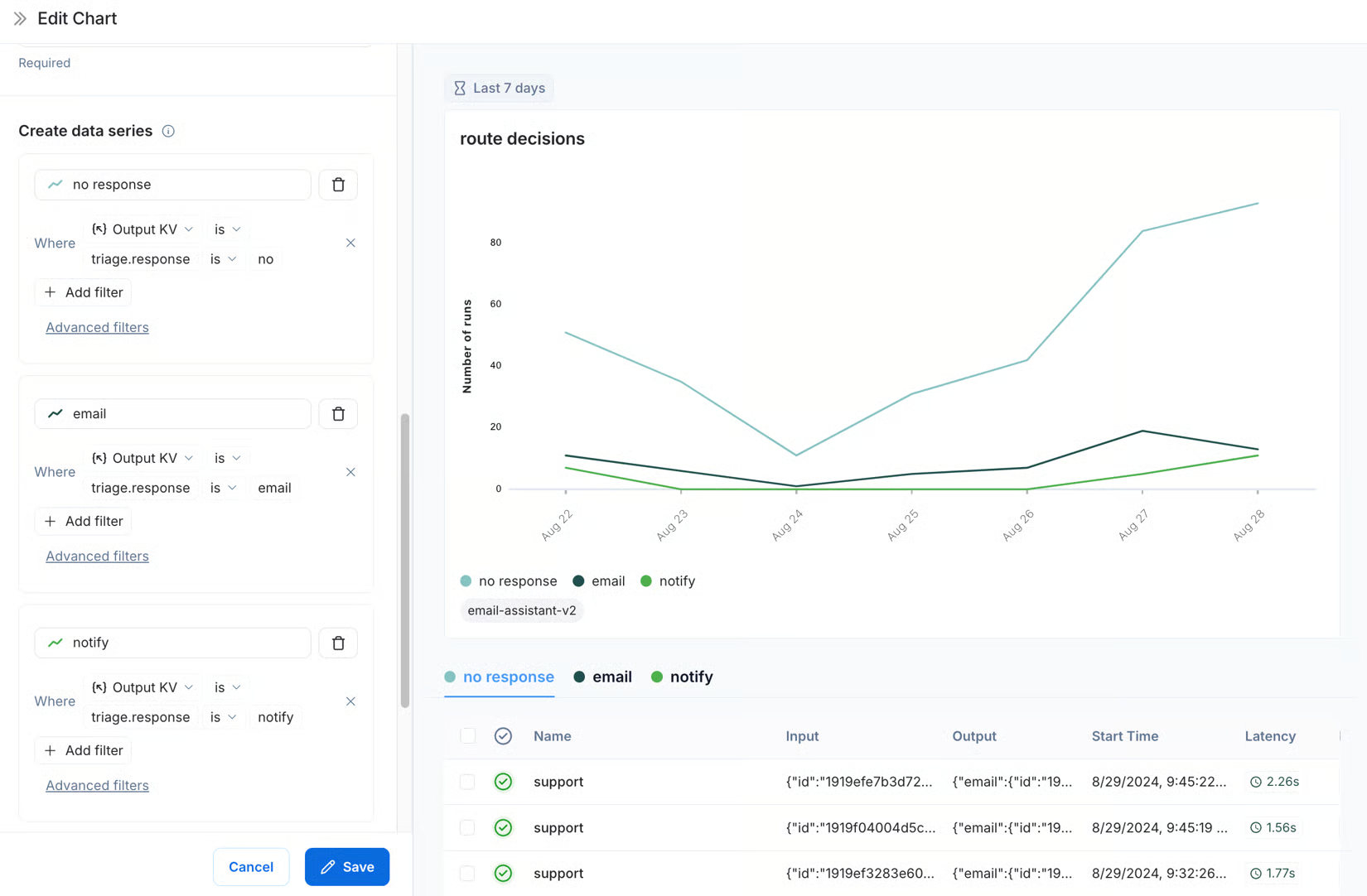
Its current create_agent API runs on LangGraph, giving even higher-level LangChain agents a graph-based runtime for tool calling, state, and multi-step execution.
Then you also have LangGraph, which gives engineering teams lower-level control over stateful and long-running workflows. This includes persistence, human-in-the-loop intervention, and durable execution.
Another one is LangSmith, which covers the production lifecycle around those agents with tracing, evaluations, deployment infrastructure, monitoring, and governance.
Plus, you can also use another agent framework with LangSmith, which makes the production layer less dependent on LangChain itself.
Key features
- LangSmith Observability: Traces the steps inside an agent execution, including model calls, tool calls, state transitions, latency, token usage, and errors. r.
- LangSmith Evaluation: Supports offline experiments before deployment and online evaluations against production traces.
- LangSmith Deployment: Provides a production runtime for agent workloads with durable execution, real-time streaming, persistent state, and horizontal scaling. It also supports MCP, A2A, and Agent Protocol interoperability.
- LangSmith Engine: An agent-engineering layer that analyzes production traces for recurring failures, groups them into issues, diagnoses likely root causes, and proposes fixes.
- LangChain Middleware: Lets developers intercept and modify an agent’s execution around model calls, tool calls, and other stages.
Advantages
- “I particularly like its wide range of integrations with LLM providers, vector databases, APIs, and other tools, which makes experimentation and switching between technologies more flexible.” (Read full review)
- “The best part is it gives what documents or trained with database it fetch from there not give from its own research.” (Read full review)
- “I also like its flexibility. I can start with a simple LLM workflow and gradually add things like RAG or external tools as the project becomes more complex.” (Read full review)
Limitations
- “The framework includes many abstractions and components, so it can take time to understand how everything fits together and how to use it effectively.” (Read full review)
- “The framework also changes quite frequently, so code and documentation can become outdated quickly.” (Read full review)
- “Performance can depend heavily on the design of the application, particularly in complex agent or multi-step workflows.” (Read full review)
7. CrewAI
Best for: Enterprises that want role-based multi-agent orchestration with an open-source Python core and a managed path to production governance.
CrewAI is an open-source Python framework and enterprise platform for building systems in which multiple AI agents divide work and collaborate toward an outcome.
Here’s how it works: each agent gets a role, goal, tools, and responsibilities, then a Crew coordinates how those specialists work together.
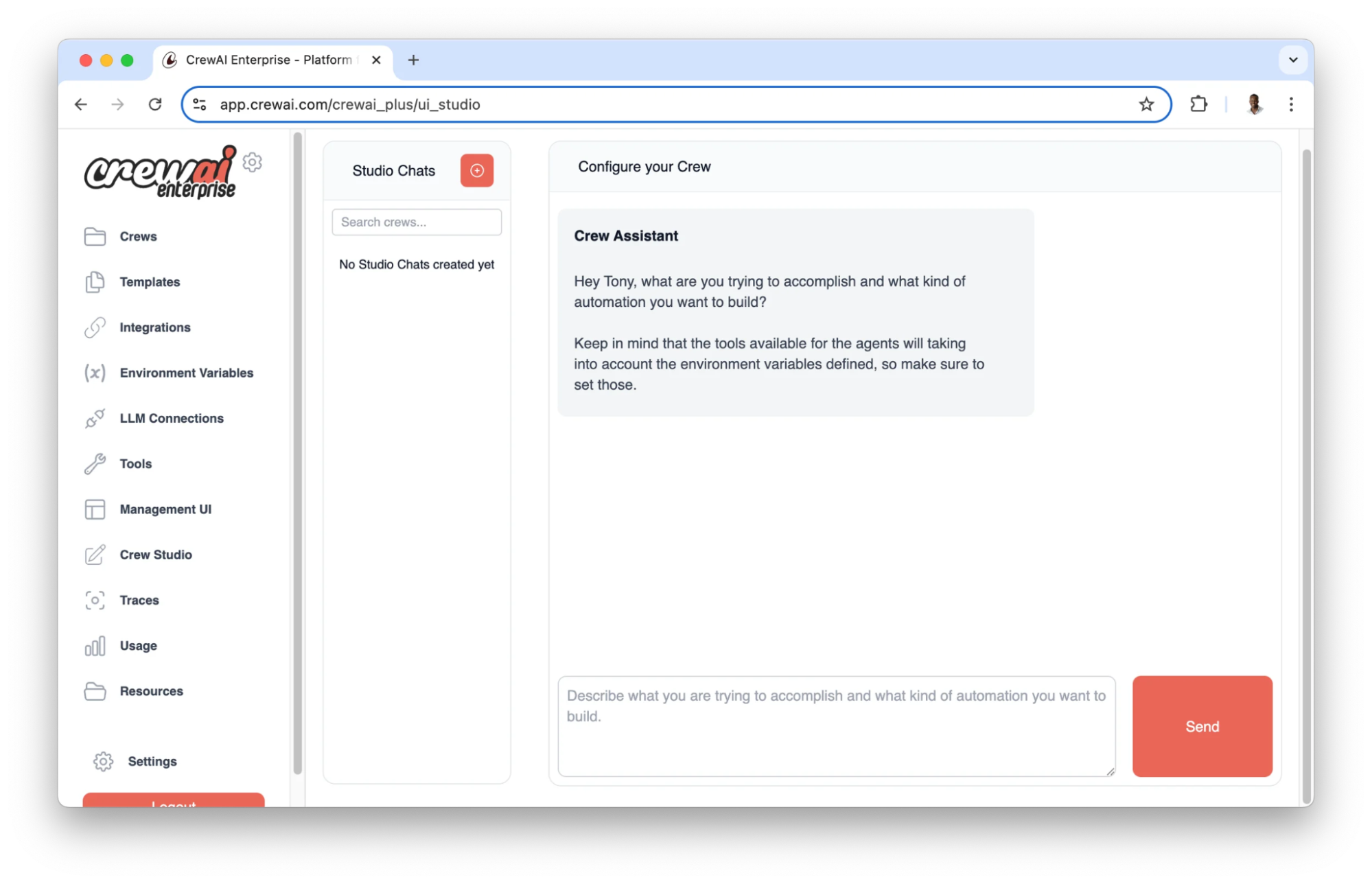
There’s also the combination of Crews and Flows.
- Crews handle tasks that benefit from autonomous reasoning and collaboration.
- Flows provide deterministic, event-driven control over execution paths, state, conditions, and API calls.
A financial review process could therefore use a Crew to investigate an unusual transaction, then return to a Flow that applies fixed business rules and requires human approval before any account action occurs.
For production deployments, CrewAI AMP adds the management layer around the open-source framework. It supports deployment, tracing, observability, RBAC, audit trails, human-in-the-loop controls, reusable tools, and managed scaling.
Key features
- Crew Studio: Users can describe a workflow, connect tools, run it, inspect traces, and deploy it from the same interface. The generated workflow remains exportable as code, so engineers can review or extend what business teams create.
- Triggers: Lets external events start Crews and Flows automatically. Integrations can receive events from services such as Gmail, Google Drive, then pass the event payload directly into an agentic workflow.
- Guardrails: Adds validation and control around agent tasks and outputs. They can enforce expected output structures, retry failed responses, add callbacks, and introduce human-in-the-loop checkpoints where an automated decision requires review.
- Tools Repository: Gives teams a reusable library for publishing and sharing tools that agents can call.
- Observability: Tracks how deployed agents execute in production through traces, logs, usage dashboards, token counts, performance metrics, and hallucination scores.
Advantages
- “The visual interface, reusable agents, and built-in integrations make it straightforward to prototype, test, and automate more complex tasks.” (Read full review)
- “The Python-first approach and compatibility with popular LLM providers also make development faster.” (Read full review)
- “I like the flexibility of using different AI agents for different parts of a task.” (Read full review)
Limitations
- “Setting up agents, tasks, tools, memory, and Flows takes some learning.” (Read full review)
- “For me CrewAI offers good value because the open source framework is free, while the hosted platform provides useful workflow management and observability.” (Read full review)
- “Debugging interactions between multiple agents and tracing the source of unexpected behavior often requires extra effort, especially in more advanced use cases.” (Read full review)
8. UiPath Platform
Best for: Enterprises that need AI agents to work alongside RPA robots, APIs, people, and legacy systems in governed end-to-end processes.
UiPath is a business orchestration and automation platform built around agentic automation. The main idea here is that enterprise work rarely belongs to an AI agent alone.
For example, an agent may reason about what should happen next, an RPA robot may need to perform the action inside a legacy application, an API may update another system, and a person may still need to approve a sensitive decision.
UiPath brings those execution types together under the same platform and governance model.
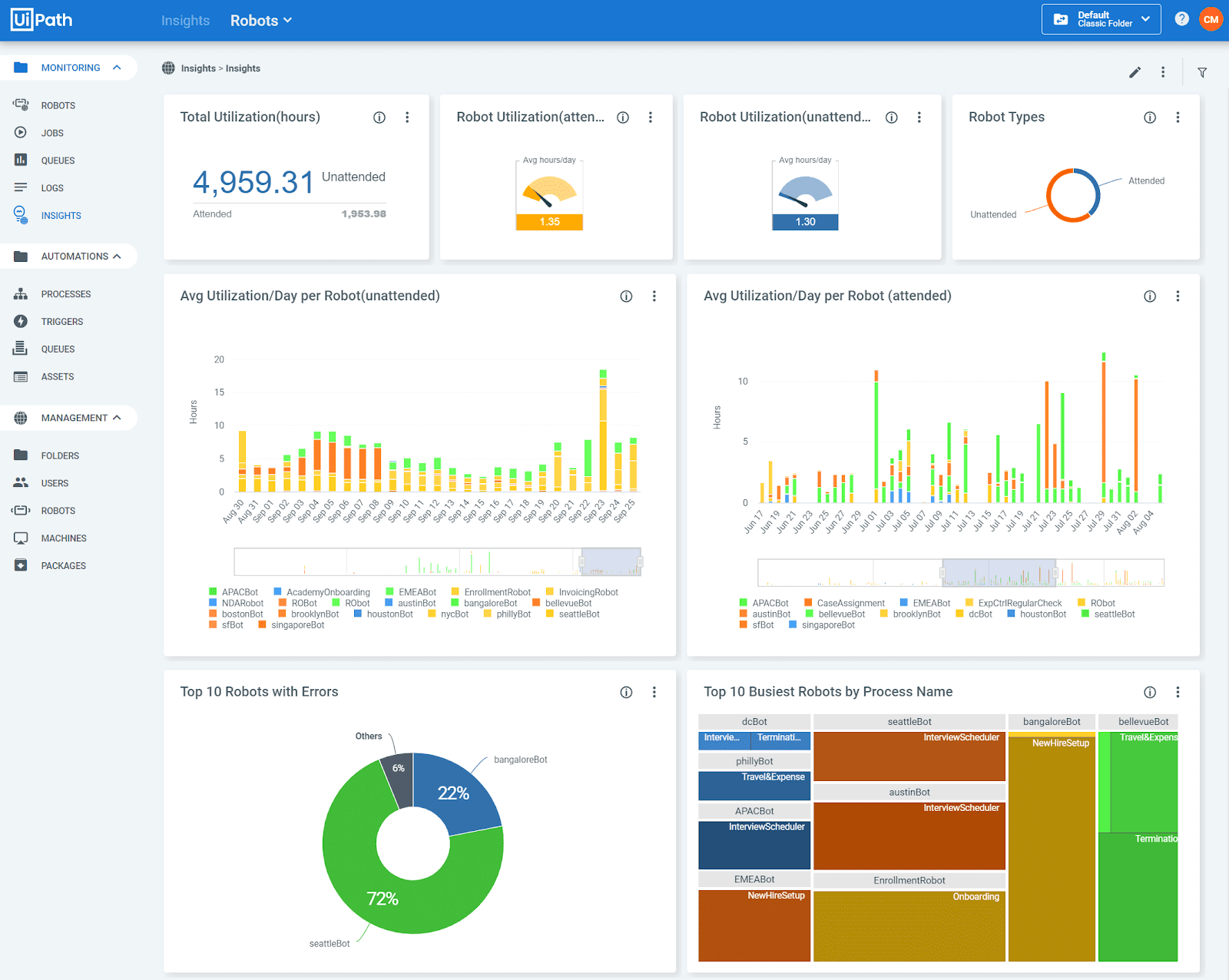
You can build visually with Agent Builder or create Coded Agents in Python using frameworks such as LangGraph, LlamaIndex, and OpenAI Agents.
Once deployed, both can use UiPath’s automation estate, integrations, human-in-the-loop controls, and orchestration services.
Then you also get Maestro that can help coordinate agents, robots, APIs, and people across long-running business processes.
Key features
- Agent Builder: Low-code, drag-and-drop canvas in UiPath Studio for configuring, testing, and shipping agents.
- Coded Agents: Gives professional developers direct control over agent logic in their preferred IDE.
- UiPath AI Trust Layer: Administrators can manage model access, AI usage, policies, audit logs, PII masking, and bring-your-own-model configurations from one control layer.
- Document Understanding: Combines AI and RPA to process unstructured and semi-structured documents, including PDFs, images, handwriting, signatures, tables, and forms.
- Action Center: Provides the human-in-the-loop layer for agentic workflows.
Advantages
- “What I appreciate most about UiPath Agentic Automation is its ability to automate processes that go beyond rule-based tasks.” (Read full review)
- UiPath Agentic Automation can manage processes needing both automation and decision-making.” (Read full review)
- “The UiPath Academy sessions keeps you curious and busy which helps in learning the next topic.” (Read full review)
Limitations
- “Debugging can sometimes be challenging due to the dynamic nature of AI responses.” (Read full review)
- “The initial setup and configuration can feel complex, especially for teams that are new to advanced automation or AI-driven workflows.” (Read full review)
- “The licensing costs might be high for smaller businesses or startups.” (Read full review)
Bring AI agents, applications, and governance together with OutSystems
By this point, you know building agents is only one part of the work. Once it starts touching enterprise data, business rules, and production workflows, your team also has to think about how it is governed, monitored, integrated, and maintained over time.
For enterprise teams, bringing those pieces together can make the path to production much easier to manage.
And that’s why we built OutSystems Agentic Systems Platform to bring agent development, application development, orchestration, integration, and governance into one environment.
Your teams can build the applications agents work inside, connect them to the systems that already run the business, and manage how those agents behave as they move into production.
Or as Zish Khan, Chief Operating Officer of UK’s leading specialist bank, Paragon, puts it:
With OutSystems, you can:
- Design and orchestrate multi-agent systems with Agent Workbench, including human oversight for workflows that need review or approval.
- Build full-stack enterprise applications 10x faster with OutSystems Mentor, which helps automate repetitive development work across the SDLC.
- Connect agents to existing enterprise systems through reusable integrations, APIs, databases, and legacy applications.
- Apply governance throughout the lifecycle with security controls, guardrails, evaluations, monitoring, and access policies.
- Keep your model strategy flexible by working with different foundation models as cost, performance, and business requirements change.
For IT and architecture teams, that means your agent strategy can grow inside the same governed environment as the applications and workflows around it.
It’s your turn. Build your first enterprise AI agent with OutSystems →
Related Resources

Learn the fundamentals of modern development


Frequently Asked Questions
Enterprise platforms reduce model lock-in by separating the orchestration and business logic from the underlying large language models.
Instead of hard-coding an application to OpenAI, Anthropic, or another provider, the platform can route requests through a common model layer.
Your team can then choose models based on cost, latency, reasoning quality, data requirements, or availability without rebuilding the surrounding application.
For long-term flexibility, look for platforms that also keep prompts, tools, workflows, and evaluations portable across model providers.
Enterprise-grade AI agents need strong controls around data access, execution, and auditability.
That typically includes role-based access control (RBAC), least-privilege permissions, encryption, dynamic data masking, immutable audit trails, and human approval for high-risk actions.
Organizations subject to requirements such as HIPAA or GDPR also need to understand where prompts and data are processed, how long model providers retain that data, and whether sensitive information can leave approved environments.
Agents should interact with legacy systems through governed interfaces rather than receiving unrestricted access.
That may include APIs, approved connectors, RPA workflows, or an MCP server that exposes specific tools an agent is allowed to call.
Each action should inherit authentication, permissions, logging, and error-handling controls.
For example, an IT agent might create an ITSM ticket automatically but require human-in-the-loop approval before resetting privileged credentials or changing production infrastructure.
This lets organizations extend enterprise automation while keeping risky actions inside defined boundaries.
Not for every use case.
Modern agent development platforms increasingly provide visual builders, reusable integrations, pre-built tools, evaluation frameworks, and low-code or no-code development experiences.
That allows full-stack developers and business technologists to build many AI assistants and multi-agent workflows without training machine learning models from scratch.
Specialized machine learning expertise can still be valuable for custom models, advanced retrieval architectures, complex evaluations, or highly specialized AI workloads. But it is no longer a prerequisite for every enterprise agent project.
- An AI assistant usually helps a user complete a task by answering questions, summarizing information, or generating content with generative AI.
- An enterprise AI agent can go further. It can use tools, access approved business systems, maintain context, coordinate with other agents, and take actions as part of a larger workflow.
The difference becomes important in production. Once software can update records, trigger enterprise automation, or make decisions across multiple systems, teams need stronger orchestration, permissions, monitoring, and governance than a typical conversational assistant requires.