
2. Mobile app lifecycle management
The mobile application lifecycle management and DevOps capabilities of OutSystems are the cornerstone of our customers' success and a critical factor in sustaining large mobile application factories as they grow—without compromising productivity.
OutSystems supports the entire mobile application lifecycle as follows:
- Deployment: One click deploys the user interface, database, workflows and integration components of a mobile app. A dependency analysis engine ensures a healthy state for all these apps when they are running: in the cloud, on-premises or hybrid.
- Operations and analytics: All mobile apps are automatically monitored, and easy-to-use analytical dashboards can guide your team to the most critical issues. Troubleshooting a problem is done in a matter of seconds.
- Management: The platform also handles the configuration management of running applications and identity management.
This combination simplifies the deployment of a complex mobile app to production without the need for scripting or manual tasks. It enables application factories to benefit from the continuous delivery that ultimately fosters the productive collaboration between the business and IT.
Table of contents
- App versioning and release management for mobile apps
- Update and patch deployment processes for mobile apps
- Monitoring and troubleshooting capabilities for mobile apps
- User feedback and engagement features for mobile apps
- App deployment in public stores
App versioning and release management for mobile apps
The OutSystems platform provides the same app versioning and release management features for mobile apps as it does for web applications, including out-of-the-box version and source control, along with a one-click deployment process for production. Because mobile apps are deployed and distributed differently, the platform also includes additional mobile-specific capabilities:
- Flexibility to modify the mobile package version, which helps control version fragmentation on user devices and enables efficient tracking and troubleshooting of mobile applications.
- Choice between two update distribution types— either releasing updates over the air using their infrastructure or opting for store distribution only. This empowers developers to decide the most suitable update method for their mobile apps.
Update and patch deployment processes for mobile apps
To update your mobile app on your users’ devices, you just need to deploy the app to OutSystems. You don’t need to rebuild your native application if no new native integrations are added.
After the publishing is complete, OutSystems automatically pushes the new version to users’ devices so everyone can start using it right away. This ensures everyone is using the latest version of your app, allowing for incredibly fast feedback loops or immediate fixes of critical app defects.
Over-the-air upgrades are available for all mobile apps built with OutSystems and installed on a mobile device. Other distribution options, such as private distribution, are also supported.
Monitoring and troubleshooting capabilities for mobile apps
OutSystems includes built-in monitoring and analytics tools so you can proactively manage mobile app performance and catch issues before they impact users. All mobile apps are automatically instrumented to collect logs and performance events, which are stored in a standard relational database. These metrics are collected by default, with no extra work for developers and no overhead on the runtime environment.
Most monitoring and troubleshooting needs are covered by the out-of-the-box tools. For deeper insight, OutSystems provides a mobile-supported component that seamlessly integrates this data with Firebase to deliver:
- Analytics: Analyze user behavior and track live usage with real-time reporting.
- Crash reporting: Monitor real-time crashes to quickly prioritize and fix stability issues.
A feature-rich performance monitoring dashboard further helps teams identify performance bottlenecks and take the appropriate corrective measures.
User feedback and engagement features for mobile apps
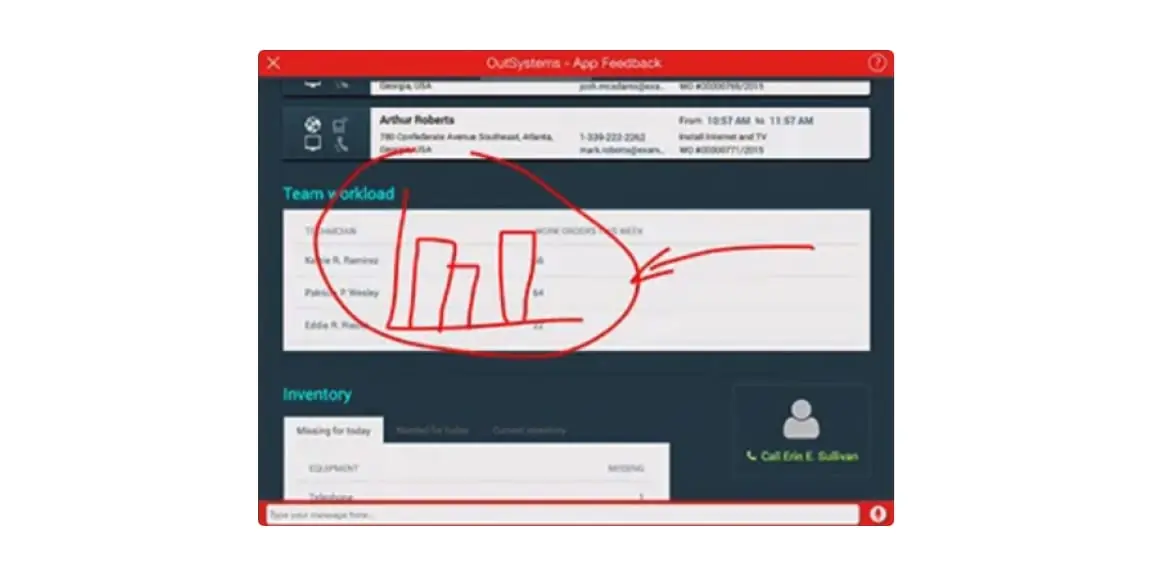
A big part of evolving your application is getting feedback from your users. With OutSystems, users can easily and directly provide feedback inside the mobile app. Users can draw annotations, write text messages, or record a voice memo.
App deployment in public stores
One of the ways you can distribute your production-ready mobile app is by providing it in the mobile stores for the general public. With the platform, you can generate a mobile application package to publish your mobile app in the App Store and Google Play store.
The following diagram shows a typical publishing process:
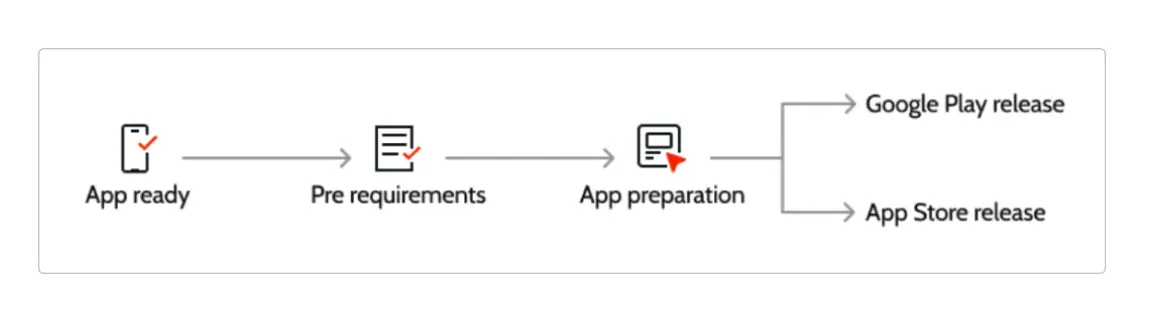
OutSystems’ technical documentation provides more information about how you can generate and distribute applications through the main app stores, and in our dedicated technical articles, you can find additional details on how to deploy your applications to Apple’s App Store and Google Play Store.