
OutSystems Problem Management O11 and before
At OutSystems, we use an 80/20 approach to solving the issues our customers may face with their usage of our product. This means we first aim at restoring service (and overcoming the limitations an issue brings) and then we focus on identifying the root cause so that our customers don’t have to deal with the same issue again.
For that, we handle customer issues in two different phases: Incident and Problem. Incidents are unplanned events that cause a service disruption; while Problems are their cause or potential cause.
At OutSystems we handle Incidents and Problems separately. Incident Management is focused on solving Incident tickets and unblocking our customers in real-time from any deterioration in the value they are receiving from their OutSystems platform. Incident Management is based on response times, as we define in - Support Severity Levels & Response Times. OutSystems support tickets are aligned with the Incident - we tend to close support tickets as the service is restored.
On the other hand, Problem Management is focused on preventing Incidents from occurring and reducing their impact if they do occur, which requires a longer-term and careful analysis. For that, OutSystems uses Problems shared with affected customers and identified as RPM-xxxx. Problem Management is initiated and advanced proactively by OutSystems based on its internal prioritization of business objectives and resources, and for that reason, it does not have defined response times or published service levels.
While working on Problems, our development teams need to decide on the best course of action based on criteria such as urgency to the customers, and the viability of alternatives or workarounds that minimize or even avoid the impact of the problem. Customers can keep track of the progress in a given Problem via Support Portal (in the support ticket that originated it); Any possible fixes to the product are identified in the Release Notes with the Problem (RPM) identifier as well.
Lifecycle
While working on a Problem, it goes through multiple phases depending on the activity happening. The diagram below explains the lifecycle of a Problem.
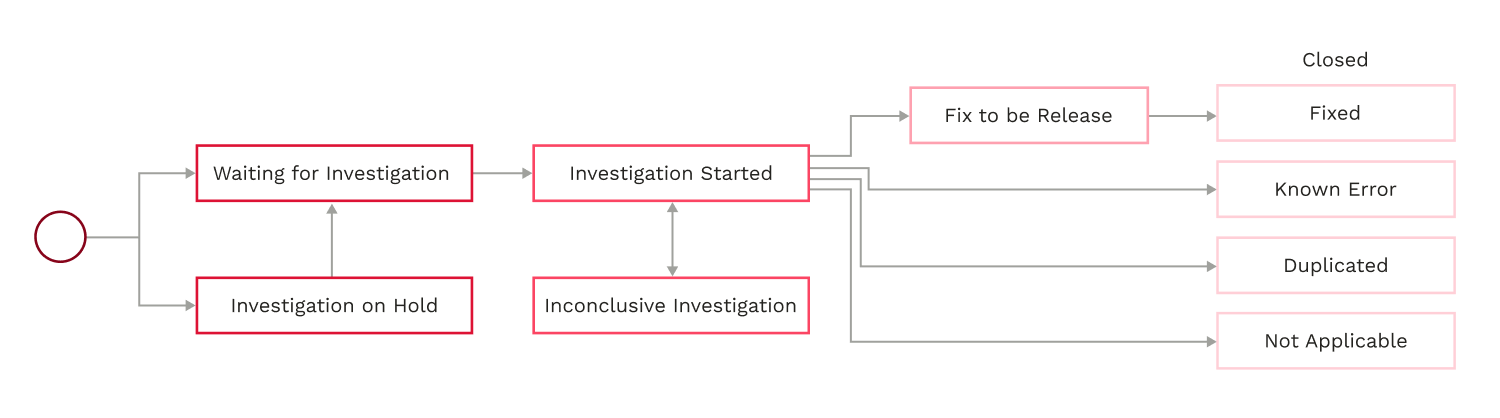
The possible statuses of a problem (RPM) are:
- Waiting for Investigation
OutSystems registered the Problem with information on how it manifests and its impact. No analysis of the cause has been performed yet. - Investigation On Hold
OutSystems is waiting for additional occurrences of the same Problem to decide on further investigating it. For more details about this status, check Details on "Investigation on hold" status. - Investigation Started
OutSystems started the investigation of the Problem, in order to assess the most adequate type of solution. - Inconclusive Investigation
OutSystems has not been able to conclude the root cause and will proceed to investigate when additional information or new occurrences are available. - Fix to be Released
OutSystems has created a software fix, which is pending release to the general public. - Closed - Fixed
The Problem was addressed with a software fix that was already released. - Closed - Known Error
The Problem was documented as a misbehavior, typically with a workaround, but a software fix was not produced. For more details about OutSystems not fixing a given Problem, check Known Errors. - Closed - Duplicated
A duplicate of an existing problem. - Closed - Not applicable
OutSystems did not consider this to be a valid Problem. The Justified Status Decision will indicate why. For more details about this status, check Details on “Not Applicable” status.
Details on “Investigation On Hold” status
Not all software fixes have a direct impact on our customers’ ability to achieve their outcomes with the platform, especially for lower-impact Problems, or when workarounds are available.
OutSystems will internally decide whether a Problem will be investigated or remain on hold until real customer data demonstrates the relevance of addressing it. In that situation, ‘Investigation on Hold’ is an intermediate state in which additional evidence is gathered to justify further attention and time investment in pursuing the Problem’s investigation and possible fix.
Even when focused on tackling the Problems that strongly impact our customer base, we may always decide to pick a lower-impact Problem for deeper investigation as additional data become available.
Details on "Not Applicable" status
Not all Problems end up being… Problems, even after being created.
Some of them are not originated as follow up of incidents but for other reasons that don’t apply, so we might not deem the Problem as one, and that will be clearly visible on the Problem page - with our justification for such a decision.
Known Errors
For as much as we would like to at OutSystems, not all problems of the world can be solved at the same time. The same goes for Problems of the OutSystems software - so we decide how to handle them to ensure the best results for our customers.
When prioritizing fixing Problems, we take a number of variables into consideration - like the impact on customers’ day to day, the effort required to fix the Problem, the risk for customers (affected or not affected by the original Problem) of possible side effects the fix might introduce, and others - to decide whether or when to fix it.
Sometimes we might identify misbehaviors in the course of Problems that, after clearer analysis, turn out to be expected behaviors that did not make sense at the time, were poorly documented, are the result of features we don’t have yet, or other similar situations.
Eventually, OutSystems may opt not to fix misbehaviors; instead, we may choose to document them, so that customers can know what to count on. When relevant, such documentation will also come with one or more workarounds visible through the Support Portal so customers can overcome that behavior.
Documenting a Problem creates an internal Known Error which might not be the end of the line - in our continuous improvement we might pick it up again for a software fix.
Find below more extensive criteria that may lead a given RPM not being fixed:
- The fix is unfeasible;
- The fix has a high risk;
- There is a simple workaround;
- The number of customers affected by the issue is low;
- The cost to fix is too high or the Return on Investment (ROI) is too low;
- The issue can be addressed by documentation;
- The issue does not represent a product issue (eg. it’s a limitation of the underlying technology);
- The desired fix is not aligned with the Product direction or vision;
- Other unforseen situation within reasonable justification.