Attach Text Files and Images to a Mentor Prompt in ODC Studio
October 19, 2026
Real development work rarely starts from a blank prompt. It starts from a user story, an acceptance-criteria list, an API response sample, or an error log someone pasted into a ticket. Until now, getting that material into Mentor in ODC Studio meant copying it into the chat, trimming it to fit, and losing structure along the way.
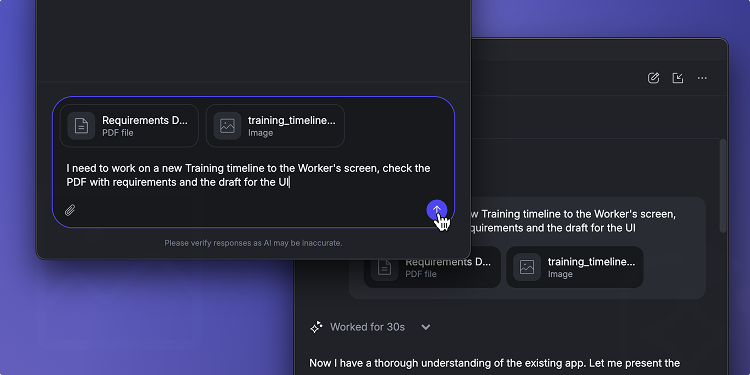
You can now attach files directly to a Mentor prompt in ODC Studio, both text and images. Mentor reads it as part of your request — so "Implement the validation rules in this file" or "Create the entity for this sample data" just works.
- Show, don’t describe. Attach a mockup, a screenshot, or a photo of a whiteboard sketch, and Mentor works from what it sees rather than from your description of it.
- Richer context, less retyping. Hand Mentor the source material instead of a summary of it. Field names, edge cases, and exact error text reach the prompt intact.
- Works with the files you already have. Images in .png, .jpg, and .jpeg, plus text-based formats such as .txt, .md, .json, and .csv.
Mentor already understands what you have open and selected in ODC Studio. Now it can understand what you're building toward, too.
Learn more about Attaching Text Files to a Mentor Prompt here