
What is AI Agent Orchestration?
AI agent orchestration is the coordination of multiple specialized AI agents, along with their tools, data, and execution steps, so they can achieve a shared business outcome. An orchestrator assigns each task, passes the right context to the right agent, and decides what happens next.
The need for orchestration grows as organizations deploy more agents. In the OutSystems 2026 State of AI Development report, which surveyed 1,900 IT leaders, 94% of organizations expressed concern that AI sprawl increases complexity, technical debt, and security risk. Only 12% have a centralized platform to manage it.
This guide explains how orchestration works, how architectures and patterns differ, which frameworks developers use, and how enterprises govern multi-agent systems in production.

What is AI agent orchestration?
AI agent orchestration refers to the coordination of AI agents, tools, data, and execution steps inside one workflow. It makes sure specialized agents contribute to the same result in the right order, with the right information, and within clear limits.
Agents in the same environment don't collaborate by default. Each one reasons and acts on its own, and without coordination, these problems can appear:
- Agents duplicate each other's work
- Handoffs between agents fail or get lost
- Agents act on outdated information
Orchestration gives teams ways to reduce these problems, detect them early, and recover when they come up. At each step, it decides which agent acts next, what information that agent gets, and when a human should step in.
AI agent orchestration brings together five core elements →
- Specialized agents. Each agent gets a narrow role, along with the tools, knowledge sources, and permissions that role needs. Narrow scopes can make agents easier to test, and they limit each agent's access to what its task needs.
- The orchestrator. The orchestrator is the control point of the workflow. It can be an orchestrator agent that uses an LLM to reason about next steps, a deterministic workflow with fixed routing rules, or a combination of both.
- Shared context and state. The orchestration system keeps a record of workflow state, including completed steps, agent outputs, pending decisions, and relevant enterprise data. Each agent receives the portion it needs, so no agent has to rediscover information or work from an outdated copy.
- Agentic workflows. Orchestration gives agents a structure to operate in. Within that structure, agents hand off work, execute independent tasks in parallel, call tools and APIs, pause for approvals, and loop back when a result needs another pass.
- Governance. Enterprises need visibility into and control over every agent in production. The orchestration system should record which agent took each action and why, which data and permissions it used, what each model call cost, where failures occurred, and which actions a human approved.
Hypothetical example: AI agent orchestration in a water damage claim →
A policyholder submits a water damage claim with a form, photos of the damage, and a policy number. Before the insurer can pay, the workflow has to extract the claim details, confirm coverage, assess fraud risk, and recommend a settlement.
Each of those tasks needs judgment, different data, and a different level of authority, so the insurer assigns them to four specialized agents. The final math and the payment decision stay in fixed rules, which apply the deductible and coverage limits and decide whether a payout needs an adjuster's approval.
The table shows what each agent and the settlement rules do, and what each one can access. The diagram below shows how the orchestrator moves the claim between them, from the first upload to the final payout.
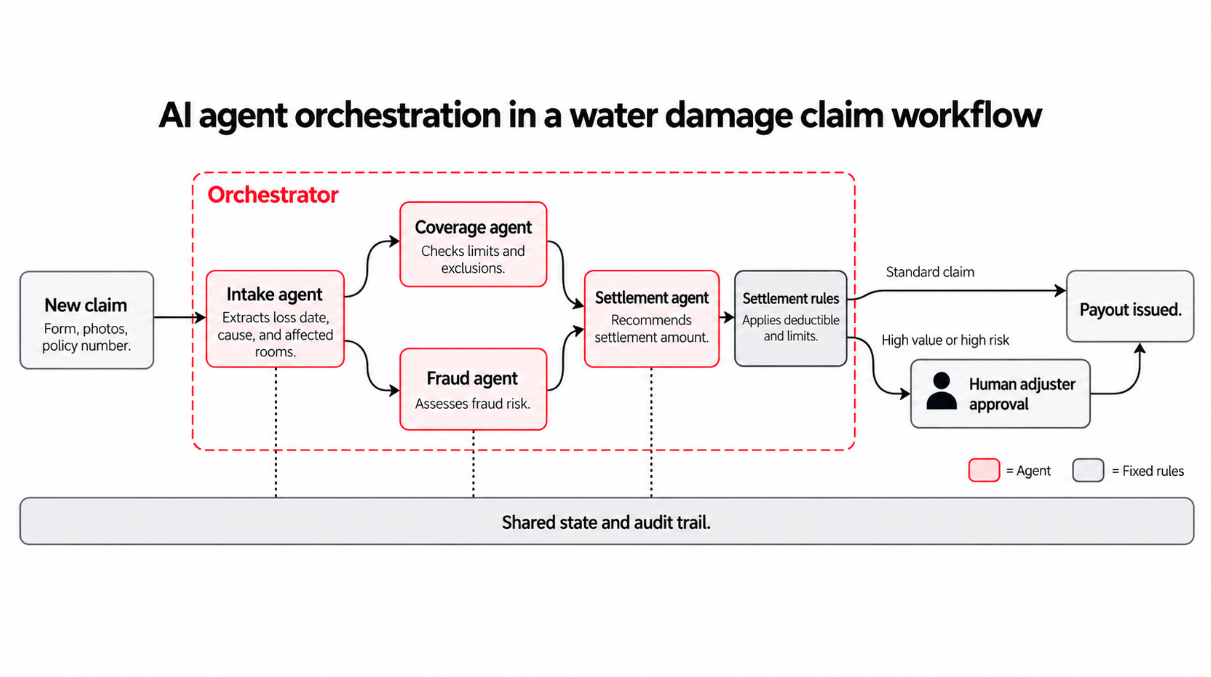
The orchestrator starts the coverage and fraud checks at the same time and holds the settlement step until both results come back.
The settlement agent recommends an amount, fixed rules apply the deductible and coverage limits, and high-value or high-risk claims go to a human adjuster for approval. The orchestrator also records every step in the shared audit trail.
That mix of delegation, parallel work, and human checkpoints also separates agent orchestration from a single AI agent, a fixed workflow, or a simple LLM chain.
How is AI agent orchestration different from other AI and automation approaches?
Agentic AI has produced a lot of overlapping vocabulary, and teams often treat terms like agent, chain, workflow, and orchestration as synonyms, even though each one describes something different.
The table below compares AI agent orchestration with five related concepts, including what each one is and when it fits best.
Most enterprise systems combine several of these approaches. A claims process might use a fixed workflow to apply the deductible, an LLM chain to summarize repair documents, and orchestrated agents for the checks that need judgment.
How does AI agent orchestration work?
The claim example earlier showed what orchestration does. This section follows a request from start to finish and explains what happens behind the scenes.
The exact setup varies across frameworks and platforms, but most orchestrated workflows go through the same stages.
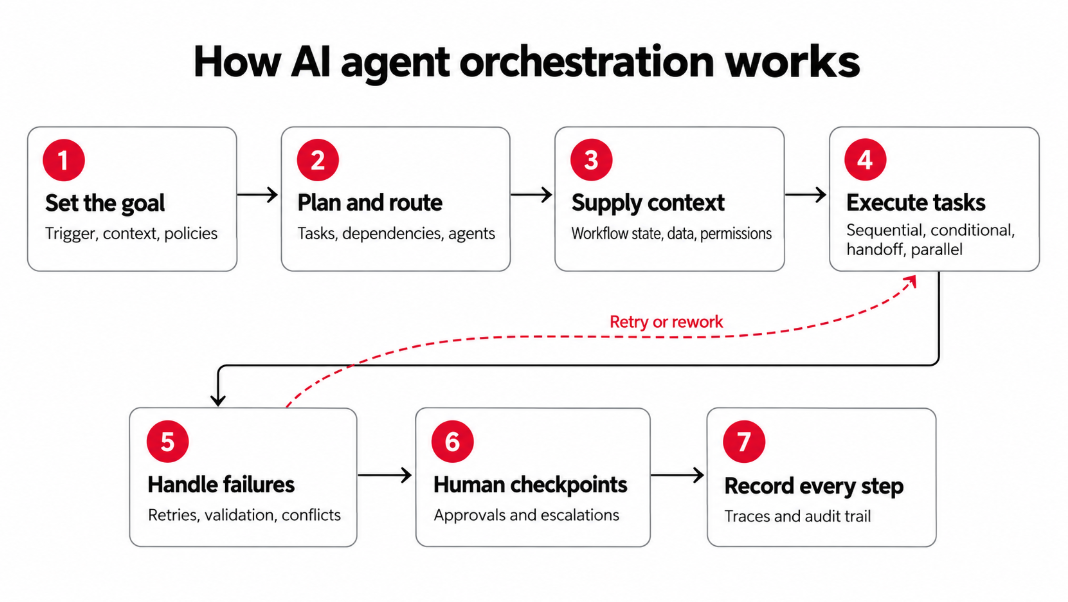
Every workflow starts with a trigger. A customer submits a request, a record changes in a business system, or another agent hands off a task. Before any agent acts, the orchestration system sets up the job. It records the goal and what counts as done, loads the relevant records and documents, and identifies which agents, tools, and policies apply.
Next, the orchestrator plans the work. It breaks the goal into tasks, maps which tasks depend on others, and decides which agent handles each one.
That routing decision can come from three places:
- Fixed rules, which are predictable and easy to audit, and cover only the cases someone planned for
- An LLM's judgment, which handles unexpected requests and makes the path harder to predict
- A hybrid of the two, where rules cover the known paths and the model decides the rest
Context is the hardest part to get right. LLMs don't remember previous calls, so each time an agent acts, the orchestration system has to hand it the right information from a shared workflow state. That state usually includes completed and pending steps, earlier agent outputs, session memory, enterprise data, and each agent's permissions.
Good orchestration passes each agent only what its task requires. In the water damage claim example, the settlement agent gets the covered damage items, coverage limit, fraud score, and repair estimate. It never sees the damage photos or the claimant's full history.
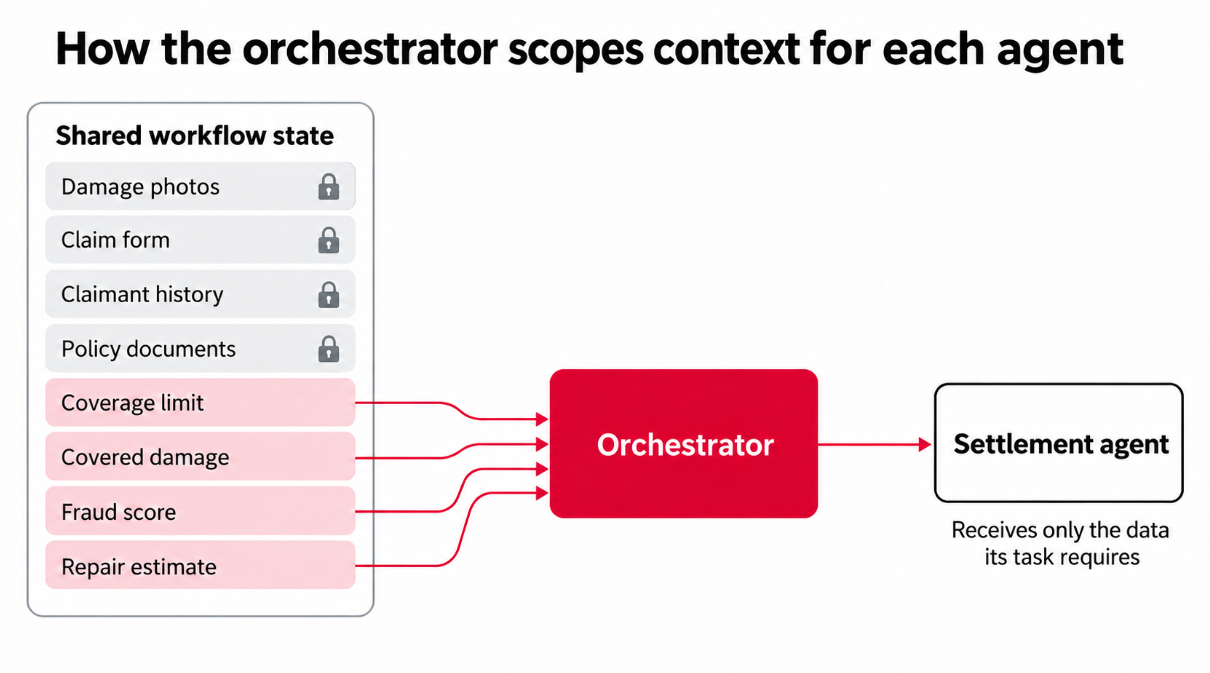
Why scoped context is important → Smaller prompts cost fewer tokens and give the model less irrelevant information to misread. Scoped context also limits how much sensitive data each agent can access, which becomes important the first time an auditor asks who saw what.
Agents also need a standard way to reach tools and each other. Two open protocols cover most of that today.
- Model Context Protocol (MCP) connects agents to tools, data sources, and APIs.
- Agent2Agent (A2A) lets agents discover each other and exchange tasks, even when different frameworks build them.
Modern frameworks increasingly support both. Microsoft Agent Framework, for example, supports MCP alongside A2A.
With context in place, the agents get to work. One workflow often mixes several execution modes.
- Sequential. A task waits for the previous one to finish.
- Conditional. A result, such as a confidence score, decides the next step.
- Handoff. One agent passes control and context to another.
- Parallel. Independent tasks execute at the same time.
If the coverage check takes 20 seconds and the fraud check takes 40, the orchestrator starts both at once and moves on after about 40 seconds, plus a little time to merge the results. The same checks in sequence would take a full minute.
Some steps will fail along the way. Agents misread documents, APIs time out, and two agents can reach different conclusions from the same evidence. A production-ready orchestration system plans for these problems with safeguards such as the following:
- Limited retries for temporary failures
- Validation of every output before it reaches the next agent
- Priority rules, evaluator agents, or human reviewers to settle conflicts
- Confidence thresholds that send uncertain results to review
- Timeouts and iteration limits that stop deadlocks and endless loops
Example → The claim form says a pipe burst suddenly, which the policy covers. The photos show mold that points to a slow leak over several weeks, which the policy excludes. The orchestrator treats the conflict as unresolved, pauses the coverage decision, and sends the cause-of-loss question to an adjuster.
That's where human oversight comes in. Human-in-the-loop (HITL) checkpoints give people the final say on payments and other high-risk actions, ambiguous cases, compliance reviews, and failures that automated recovery can't fix.
At a checkpoint, the system saves the workflow state, sends the reviewer a summary, and waits. Durable execution lets the workflow resume from that exact point, whether the reviewer responds in five minutes or two days.
Some organizations prefer lighter oversight. According to the OutSystems 2026 State of AI Development report, 52% of surveyed organizations rely on a human-on-the-loop model, where people supervise agents and step in when needed.
Finally, every step leaves a trace. For each action, the trace records:
- Which agent acted
- What it received and produced
- Which model and tools it used
- How many tokens it consumed
- Who approved the result
Operations teams use traces to find failed handoffs and cost spikes. Compliance teams use them to explain a decision months after it happened. If an auditor reviews the water damage payout next year, the trace shows which agent recommended the settlement, which rules set the final amount, and which adjuster approved the payment.
These stages look similar across most systems. The bigger differences come from how control is distributed across agents and how work moves between them.
AI agent orchestration patterns and architectures
Two design decisions usually shape every multi-agent system. The control architecture decides who directs the agents, and the workflow pattern decides how work moves between them.
Control architectures
The control architecture determines how authority is divided across a multi-agent system. Some systems give one orchestrator full control, and others spread decisions across managers, peer agents, or separate systems.
Four approaches cover most enterprise setups.
Centralized orchestration
A single orchestrator directs every specialist agent in the workflow. It assigns tasks, passes context, and combines the results, and the agents report back to it and don't coordinate with each other. The water damage claim from earlier uses this model.
- Best for: Workflows that need predictable execution, strong governance, and clear ownership of every decision.
- Trade-off: Every task passes through one control point, so the orchestrator can become a bottleneck under heavy load or a single point of failure if it goes down.
Hierarchical orchestration
A top-level orchestrator hands work to manager agents, and each manager directs its own team of specialists. An insurer, for example, might route new applications to an underwriting manager and claims to a claims manager, each with its own agents.
- Best for: Large multi-agent systems that span several business domains or complex processes with different areas of responsibility.
- Trade-off: Each level of delegation adds latency and cost, and a mistake at the manager level affects every agent below it. Traces also get longer, which makes failures harder to track to their source.
Decentralized orchestration
Agents coordinate directly with each other, with no central orchestrator. In IT operations, for example, a monitoring agent that detects an outage can alert a diagnostics agent, which then calls a remediation agent once it finds the cause.
- Best for: Systems where autonomy, resilience, and flexible collaboration are more important than centralized control. With no single control point, the rest of the system can keep working if one agent fails, as long as the other agents don't depend on its output.
- Trade-off: No single component sees the full workflow, so decentralized systems are harder to govern, audit, and debug.
Federated orchestration
Separate agent systems keep control of their own agents and data but still work together on shared tasks. A bank with subsidiaries in several countries might use this model, so each region keeps customer data local and shares only the results other regions need.
- Best for: Environments where data sovereignty, privacy regulations, or organizational boundaries rule out a single central orchestrator.
- Trade-off: Federated systems depend on shared protocols and clear agreements about what crosses each boundary. They take more effort to set up, and end-to-end visibility across systems is harder to achieve.
Common multi-agent workflow patterns
Workflow patterns describe how work moves between agents once a task starts. They work inside any of the control architectures above, so a centralized system can still use handoffs, parallel branches, or feedback loops.
These five appear most often in enterprise systems.
Sequential/handoff pattern
Agents work in a fixed order, and each one passes its output and context to the next. In a contract review, for example, an extraction agent pulls out the key clauses, a legal agent checks them against the company's standard terms, and a summary agent drafts a memo for the legal team.
- Best for: Processes with clear dependencies, where each step needs the previous step's output.
- Trade-off: Total time equals the sum of every step, and one failure stops everything after it. Errors also carry forward, so a mistake early in the sequence affects every later agent.
Parallel/fan-out pattern
The orchestrator sends independent tasks to several agents at once and combines their outputs once every branch finishes. When a company evaluates a new vendor, for example, a financial agent, a security agent, and a legal agent can each review the supplier at the same time.
- Best for: Research, analysis, evaluation, and other workflows with subtasks that don't depend on each other.
- Trade-off: The workflow needs a merge step with clear rules for conflicting outputs, such as a security agent that rejects a vendor the financial agent approved.
Router/supervisor pattern
A central agent reviews each incoming task and sends it to the specialist best suited to handle it.
An IT help desk router can send password resets to one agent, hardware issues to another, and access requests to a third. In the supervisor version, the central agent also checks the specialist's result before it closes the task.
- Best for: High volumes of mixed requests that need different specialists.
- Trade-off: The whole pattern depends on the router's judgment. A misrouted request reaches an agent without the right tools or permissions, so ambiguous requests need a fallback path, such as a human queue.
Group chat/collaborative pattern
Several agents contribute to a shared conversation. They propose ideas, critique each other's work, and refine an answer over several rounds, while a moderator agent or a set of rules decides who speaks next and when the discussion ends.
For instance, an investment team might have a growth agent, a risk agent, and a market agent debate a proposal before a summary agent writes the recommendation.
- Best for: Open-ended problems that benefit from several perspectives, such as strategy reviews or complex analysis.
- Trade-off: Each round adds model calls, and the path is hard to predict. Use this pattern selectively, with a turn limit and a clear end condition.
Evaluator/feedback-loop pattern
One agent completes a task, and a second agent checks the result against defined acceptance criteria. If the result falls short, the evaluator sends it back with specific feedback, and the loop repeats until the result passes. A coding agent might write a data transformation script while an evaluator agent executes the tests and returns any failures.
- Best for: Tasks with clear, testable quality standards, such as code, data validation, or content that must meet regulatory rules.
- Trade-off: Each iteration adds cost and latency. Without an iteration cap, a task that can't pass can loop indefinitely.
When and how enterprises benefit from AI agent orchestration
Multi-agent orchestration pays off for some processes and creates unnecessary overhead for others. Every extra agent brings more model calls, more handoffs, and more potential failure points.
Gartner predicts that over 40% of agentic AI projects will be canceled by the end of 2027 because of rising costs, unclear business value, or weak risk controls. The first step is to decide whether a process needs orchestration at all.
Multi-agent orchestration is a good fit when a process:
- Needs several distinct areas of expertise, such as legal, financial, and technical review
- Involves agents that need different tools, data access, or permission levels
- Contains independent tasks that can execute in parallel
- Spans several applications or business functions
- Requires multiple approval or escalation steps
- Is too complex for one agent to handle reliably
When a simpler setup works better → A single agent or a deterministic workflow usually fits narrow tasks, where one agent has all the context and tools it needs. It's also the safer choice when speed, cost, or predictable execution matter more than autonomy.
In Anthropic's internal evaluation, its multi-agent research system outperformed a single-agent setup by 90.2%. Anthropic also found that multi-agent systems use about 15 times more tokens than standard chat interactions. The two figures use different baselines. Together, they suggest multi-agent setups pay off for complex, open-ended research and rarely for routine requests such as a password reset.
For the right processes, orchestration offers seven clear benefits:
- Specialization: Each agent gets a purpose-built role with its own knowledge, tools, and permissions. Narrow agents can be easier to test and tune, and specialization can improve reliability when separating the task into different roles helps. Teams should still compare the result with a capable single-agent baseline before adding orchestration overhead.
- Parallel execution: Independent tasks execute at the same time, so the parallel stage finishes close to the duration of its slowest branch. Routing, merging, and any sequential steps add time on top.
- Modularity: Teams can add, replace, or update one agent without redesigning the whole system. A new regulation might call for a new compliance agent, and the rest of the workflow stays the same.
- Controlled autonomy: Guardrails, approval steps, and policies define where agents can act on their own. Agents reason where a task needs judgment, and fixed rules handle the rest.
- Cross-system coordination: One workflow can coordinate actions across applications, APIs, knowledge bases, and data pipelines. A single orchestrated process can update a CRM record, query an ERP system, and open an IT ticket.
- Operational scalability: Shared orchestration and governance mechanisms let teams manage dozens or hundreds of agents with the same monitoring, permissions, and audit rules.
- Reduced agent sprawl: Orchestration gives every agent a defined place in a governed workflow, so new agents join a managed system and don't pile up as disconnected tools. That structure is key as agent stacks grow more varied. OutSystems research found that 38% of surveyed organizations mix custom-built and pre-built agents, which makes their AI stacks hard to standardize and secure.
Keep in mind → More agents don't guarantee better results. Cost savings, resilience, and better decisions depend on sound design, governance, and monitoring, and a poorly scoped setup can perform worse than the single agent it replaced.
AI agent orchestration examples
The same orchestration building blocks apply to very different business processes. Here's how specialized agents, human checkpoints, and workflow patterns combine in three common enterprise workflows.
The three workflows below are illustrative scenarios.
In all three examples, agents handle the repetitive checks and people keep control of the decisions with the highest stakes. The same setup also brings new risks, such as lost context between handoffs, agents with too much access, and costs that climb with every extra model call.
AI agent orchestration challenges and risks
Each benefit of orchestration comes with a matching risk. Specialized agents need more handoffs, parallel branches add more model calls, and modular systems can spread across more frameworks than any team can manage.
The challenges below are the ones enterprise teams face most often:
- State and context management: Agents depend on accurate shared context, and that context can degrade as work passes from one agent to the next. Details get dropped in handoffs, agents act on outdated data, or two agents produce contradictory outputs from different versions of the same record. Full context for every agent creates its own problem. In a 2025 study of 18 LLMs, Chroma found that model performance on its tested tasks became less reliable as input length increased.
- Non-deterministic behavior: The same input can produce a different output, or send an agent down a different path, from one execution to the next. Each agent in a multi-agent system adds another point of variation, and small differences early in a workflow can compound by the final step. That makes tests harder to design and results harder to reproduce.
- Coordination failures: Agents can wait on each other in a deadlock, repeat work another agent already finished, misread a handoff, or loop with no end condition. A study of more than 1,600 execution traces across seven popular multi-agent frameworks identified 14 different failure modes, grouped into system design issues, inter-agent misalignment, and task verification problems.
- Security and permissions: Delegation can expand an agent's access without anyone noticing. An agent should never gain broader data or system privileges because another agent handed it a task. In a 2025 SailPoint survey, 80% of respondents reported that their AI agents had already taken unintended actions, and 39% reported that agents had accessed systems they weren't authorized to use.
- Governance, compliance, and observability: Every agent action needs a complete trace for audits and debugging, and multi-agent workflows make that harder, since a bad result can originate with any agent, tool, or handoff along the way. In the same survey, only 44% of respondents said their organizations have policies in place to secure their AI agents.
- Cost and latency: More agents mean more model calls, more context transfer, and more orchestration overhead. Parallel execution can shorten a workflow, and the bill still includes every call in every branch. Retries and feedback loops add more calls on top, often without anyone budgeting for them.
- Agent and framework sprawl: Orchestration programs can create the sprawl they're meant to fix. When every team picks its own framework, protocols, agents, and observability tools, the organization ends up with several orchestration systems that don't work together.
AI agent orchestration frameworks
Developers rarely build orchestration logic from scratch. Most teams start with a framework or SDK that provides ready-made building blocks for agents, tools, state, and handoffs.
The term "AI agent framework" covers a wide range of tooling, though. Some products are full orchestration frameworks, some are runtimes that execute and persist workflows, and others are lightweight SDKs.
The table below compares five widely used options by type, orchestration approach, state management, key patterns, and fit.
LangGraph
Type: Low-level agent orchestration framework and runtime, available in Python and JavaScript.
LangGraph comes from the team behind LangChain and models each agent workflow as a graph. Nodes do the work, and each one can call an LLM, a tool, or plain code.
Edges decide which node executes next, while graph state gives nodes a structured way to share and update workflow information. Nodes can also use scoped or private state when parts of the workflow need information that isn’t shared across the whole graph.
Key capabilities:
- Explicit state schemas for shared workflow data, plus private state channels for data that only certain nodes need.
- Fixed or conditional edges that choose the next node based on the current state.
- Sequential, parallel, and cyclic workflows within the same graph.
- Durable execution that resumes a workflow from its last saved step after a failure.
- Human-in-the-loop pauses to inspect or edit state before execution continues.
- Execution tracing and runtime metrics through LangSmith.
Best for: Teams that need fine-grained control over complex, long-running multi-agent workflows and are comfortable with a code-first approach.
CrewAI
Type: Multi-agent orchestration framework for Python.
CrewAI organizes agents into crews, which are teams of role-based agents that work through a set of tasks together. Flows add structure around those crews. They connect crews, code, and direct model calls in event-driven workflows with shared state and conditional logic.
Key capabilities:
- Role-based agents, each with its own role, goal, and backstory.
- Sequential processes, or hierarchical ones where a manager agent plans, delegates, and validates work.
- Event-driven Flows that trigger steps and branch based on earlier outputs.
- Shared state across tasks and crews, with flexible or typed state models.
- Human feedback steps that pause a flow and route it based on a reviewer's response.
Best for: Teams that want to build role-based multi-agent workflows quickly, with an approach that mirrors how human teams divide work.
Microsoft Agent Framework
Type: Open-source agent framework and SDK for Python and .NET.
Microsoft Agent Framework is the unified successor to AutoGen and Semantic Kernel. It brings AutoGen's tools for agent collaboration and Semantic Kernel's production tooling together in one open-source SDK.
Teams define workflows as graphs, so they decide exactly which agent acts at each step. Version 1.0 reached general availability in April 2026.
Key capabilities:
- Graph-based workflows that connect agents and functions through explicit execution paths.
- Built-in sequential, concurrent, handoff, and group chat orchestrations, plus Magentic, a manager-led pattern for dynamic planning.
- Checkpoints and state management for long-running workflows.
- Human-in-the-loop approvals that pause a workflow before sensitive tool calls.
- Support for MCP tools and A2A communication with agents built on other frameworks.
- OpenTelemetry-based tracing and monitoring.
Best for: Teams that build in Python or .NET, especially teams in the Microsoft and Azure ecosystem or those migrating from AutoGen or Semantic Kernel.
Google Agent Development Kit (ADK)
Type: Open-source agent development framework, available in Python, TypeScript, Go, and Java.
Google's ADK treats agents as composable building blocks. LLM agents handle reasoning, and workflow agents control execution order without calling a model.
ADK 2.0 adds a graph-based workflow runtime for more deterministic control. It became generally available for Python in May 2026, and Go and TypeScript versions followed. Features vary by language, so check the documentation for the version you plan to use. ADK is optimized for Gemini and still works with other models.
Key capabilities:
- Sequential, parallel, and loop workflow agents for predictable pipelines.
- LLM-driven delegation, where a coordinator agent passes tasks to specialist subagents.
- Graph-based workflows in ADK 2.0 for Python, Go, and TypeScript, with conditional routing, fan-out and fan-in, retries, and human-in-the-loop pauses.
- Session state for the current conversation and memory that persists across sessions.
- Support for MCP tools and A2A communication with remote agents.
- A CLI and developer UI to inspect events, state changes, and each execution step.
Best for: Teams that want to combine deterministic workflows with LLM-driven delegation, especially teams on Google Cloud or working with Gemini models.
OpenAI Agents SDK
Type: Lightweight multi-agent workflow SDK for Python and TypeScript.
The OpenAI Agents SDK is the production-ready successor to Swarm, OpenAI's earlier experimental agent framework. It keeps its abstractions small, with agents, tools, handoffs, and guardrails, and relies on standard Python or TypeScript code for everything else.
It's technically an SDK, and developers often compare it with LangGraph and CrewAI for the same orchestration problems. OpenAI builds it, and it also works with models from other providers.
Key capabilities:
- Manager-style orchestration, where a central agent calls specialist agents as tools and keeps control of the workflow.
- Handoffs that pass the conversation and control to a specialist agent.
- Code-driven orchestration for more predictable flows, including agent chains and parallel execution of independent agents.
- Sessions that keep conversation history and working context across multiple turns.
- Guardrails that validate inputs and outputs alongside agent execution, plus human-in-the-loop approvals for tool calls.
- Built-in tracing to visualize, debug, and monitor workflows.
Best for: Teams that want a lightweight, code-first way to build multi-agent workflows with minimal abstraction, especially teams that already build on OpenAI models.
How to choose the right AI agent orchestration strategy
The right orchestration strategy fits the process it supports. A claims workflow with strict approval rules needs a different setup than an internal research assistant. These eight considerations help match the approach to the work, the risk, and your team's capacity.
- Confirm you need multiple agents: Test whether one agent or a fixed workflow can handle the process first. Use specialized agents only when delegation, parallel work, separate permissions, or distinct expertise creates clear value.
- Decide how much control stays in code: Deterministic workflows fix the order of steps in code, which makes execution paths predictable and costs and latency easier to estimate. Model-directed orchestration adapts to unexpected requests. Many enterprise workflows combine the two, with code for known paths and model judgment for the exceptions.
- Match the architecture and patterns to the process: Centralized control fits processes that need clear ownership, and hierarchical or federated setups fit processes that cross business domains or organizational boundaries. Choose workflow patterns step by step, based on how the tasks depend on each other.
- Define state and context requirements: Decide where workflow state is stored, what context each agent receives, how long it persists, and which knowledge bases and enterprise data each agent can access.
- Plan for interoperability: Agents may need to work across frameworks, models, APIs, and business systems. Support for open protocols such as MCP and A2A keeps those options open as the agent portfolio grows.
- Set up governance before you scale autonomy: Define access controls, approval steps, audit trails, guardrails, and escalation paths while the system is still small. They're far easier to set up for five agents than to retrofit across fifty.
- Decide how much of the stack you want to own: Frameworks and SDKs give developers full code-level control, and the team handles hosting, security, observability, and upgrades. Enterprise platforms include more of that deployment, governance, and lifecycle work.
- Evaluate production readiness: A prototype proves an idea can work once. Before you commit, check how each agent and workflow will be tested, deployed, monitored, versioned, and maintained as models and business rules change.
These eight points make the choice of tools much simpler. They show whether a lightweight SDK, a full framework, or an enterprise platform fits the process, and they give every stakeholder the same criteria to evaluate options against.
How OutSystems enables enterprise AI agent orchestration
Earlier, we saw that 94% of surveyed organizations worry about AI sprawl and only 12% manage it through a centralized platform. Orchestration helps coordinate individual workflows, but enterprises still need one place to govern every agent, app, and data source those workflows touch.
OutSystems provides that foundation with its Agentic Systems Platform. Teams build, orchestrate, and govern agents alongside their enterprise applications and workflows, with shared context, security, and oversight across the whole portfolio.
Here's what that looks like in practice.
- Agent Workbench: As the foundation of OutSystems Agentic Enterprise Orchestration, Agent Workbench lets teams design multi-agent workflows in a visual drag-and-drop interface, combine deterministic steps with agent reasoning, and coordinate agents in sequence, in parallel, or in a hierarchy.
- Enterprise Context Graph: The Enterprise Context Graph gives Mentor and connected coding tools a live, queryable model of the organization's apps, agents, workflows, data, business logic, and the dependencies between them, so AI-generated changes fit the existing system.
- Enterprise integration and MCP: MCP-powered connections, prebuilt connectors, and APIs link agents to ERP, CRM, legacy systems, and external tools without a rip-and-replace of core systems. The A2A connector also lets OutSystems agents call skills from external agents, which stay on the platforms that host them.
- Security and governance: Agent Guardrails are built into the runtime, so once a team turns them on, agents can't bypass them. They block prompt attacks, mask or block personal data, and filter harmful content. Access controls, AI usage limits, evaluations, and audit trails help teams enforce the policies they set for each agent.
- Agentic Workflows: Human-agent handoffs let people approve decisions, handle escalations, or step in when an agent needs help.
- Built-in observability: Teams can test agent behavior during development or at runtime and track reasoning paths, tool usage, response quality, and costs in real time.
- Full agent lifecycle: Agents move from build and test to deployment across dev, test, and production environments with one-click publishing, and teams can swap models to optimize cost, quality, and performance without rewiring logic.
- Agentic Systems Engineering: Developers build with Mentor, the platform's coding agent, or with the tools they already use. Agent Experience, currently in early access, connects coding tools such as Claude Code, Cursor, or Codex to ODC applications through MCP.
See how Agent Workbench brings orchestration, governance, and observability together on one platform. Schedule a demo to explore it with an OutSystems expert, or book a 1:1 agentic consult to map one of your own processes to a governed multi-agent workflow.
Useful Resources
Related Resources

Learn the fundamentals of modern development


Frequently Asked Questions
No. A central control plane gives teams one place for governance, auditability, and conflict resolution, which is why many enterprise workflows use one.
Decentralized and federated multi-agent architectures spread that control across agents or separate systems. That setup can improve resilience, since no single orchestrator has to stay available for the workflow to continue. It also makes governance, auditing, and debugging harder.
Yes. Inter-agent communication can happen through handoffs, shared state, APIs, or open protocols such as A2A, which lets agents from different frameworks exchange tasks.
MCP connects agents to tools and data, but it isn't an agent-to-agent protocol on its own. Many AI agent orchestration platforms now support both.
Autonomous AI agents should hand off high-risk actions, low-confidence results, policy exceptions, and failures they can't fix.
In supply chain management, for example, an agent can draft a purchase order, and a manager approves anything above the budget. Define these escalation points in advance, and log every handoff for auditability.

