AI agent orchestration is the coordination of multiple specialized AI agents, along with their tools, data, and execution steps, so they can achieve a shared business outcome. An orchestrator assigns each task, passes the right context to the right agent, and decides what happens next.
The need for orchestration grows as organizations deploy more agents. In the OutSystems 2026 State of AI Development report, which surveyed 1,900 IT leaders, 94% of organizations expressed concern that AI sprawl increases complexity, technical debt, and security risk. Only 12% have a centralized platform to manage it.
This guide explains how orchestration works, how architectures and patterns differ, which frameworks developers use, and how enterprises govern multi-agent systems in production.
Discover what AI agents are and their importance for enterprises.
https://www.outsystems.com/ai/what-are-ai-agents
Learn how agentic AI empowers teams to delegate outcomes.
https://www.outsystems.com/ai/what-is-agentic-ai
In this guide, explore AI security threats, risks, and best practices.
https://www.outsystems.com/ai/what-is-ai-security
How autonomous AI delivers end-to-end outcomes with reasoning and planning.
https://www.outsystems.com/ai/autonomous-ai
Explore how GenAI is reshaping the way apps and software are developed, deployed, and designed.
https://www.outsystems.com/ai/generative/software
Compare the 8 best enterprise AI agent development platforms.
https://www.outsystems.com/ai/ai-agent-development-platforms
How modern app development supports enterprise systems.
https://www.outsystems.com/application-development
The basics of low-code technology for enterprise delivery.
https://www.outsystems.com/low-code
A complete guide for digital transformation frameworks.
https://www.outsystems.com/digital-transformation
The growing role of AI and agentic systems in software development.
https://www.outsystems.com/ai/ai-software-development
Does AI agent orchestration always require a central control plane?
No. A central control plane gives teams one place for governance, auditability, and conflict resolution, which is why many enterprise workflows use one.
Decentralized and federated multi-agent architectures spread that control across agents or separate systems. That setup can improve resilience, since no single orchestrator has to stay available for the workflow to continue. It also makes governance, auditing, and debugging harder.
Can AI agents built with different frameworks communicate with each other?
Yes. Inter-agent communication can happen through handoffs, shared state, APIs, or open protocols such as A2A, which lets agents from different frameworks exchange tasks.
MCP connects agents to tools and data, but it isn't an agent-to-agent protocol on its own. Many AI agent orchestration platforms now support both.
When should autonomous AI agents hand control back to a human?
Autonomous AI agents should hand off high-risk actions, low-confidence results, policy exceptions, and failures they can't fix.
In supply chain management, for example, an agent can draft a purchase order, and a manager approves anything above the budget. Define these escalation points in advance, and log every handoff for auditability.


AI agent orchestration refers to the coordination of AI agents, tools, data, and execution steps inside one workflow. It makes sure specialized agents contribute to the same result in the right order, with the right information, and within clear limits.
Agents in the same environment don't collaborate by default. Each one reasons and acts on its own, and without coordination, these problems can appear:
Orchestration gives teams ways to reduce these problems, detect them early, and recover when they come up. At each step, it decides which agent acts next, what information that agent gets, and when a human should step in.
AI agent orchestration brings together five core elements →
Hypothetical example: AI agent orchestration in a water damage claim →
A policyholder submits a water damage claim with a form, photos of the damage, and a policy number. Before the insurer can pay, the workflow has to extract the claim details, confirm coverage, assess fraud risk, and recommend a settlement.
Each of those tasks needs judgment, different data, and a different level of authority, so the insurer assigns them to four specialized agents. The final math and the payment decision stay in fixed rules, which apply the deductible and coverage limits and decide whether a payout needs an adjuster's approval.
The table shows what each agent and the settlement rules do, and what each one can access. The diagram below shows how the orchestrator moves the claim between them, from the first upload to the final payout.
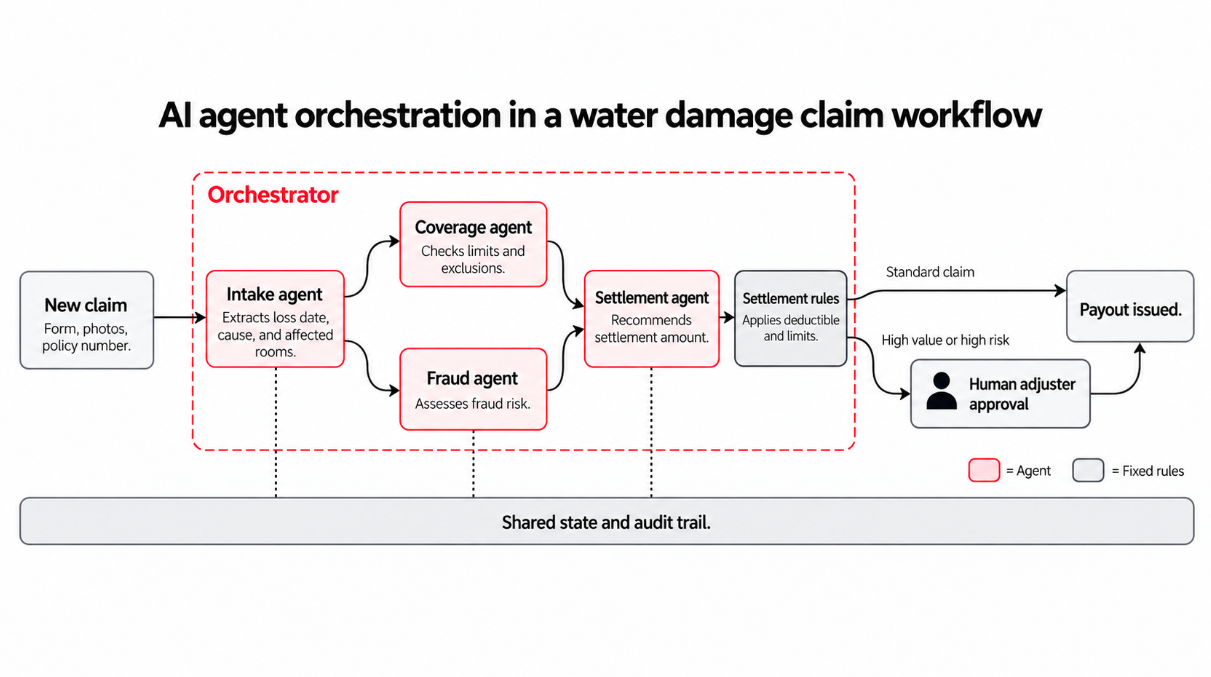
The orchestrator starts the coverage and fraud checks at the same time and holds the settlement step until both results come back.
The settlement agent recommends an amount, fixed rules apply the deductible and coverage limits, and high-value or high-risk claims go to a human adjuster for approval. The orchestrator also records every step in the shared audit trail.
That mix of delegation, parallel work, and human checkpoints also separates agent orchestration from a single AI agent, a fixed workflow, or a simple LLM chain.
Agentic AI has produced a lot of overlapping vocabulary, and teams often treat terms like agent, chain, workflow, and orchestration as synonyms, even though each one describes something different.
The table below compares AI agent orchestration with five related concepts, including what each one is and when it fits best.
Most enterprise systems combine several of these approaches. A claims process might use a fixed workflow to apply the deductible, an LLM chain to summarize repair documents, and orchestrated agents for the checks that need judgment.
The claim example earlier showed what orchestration does. This section follows a request from start to finish and explains what happens behind the scenes.
The exact setup varies across frameworks and platforms, but most orchestrated workflows go through the same stages.
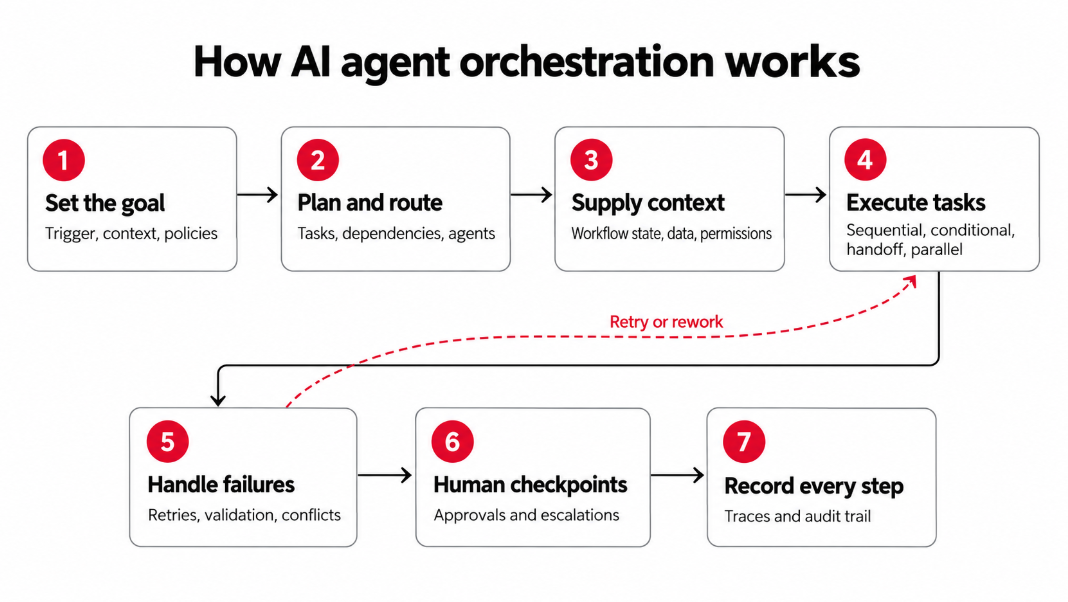
Every workflow starts with a trigger. A customer submits a request, a record changes in a business system, or another agent hands off a task. Before any agent acts, the orchestration system sets up the job. It records the goal and what counts as done, loads the relevant records and documents, and identifies which agents, tools, and policies apply.
Next, the orchestrator plans the work. It breaks the goal into tasks, maps which tasks depend on others, and decides which agent handles each one.
That routing decision can come from three places:
Context is the hardest part to get right. LLMs don't remember previous calls, so each time an agent acts, the orchestration system has to hand it the right information from a shared workflow state. That state usually includes completed and pending steps, earlier agent outputs, session memory, enterprise data, and each agent's permissions.
Good orchestration passes each agent only what its task requires. In the water damage claim example, the settlement agent gets the covered damage items, coverage limit, fraud score, and repair estimate. It never sees the damage photos or the claimant's full history.
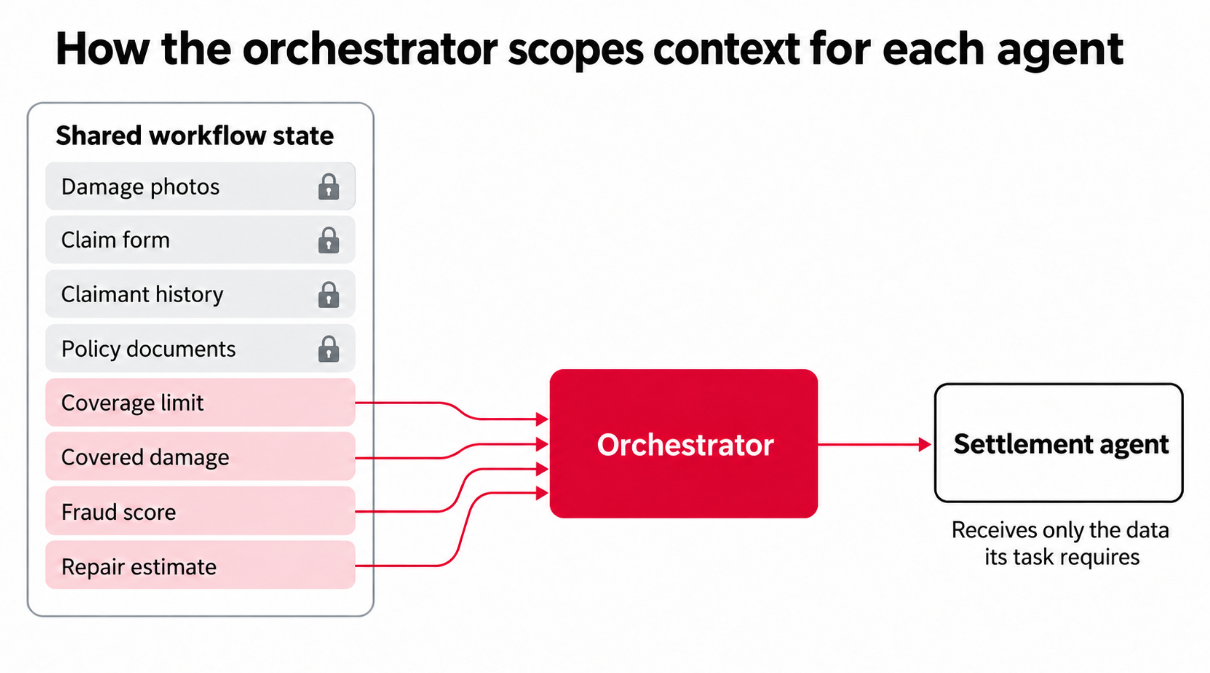
Why scoped context is important → Smaller prompts cost fewer tokens and give the model less irrelevant information to misread. Scoped context also limits how much sensitive data each agent can access, which becomes important the first time an auditor asks who saw what.
Agents also need a standard way to reach tools and each other. Two open protocols cover most of that today.
Modern frameworks increasingly support both. Microsoft Agent Framework, for example, supports MCP alongside A2A.
With context in place, the agents get to work. One workflow often mixes several execution modes.
If the coverage check takes 20 seconds and the fraud check takes 40, the orchestrator starts both at once and moves on after about 40 seconds, plus a little time to merge the results. The same checks in sequence would take a full minute.
Some steps will fail along the way. Agents misread documents, APIs time out, and two agents can reach different conclusions from the same evidence. A production-ready orchestration system plans for these problems with safeguards such as the following:
Example → The claim form says a pipe burst suddenly, which the policy covers. The photos show mold that points to a slow leak over several weeks, which the policy excludes. The orchestrator treats the conflict as unresolved, pauses the coverage decision, and sends the cause-of-loss question to an adjuster.
That's where human oversight comes in. Human-in-the-loop (HITL) checkpoints give people the final say on payments and other high-risk actions, ambiguous cases, compliance reviews, and failures that automated recovery can't fix.
At a checkpoint, the system saves the workflow state, sends the reviewer a summary, and waits. Durable execution lets the workflow resume from that exact point, whether the reviewer responds in five minutes or two days.
Some organizations prefer lighter oversight. According to the OutSystems 2026 State of AI Development report, 52% of surveyed organizations rely on a human-on-the-loop model, where people supervise agents and step in when needed.
Finally, every step leaves a trace. For each action, the trace records:
Operations teams use traces to find failed handoffs and cost spikes. Compliance teams use them to explain a decision months after it happened. If an auditor reviews the water damage payout next year, the trace shows which agent recommended the settlement, which rules set the final amount, and which adjuster approved the payment.
These stages look similar across most systems. The bigger differences come from how control is distributed across agents and how work moves between them.
Two design decisions usually shape every multi-agent system. The control architecture decides who directs the agents, and the workflow pattern decides how work moves between them.
The control architecture determines how authority is divided across a multi-agent system. Some systems give one orchestrator full control, and others spread decisions across managers, peer agents, or separate systems.
Four approaches cover most enterprise setups.
A single orchestrator directs every specialist agent in the workflow. It assigns tasks, passes context, and combines the results, and the agents report back to it and don't coordinate with each other. The water damage claim from earlier uses this model.
A top-level orchestrator hands work to manager agents, and each manager directs its own team of specialists. An insurer, for example, might route new applications to an underwriting manager and claims to a claims manager, each with its own agents.
Agents coordinate directly with each other, with no central orchestrator. In IT operations, for example, a monitoring agent that detects an outage can alert a diagnostics agent, which then calls a remediation agent once it finds the cause.
Separate agent systems keep control of their own agents and data but still work together on shared tasks. A bank with subsidiaries in several countries might use this model, so each region keeps customer data local and shares only the results other regions need.
Workflow patterns describe how work moves between agents once a task starts. They work inside any of the control architectures above, so a centralized system can still use handoffs, parallel branches, or feedback loops.
These five appear most often in enterprise systems.
Agents work in a fixed order, and each one passes its output and context to the next. In a contract review, for example, an extraction agent pulls out the key clauses, a legal agent checks them against the company's standard terms, and a summary agent drafts a memo for the legal team.
The orchestrator sends independent tasks to several agents at once and combines their outputs once every branch finishes. When a company evaluates a new vendor, for example, a financial agent, a security agent, and a legal agent can each review the supplier at the same time.
A central agent reviews each incoming task and sends it to the specialist best suited to handle it.
An IT help desk router can send password resets to one agent, hardware issues to another, and access requests to a third. In the supervisor version, the central agent also checks the specialist's result before it closes the task.
Several agents contribute to a shared conversation. They propose ideas, critique each other's work, and refine an answer over several rounds, while a moderator agent or a set of rules decides who speaks next and when the discussion ends.
For instance, an investment team might have a growth agent, a risk agent, and a market agent debate a proposal before a summary agent writes the recommendation.
One agent completes a task, and a second agent checks the result against defined acceptance criteria. If the result falls short, the evaluator sends it back with specific feedback, and the loop repeats until the result passes. A coding agent might write a data transformation script while an evaluator agent executes the tests and returns any failures.
Multi-agent orchestration pays off for some processes and creates unnecessary overhead for others. Every extra agent brings more model calls, more handoffs, and more potential failure points.
Gartner predicts that over 40% of agentic AI projects will be canceled by the end of 2027 because of rising costs, unclear business value, or weak risk controls. The first step is to decide whether a process needs orchestration at all.
Multi-agent orchestration is a good fit when a process:
When a simpler setup works better → A single agent or a deterministic workflow usually fits narrow tasks, where one agent has all the context and tools it needs. It's also the safer choice when speed, cost, or predictable execution matter more than autonomy.
In Anthropic's internal evaluation, its multi-agent research system outperformed a single-agent setup by 90.2%. Anthropic also found that multi-agent systems use about 15 times more tokens than standard chat interactions. The two figures use different baselines. Together, they suggest multi-agent setups pay off for complex, open-ended research and rarely for routine requests such as a password reset.
For the right processes, orchestration offers seven clear benefits:
Keep in mind → More agents don't guarantee better results. Cost savings, resilience, and better decisions depend on sound design, governance, and monitoring, and a poorly scoped setup can perform worse than the single agent it replaced.
The same orchestration building blocks apply to very different business processes. Here's how specialized agents, human checkpoints, and workflow patterns combine in three common enterprise workflows.
The three workflows below are illustrative scenarios.
In all three examples, agents handle the repetitive checks and people keep control of the decisions with the highest stakes. The same setup also brings new risks, such as lost context between handoffs, agents with too much access, and costs that climb with every extra model call.
Each benefit of orchestration comes with a matching risk. Specialized agents need more handoffs, parallel branches add more model calls, and modular systems can spread across more frameworks than any team can manage.
The challenges below are the ones enterprise teams face most often:
Developers rarely build orchestration logic from scratch. Most teams start with a framework or SDK that provides ready-made building blocks for agents, tools, state, and handoffs.
The term "AI agent framework" covers a wide range of tooling, though. Some products are full orchestration frameworks, some are runtimes that execute and persist workflows, and others are lightweight SDKs.
The table below compares five widely used options by type, orchestration approach, state management, key patterns, and fit.
Type: Low-level agent orchestration framework and runtime, available in Python and JavaScript.
LangGraph comes from the team behind LangChain and models each agent workflow as a graph. Nodes do the work, and each one can call an LLM, a tool, or plain code.
Edges decide which node executes next, while graph state gives nodes a structured way to share and update workflow information. Nodes can also use scoped or private state when parts of the workflow need information that isn’t shared across the whole graph.
Key capabilities:
Best for: Teams that need fine-grained control over complex, long-running multi-agent workflows and are comfortable with a code-first approach.
Type: Multi-agent orchestration framework for Python.
CrewAI organizes agents into crews, which are teams of role-based agents that work through a set of tasks together. Flows add structure around those crews. They connect crews, code, and direct model calls in event-driven workflows with shared state and conditional logic.
Key capabilities:
Best for: Teams that want to build role-based multi-agent workflows quickly, with an approach that mirrors how human teams divide work.
Type: Open-source agent framework and SDK for Python and .NET.
Microsoft Agent Framework is the unified successor to AutoGen and Semantic Kernel. It brings AutoGen's tools for agent collaboration and Semantic Kernel's production tooling together in one open-source SDK.
Teams define workflows as graphs, so they decide exactly which agent acts at each step. Version 1.0 reached general availability in April 2026.
Key capabilities:
Best for: Teams that build in Python or .NET, especially teams in the Microsoft and Azure ecosystem or those migrating from AutoGen or Semantic Kernel.
Type: Open-source agent development framework, available in Python, TypeScript, Go, and Java.
Google's ADK treats agents as composable building blocks. LLM agents handle reasoning, and workflow agents control execution order without calling a model.
ADK 2.0 adds a graph-based workflow runtime for more deterministic control. It became generally available for Python in May 2026, and Go and TypeScript versions followed. Features vary by language, so check the documentation for the version you plan to use. ADK is optimized for Gemini and still works with other models.
Key capabilities:
Best for: Teams that want to combine deterministic workflows with LLM-driven delegation, especially teams on Google Cloud or working with Gemini models.
Type: Lightweight multi-agent workflow SDK for Python and TypeScript.
The OpenAI Agents SDK is the production-ready successor to Swarm, OpenAI's earlier experimental agent framework. It keeps its abstractions small, with agents, tools, handoffs, and guardrails, and relies on standard Python or TypeScript code for everything else.
It's technically an SDK, and developers often compare it with LangGraph and CrewAI for the same orchestration problems. OpenAI builds it, and it also works with models from other providers.
Key capabilities:
Best for: Teams that want a lightweight, code-first way to build multi-agent workflows with minimal abstraction, especially teams that already build on OpenAI models.
The right orchestration strategy fits the process it supports. A claims workflow with strict approval rules needs a different setup than an internal research assistant. These eight considerations help match the approach to the work, the risk, and your team's capacity.
These eight points make the choice of tools much simpler. They show whether a lightweight SDK, a full framework, or an enterprise platform fits the process, and they give every stakeholder the same criteria to evaluate options against.
Earlier, we saw that 94% of surveyed organizations worry about AI sprawl and only 12% manage it through a centralized platform. Orchestration helps coordinate individual workflows, but enterprises still need one place to govern every agent, app, and data source those workflows touch.
OutSystems provides that foundation with its Agentic Systems Platform. Teams build, orchestrate, and govern agents alongside their enterprise applications and workflows, with shared context, security, and oversight across the whole portfolio.
Here's what that looks like in practice.
See how Agent Workbench brings orchestration, governance, and observability together on one platform. Schedule a demo to explore it with an OutSystems expert, or book a 1:1 agentic consult to map one of your own processes to a governed multi-agent workflow.