
1. Mobile app development capabilities
The OutSystems low-code platform enables enterprise-grade mobile application development with capabilities that span four key categories:
- Mobile apps: These apps can be installed on users' phones, with access to device sensors, offline functionality, and native user experience for Android (APK) and iOS (IPA) all with a single IDE and visual language.
- Progressive web apps: Accessible through mobile browsers, these apps adapt seamlessly to different devices and browsers without installation.
- UI/UX: The part of your mobile app that engages users and enables them to accomplish tasks, order items, and much more.
- Mobile frontends and backends: These support custom native mobile apps built both with the OutSystems platform and industry-standard tools like XCode, Android Studio, or Visual Studio, and respective native languages.
Table of contents
- Simplified cross-platform mobile app development
- Progressive web app distribution
- UI/UX capabilities for mobile apps
- Ease of building front-ends and backends
Simplified cross-platform mobile app development
With OutSystems, you can develop mobile apps that are deployable and functional on iOS and Android devices. These apps automatically adapt to varying form factors, maintaining consistency and using a unified code base. Developers implement client-side logic and local data storage, and craft the UI and front-end code just once. This eliminates the need to modify the codebase for individual devices.
To enable this streamlined process, the OutSystems platform generates highly performant applications with an optimized responsive JavaScript application at its core, wrapped by a native shell that deals with all interactions with the device, offline data, and logic.

To create native mobile apps with OutSystems, you don’t need a Mac to build your iOS app, nor do you have to install Java and Android Studio to build for Android. Instead, all you do is configure the app, add your keys or certificates, and click a button. The platform takes care of generating native builds for Android and iOS with all the required content and plugins. OutSystems native apps are constructed on the Ionic Capacitor and Apache Cordova frameworks, which allow developers to access a wide range of native device functions for their apps seamlessly. They simply refer to the git repository for the plugin, and they’re good to go.

This access includes geolocation, camera, notifications, barcode scanners, beacons, and more, all made possible by the simplicity of the OutSystems language. There are three types of plugins developers can use.
Platform-supported plugins are available on the OutSystems Forge and are certified and fully supported by OutSystems.
Community-supported plugins are uploaded to the Forge by members of the OutSystems Community, which also provide best-effort support for them.
When the plugin you need isn’t available on the Forge, you can create your own. Simply select from one of the thousands of available Capacitor or Cordova plugins, add your GitHub address, and wrap the plugin code with an OutSystems API. From there, the new native functionality will be available in all your OutSystems apps. If the business requires something very specific, it’s possible to create a new custom plugin. Check out these articles for more information on using existing plugins and building custom plugins.
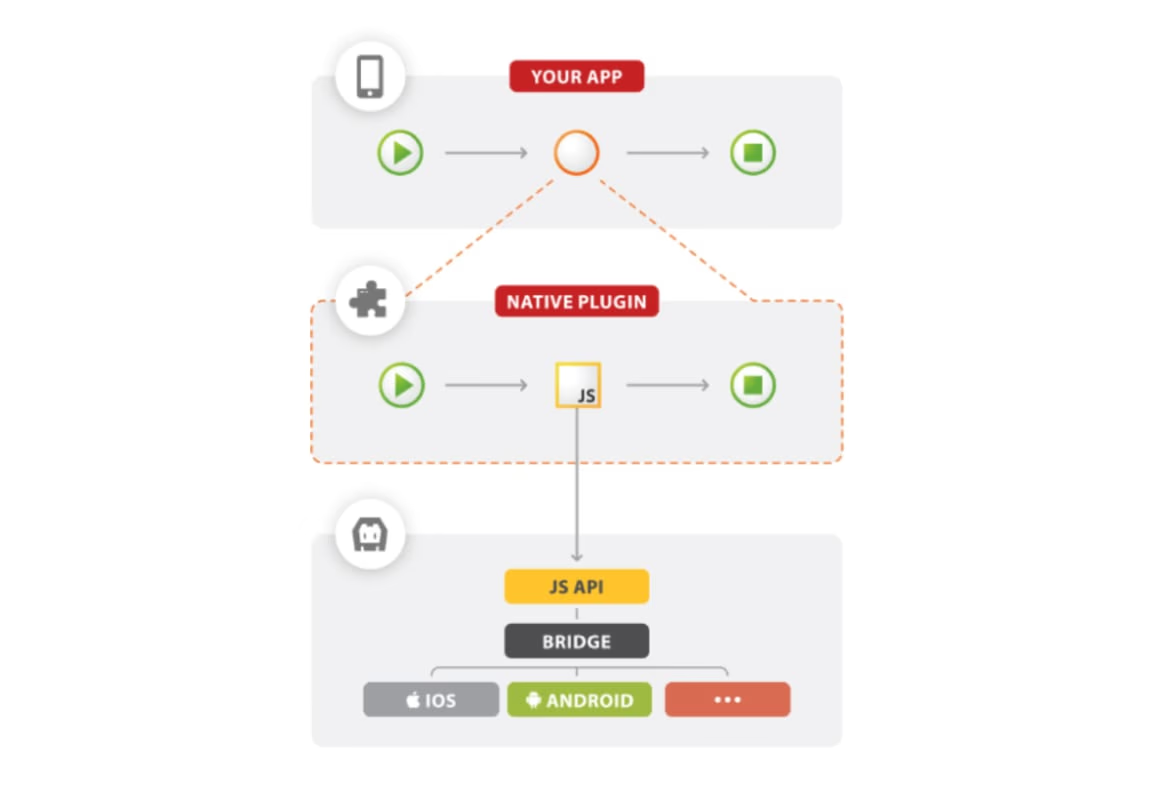
Learn more about the array of available plugins for your mobile applications
OutSystems provides all the tools you need to build applications that run offline or in poor network conditions. You can quickly and easily model all offline requirements for everything from a very simple app that just caches data and content for performance to very complex apps that do offline calculations and require complex conflict resolution. As a result, the platform enables you to overcome the following challenges:
- Limited space for storing data locally
- Data synchronization between devices and the server
- Data conflicts and outdated client-side code
- Security of sensitive information
Applications built with the platform automatically store all the application's content on your device for performance and offline access, and the OutSystems visual language provides everything you need to control which data goes to the device.
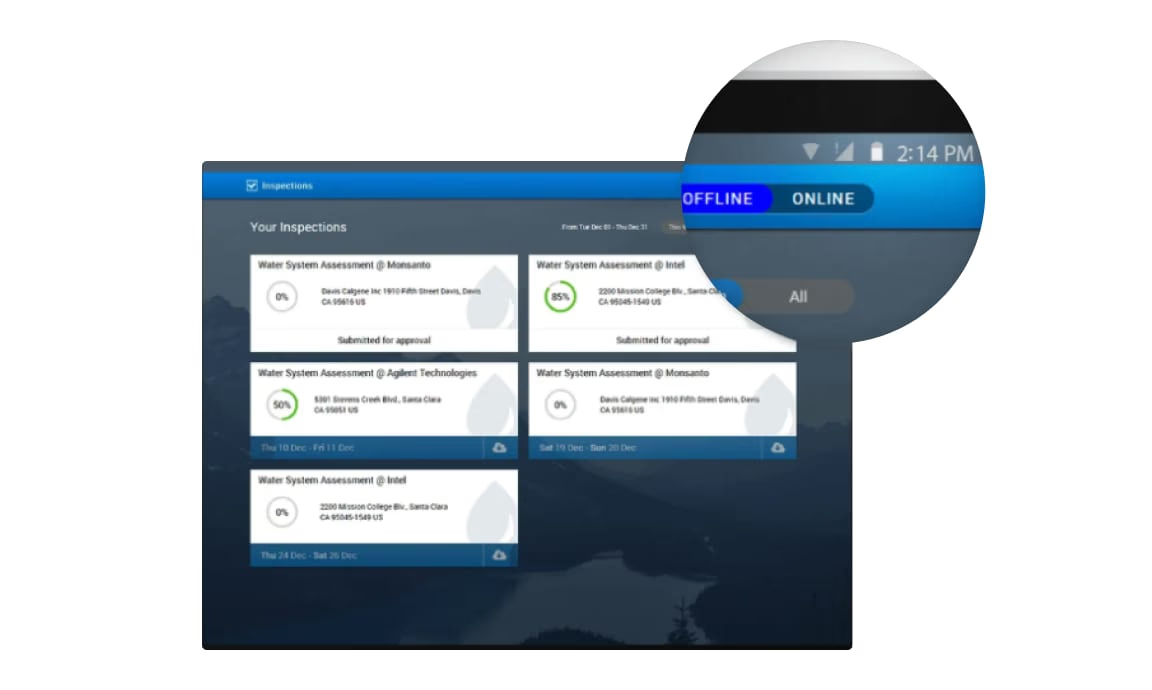
To address the limited space on data stored locally, OutSystems allows you to visually define the information you want to store on the device. This means you have total control over which data should be stored offline without losing the speed and flexibility of the visual language. Data on the device is stored on a local database, using SQLite as an underlying technology. There are no limits to how much data is stored other than the physical size of the storage, and data remains even if the app is closed, the device is rebooted, or power is lost.
Likewise, all data synchronization is done with the OutSystems visual language. You have control over when the synchronization process occurs, and you have full flexibility to use the synchronization pattern that matches your business specification, no matter how complex. This process can be started by your application at any time, or automatically in specific instances, such as when the user logs in, when the application starts, or when connectivity to the server is restored.
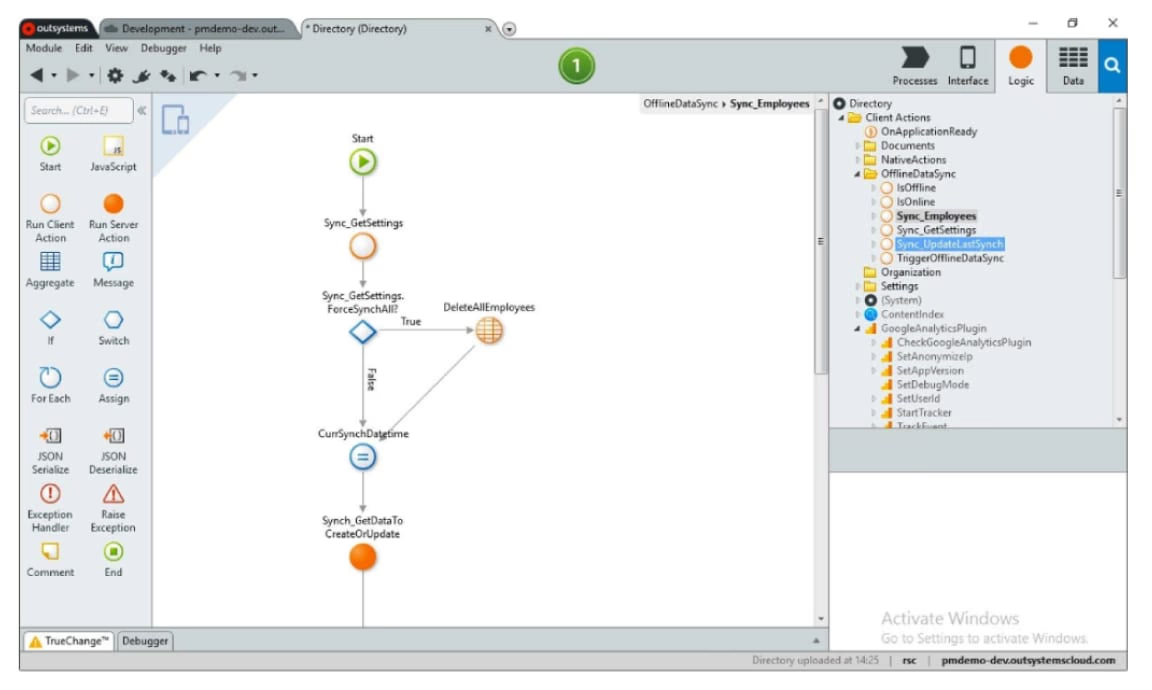
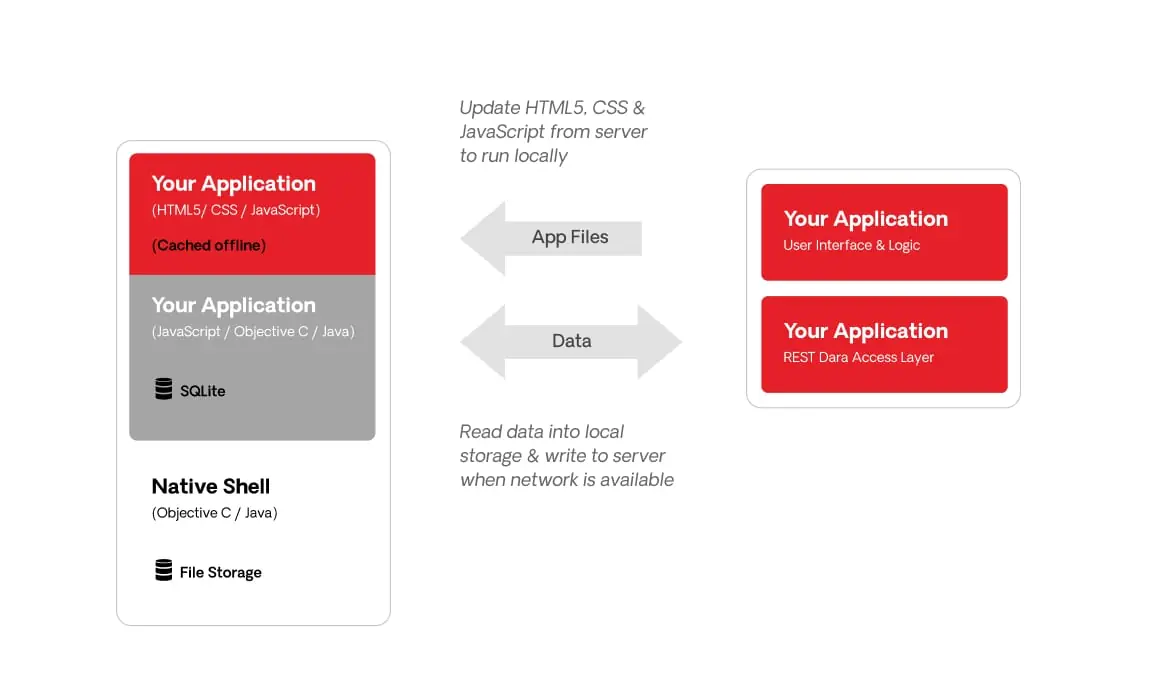
This diagram outlines the runtime architecture of a typical application built using OutSystems with offline support. The native application includes all the resources required to run standalone from the server without any connectivity. When connectivity is available, the application will automatically check for newer versions of the resources and update itself—which you can also control and customize.
To address conflicts, the platform enables you to use a synchronization pattern where:
- The server database holds the master data that can change over time.
- The local storage database holds a subset of the master data and can be modified.
- Synchronization sends the modified data from the local storage to the server database and vice versa.
- In the server, data is updated and any conflicting changes are registered for later resolution.
When the server-side code changes (but the data doesn’t) and the client is running an older version, synchronization updates the client by sending the new or modified code from the server.
If there is a need to secure sensitive information, you simply activate the data encryption on your application. This will ensure secure 256-bit AES encryption of your data on the device.
On the back-end, REST APIs are automatically generated and exposed to enable the client to send and receive data from the server. These are secure APIs that ensure only authenticated users can start the synchronization process, and all connections run over SSL so data remains secure.
To debug native mobile capabilities, such as mobile plugins, OutSystems provides specific debugging capabilities for both Android and iOS. In both cases, you’ll need to establish a connection to the actual device, typically through a USB cable. These options enable you to debug and troubleshoot your app's behavior with greater precision, aiding in the discovery, comprehension, and resolution of issues. They allow you to actively interact with and utilize the device's hardware and sensors, such as the camera or GPS location.
To learn more about debugging applications built with OutSystems, check out our technical documentation.
Progressive web app distribution
Progressive web applications (PWAs) are a type of application delivered through the web, built using common web languages, including HTML, CSS and JavaScript. Because PWAs can work offline, send push notifications, and access device hardware, their user experiences are similar to native applications.
During the development of a mobile app using OutSystems, developers can enable PWA distribution, and the PWA will automatically be prepared for use and fully compliant with Lighthouse, Google's open-source automated tool for evaluating web page quality. Since OutSystems and the OutSystems Community are consistently expanding the range of components that support native and PWAs, you can use a single code base without the need for additional specific logic, and the same mobile plugin will function in native applications and PWAs.
PWAs built with OutSystems are an excellent match for specific scenarios, given their numerous advantages:
- Faster and simplified distribution: PWAs bypass the need for public store (App Store, Google Play) upload processes and approvals.
- Sharing and discovery: PWAs are easy to share via URLs (including on social media) and can be indexed by search engines, making them easier to find and grow organic traffic. They’re also a strong option for organizations that want to distribute internal mobile apps without going through an app store.
- Fewer installation hassles: Users access PWAs directly from a web browser—no app store needed. This lowers barriers to entry and fosters increased engagement.
- Ongoing updates: Being web-based, PWAs are automatically updated, sparing users from manual app updates.
- Minimal impact on device resources: PWAs are not installed, so they don't use many device resources. This is advantageous for users with devices that have limited storage.
UI/UX capabilities for mobile apps
OutSystems enables developers and teams to design high-quality user interfaces that work across all devices. In the visual designer, they can shape and refine the user experience without needing to be experts in HTML, CSS or JavaScript. The “what you see is what you get” editor includes everything needed to create a great UX, such as a drag-and-drop editor, grid and flex layouts, smart vertical spacing, and accelerators like UI patterns and scaffolding, so building mobile screens is as fast and efficient as possible.
The screen editor provides a real-time preview of your design, which speeds up development by letting you instantly see and adjust how your app looks on multiple devices.


OutSystems also offers OutSystems Mobile UI, a fully responsive, integrated UI framework with customizable themes for mobile apps. A large library of samples and patterns helps teams quickly build beautiful mobile experiences with a polished look and feel—all with drag-and-drop simplicity and no need to hand-code the UI.
Dozens of ready-to-use UI patterns can be dropped directly into screens to assemble rich interfaces without writing any coding. Because CSS is often one of the hardest front-end languages to master, and device form factors keep multiplying, Mobile UI is designed to remove that complexity. Its codeless approach boosts developer productivity, improves usability and look and feel out of the box, and lowers the skills barrier for creating modern, engaging user experiences.
OutSystems UI includes a set of widgets that allow developers to create richer multi-channel user experiences. Users can be more productive when inputting data in an app, while the developer team focuses on business functionality. These widgets are:
- Powered by HTML and CSS standards, a major advantage for accessibility compliance or customization requirements.
- Supported by rich, client-side JavaScript interactions for engaging user interaction and full extensibility of custom behavior when it's needed.
- Easy to use in the visual development environment, which saves developers long hours of JavaScript troubleshooting.
- Multi-channel ready so they work and adapt themselves across multiple devices and form factors, and with substantial usability-related improvements for mobile scenarios.
The framework includes a theme specifically tailored for mobile applications. It uses design tokens to streamline the customization process and ensure consistency across your entire interface.
It also provides a versatile Layout widget that’s highly customizable. You can choose from several base layout configurations and easily add elements like a top bar, bottom bar, and side menu, depending on what your application needs.
To speed up development, there’s a ready-to-use set of common screens—such as Login, Forgot Password, and Profile—making it significantly easier to create your first application.
Critically, this theme and layout system are designed to work across both your mobile and tablet applications. All component patterns are compatible and automatically adopt the same consistent visual style.
The framework includes dozens of pre-built widgets with modern controls and patterns, such as button groups, toggle buttons, dropdowns, bottom sheets, carousels, and many others. This makes building application user interfaces much faster and easier.
From structuring content in modern layouts to using advanced controls, data visualization elements, and updated navigation mechanisms, developer teams get out-of-the-box coverage for most patterns an application will need. There are also specific patterns designed for responsive behavior and for crafting mobile-first experiences.

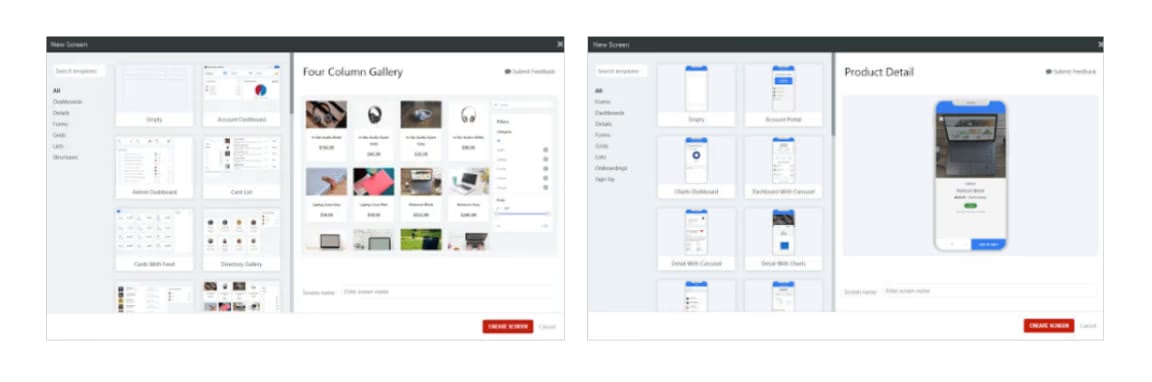
When you use the OutSystems UI framework for specific use cases, screen templates help you build enterprise applications faster. They provide fully functional screens with built-in logic, styles, and sample data. These templates cover common enterprise scenarios and embed UI and UX best practices based on research into leading applications.
From onboarding flows, directories, product detail pages, profiles screens with lists and galleries, shopping carts, and more, all templates are fully editable and customizable to match your company’s brand guidelines. Connecting your own data is simple—just drag and drop an entity onto the widget you want to update.
In OutSystems UI, themes, layouts, and patterns are all responsive. Instead of relying on the browser or device to decide what to display, it uses a server-side approach called RESS (Responsive Web Design with Server-Side components). The server calculates and optimizes the content for each device before sending it, which improves both fit and performance.
This approach has several advantages over client-side responsiveness:
- Only the required content is sent to the browser because the server knows which device is in use.
- There are no CSS media queries to maintain, making device-specific styling easier to understand.
- Different strategies can be applied on the server to handle different devices.
Responsive patterns can define how the interface should be on each device type without writing any CSS or JavaScript. Visual APIs are also available so developers can run server logic based on the device. For example, you can choose to extract certain data only when the app runs on a tablet or desktop, or deliver an optimized image when the app runs on a smartphone.
Ease of building front-ends and backends
OutSystems provides everything you need to build front-end logic for your mobile app. A cross-platform visual language makes it easy and quick to create and change all aspects of your application's interaction with users. You can get all the performance advantages of running code on the device, without having to worry about coding for multiple operating systems—it’s the same language for iOS and Android.
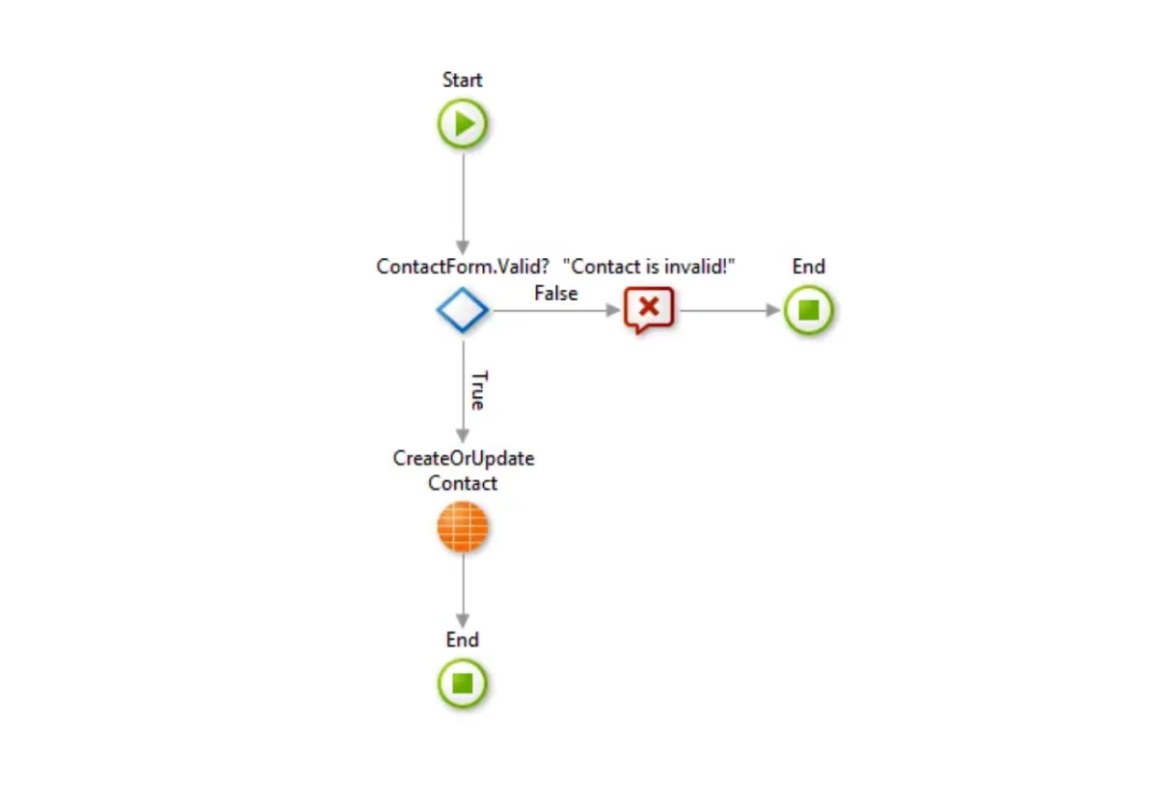
The back-end of an OutSystems mobile app is built with the same visual language as the front-end, which means you only need to master a single language. OutSystems provides numerous capabilities that simplify the development of the backend, including:
- Easy integration to external enterprise systems, databases, or custom apps, along with the integration of REST APIs.
- Visual mashup and orchestration of multiple data sources and APIs behind secured mobile endpoints.
- Extensibility through custom code.
- Centralized identity and authorization system, integrated with your common identity systems.
- Support for background jobs and asynchronous event-driven mechanisms for custom, long-running backend processing.
- Open source components made available by a huge community.
The platform makes sure every application generated from your visual model is enterprise-ready by default—secure, robust, scalable, auditable, and easy to manage.
Learn more about OutSystems' mobile-dedicated security capabilities