



What is low-code automation?
Low-code automation uses a visual development environment and drag-and-drop tools to automate workflows and business processes with minimal hand-coding. In practice, it combines workflow modeling, reusable building blocks, and integration capabilities so teams can move from idea to production faster—and keep improving automations as needs change.
Development teams that adopt a low-code automation approach can collaborate to build scalable solutions faster, while enabling business stakeholders to participate in automation initiatives in a governed way.
While traditional automation often requires extensive programming knowledge, low-code automation simplifies the work through visual design and pre-built components. As a result, businesses can automate workflows, manage process automation, and integrate with enterprise systems with less custom overhead.
How does low-code automation work?
Most low-code automation platforms bring together a few core building blocks:
- Visual workflow modeling: Map steps, owners, rules, and approvals in a process flow.
- Decision logic: Define rules and branching logic, and incorporate AI-assisted decisioning where it fits.
- Integrations and orchestration: Connect data and actions across systems (ERP, CRM, identity, data sources) to keep work moving end-to-end.
- Reusable components: Standardize common steps (notifications, validations, connectors, task patterns) so teams don’t rebuild from scratch.
- Automated testing and deployment: Support faster releases with automated test coverage and CI/CD-friendly delivery practices.
Will AI replace low-code?
AI isn’t replacing low-code—it’s changing what “good” looks like. The platforms winning in enterprise environments will be the ones that pair governed, repeatable delivery with AI that accelerates the lifecycle: generating and refining workflows, speeding up testing, and improving decisioning inside processes.
In other words, the direction is AI-powered low-code automation: low-code provides the structure, control, and scalability; AI improves speed, quality, and adaptability.
Why use low-code automation?
Traditional automation can demand deep coding expertise, significant IT resources, and long development cycles. Teams often run into rigid frameworks, higher maintenance effort, and scalability challenges—especially when automations must evolve alongside the business.
A low-code automation platform helps CTOs and IT leaders drive measurable outcomes.
- Faster time to market: Deliver workflow and process automation sooner, and shorten iteration cycles as requirements change.
- Cost-effective development: Reduce build and maintenance overhead by minimizing custom scripting and maximizing reuse.
- Increased developer productivity: Reduce repetitive work with visual development and reusable components so teams can deliver more with the same resources.
- Scalable automation: Expand automation across teams and departments with consistent standards and control.
It also supports broader business needs and day-to-day execution:
- Flexibility and adaptability: Update workflows and business rules quickly as priorities shift.
- AI-driven efficiency: Apply AI assistance where it adds value, like accelerating workflow creation, improving decisioning, and supporting quality.
- Automation testing: Support test automation and CI/CD practices to improve release confidence and reduce regressions.
Understanding automation testing
Automation testing executes checks that confirm an application works as intended—supporting quality, performance, and reliability. Low-code automation testing can reduce the time spent building and maintaining test scripts by minimizing hand-coded setup and making common test patterns easier to repeat across releases.
Beyond basic functional testing, low-code test automation is often used to support:
- Regression testing: Validate that updates didn’t break existing workflows and critical user paths.
- Security testing: Help teams catch common vulnerabilities and configuration issues earlier in delivery cycles.
- Performance testing: Identify bottlenecks and validate that automations behave as expected under load.
Integrating low-code automation testing into CI/CD supports continuous delivery, helping teams ship updates with more confidence and consistency.
Low-code automation vs. RPA
Low-code automation and RPA can both reduce manual work, but they’re best suited to different problems. Low-code automation is typically the better fit when you’re designing governed workflows, integrating systems, and building process-centric apps. RPA is often useful when you need to automate repetitive tasks on top of existing UIs, especially when APIs or integrations are limited.
| Category | Low-code automation | RPA |
|---|---|---|
|
Scope |
End-to-end workflows, process automation, and app experiences |
Task automation, often UI-driven and narrower in scope |
|
Integration model |
Connects systems through integrations and orchestration patterns |
Often interacts through the UI when direct integration is hard |
|
Governance |
Typically designed for policy, roles, and change control |
Can be harder to govern at scale across many bots |
|
Scalability |
Built to scale patterns across teams and processes |
Scaling can require more bot management and upkeep |
Low-code automation vs. traditional automation
Traditional automation is frequently scripted and code-heavy, which can be powerful but slower to build, harder to maintain, and more dependent on specialized skills. Low-code automation reduces the “build tax” by using visual design, reusable components, and standard delivery patterns—while still supporting code where it’s necessary.
| Category | Low-code automation | Traditional automation (scripted/code-heavy) |
|---|---|---|
|
Speed |
Faster build and iteration for common workflow patterns |
Slower cycles, especially for changes and extensions |
|
Skills |
Broader team participation with governance; less hand-coding required |
Heavy reliance on specialized engineering skills |
|
Cost |
Lower maintenance overhead through reuse and standardization |
Higher build and upkeep costs over time |
|
Maintainability |
Easier updates through visual models and shared components |
Can become brittle as scripts accumulate |
Low-code automation use cases
Low-code automation tools are transforming businesses, driving efficiency and agility across several industries. Key use cases include:
- Business process management: Low-code automation standardizes approvals, document processing, and operational workflows across departments. It enhances efficiency, eliminates bottlenecks, and ensures compliance.
- Workflow automation: From employee onboarding to invoice processing, automating workflows simplifies daily and mundane tasks, improves accuracy, and ensures process consistency.
- Legacy system modernization: Many enterprises rely on outdated systems, slowing down operations. By integrating low-code automation with existing infrastructures, you can extend the lifespan of your applications while improving performance.
- Customer service automation: AI-driven chatbots, self-service portals, and ticketing systems optimize the customer experience by resolving problems faster, which reduces wait times. This improves customer satisfaction and reduces customer service workloads.
- DevOps automation: The combination of automated testing and CI/CD lets teams build, test, and deploy applications more efficiently.
With the flexibility and agility to adapt and scale, organizations can continuously optimize their processes. Companies like Medtronic have used OutSystems to build a monitoring and triaging system, saving clinical staff time while improving patient care.
Similarly, HEINEKEN has scaled app development across more than 80 countries, using a federated development model, enabling faster innovation and streamlined operations.
Explore more OutSystems customer success stories
OutSystems: The enterprise low-code automation platform
OutSystems brings together application development and low-code process automation so teams can build workflow-driven experiences, orchestrate integrations across enterprise systems, and deliver automation with the governance IT leaders expect.
For organizations evaluating low-code automation tools, OutSystems supports the capabilities that matter for real-world scale:
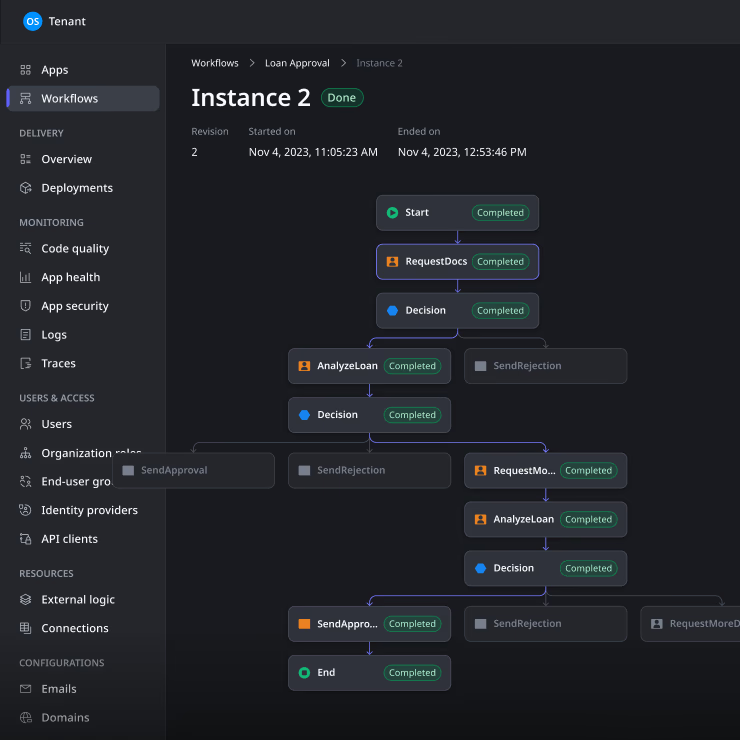
- Visual workflow builder: Model processes, tasks, approvals, and exceptions with clarity—then evolve them as needs change.
- AI-powered support: Apply AI assistance using our Agentic AI Workbench across the lifecycle, including accelerating development and improving testing workflows.
- Automation testing and CI/CD alignment: Support repeatable delivery practices so teams can ship faster with fewer surprises.
- Enterprise governance and security: Keep standards, access, and controls consistent as adoption expands.

How to choose a low-code automation platform
Use this checklist to evaluate low-code automation platforms based on what will matter at scale:
- Automation scope: Can it handle workflows, process automation, and app experiences—not just isolated tasks?
- Integration needs: How easily can it connect to the systems you rely on, and orchestrate work across them?
- AI capabilities: Does it provide practical AI assistance and decisioning support that improves delivery and outcomes?
- Governance: Can you standardize patterns, manage access, and control change across teams?
- Security: Does it support the security expectations and due diligence required for enterprise delivery?
- Scalability: Will it hold up as you expand across departments, regions, and use cases?
- Ecosystem: Is there a strong base of reusable components, templates, and community resources to accelerate adoption?
Learn the fundamentals of modern development


Frequently asked questions:
Low-code automation improves efficiency, reduces development time, enhances scalability, and streamlines workflows.
No-code automation allows users to automate processes using a visual environment without the need to write code.
OutSystems provides a comprehensive AI-driven low-code platform with workflow automation capabilities and seamless integrations.
Automation enhances productivity, reduces errors, and accelerates business growth by optimizing repetitive tasks and processes.
Automation tools help streamline workflows, testing, and integration processes while improving efficiency and reducing manual efforts.
AI is more likely to enhance low-code automation than replace it by accelerating development, improving testing, and supporting decisioning within workflows. Low-code remains the governed foundation for building and operating automations at scale.
A common example is automating an onboarding workflow: collecting data, routing approvals, triggering account provisioning across systems, sending notifications, and tracking completion—all modeled visually, integrated end-to-end, and updated as requirements evolve.
AI workflow automation combines artificial intelligence with traditional workflow automation to create more intelligent, adaptive processes.