New error management widget for ODC Workflows
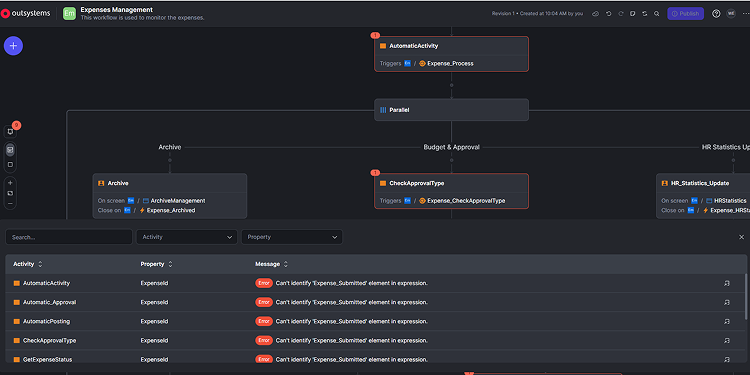
We’re introducing a new widget for error management in OutSystems Developer Cloud (ODC) Workflows: a new, visually intuitive panel that helps you quickly identify and resolve issues while building workflows.
Located at the bottom of the Workflow Editor, the Notification Panel aggregates all workflow errors in one place. Instead of navigating through multiple activities and properties to track down issues, you can now instantly see where problems exist and jump directly to them with a single click.
A notification indicator shows the number of errors detected in your workflow. Clicking it opens the Notification Panel, where you can:
- Identify issues at a glance – View a clear summary of all workflow errors in one place.
- Jump directly to the problem – Click any error to navigate straight to the affected node.
- Resolve issues faster – Reduce debugging time and avoid manually searching across the workflow.
With improved visibility, navigation, and filtering, this feature makes workflow creation smoother and more efficient—so you can spend less time debugging and more time delivering value.