
Von der Entwicklung bis zur Bereitstellung in kürzester Zeit
Sagen Sie „ja" zu allen App-Anfragen – ohne sich Gedanken über Lieferzeiten machen zu müssen. Mit der Ein-Klick-Bereitstellung, integrierter Governance, Application-Lifecycle-Management und DevOps beschleunigt die Low-Code-Plattform von OutSystems alle Schritte von der Entwicklung über die Bereitstellung bis zu Änderungen.








Ein-Klick-Bereitstellung
Um Apps in die Produktion zu bringen, sind keine speziellen Kenntnisse erforderlich. Ein Klick führt zu einer automatisierten, skriptlosen Bereitstellung. Darüber hinaus verwaltet die OutSystems-Plattform die Abhängigkeiten ganzer App-Portfolios – Sie brauchen sich um nichts zu kümmern. Das beschleunigt die Bereitstellung und minimiert Risiken.

Ändern Sie Apps schnell und fehlerfrei mit automatisierter Governance
Entwickeln Sie Applikationen so schnell weiter, wie sich geschäftliche Anforderungen ändern. Wenn Entwickler eine Änderung vornehmen, analysiert die in die OutSystems-Plattform integrierte automatisierte Governance die Auswirkungen, sucht nach Fehlern und überwacht die Leistung in Echtzeit. Ein Rollback oder Zusammenführen von Entwicklungen ist ganz einfach möglich.

Einfaches Lifecycle-Management mit LifeTime
OutSystems LifeTime vereinfacht und beschleunigt das Application Lifecycle Management (ALM) mit KI-gestützter Automatisierung. Laufzeitkonfigurationen wie die Planung von Batch-Jobs, Web-Service-Endpunkte, Geschäftseigenschaften und Versionen erfolgen alle an einer Stelle.
Zuverlässige Bereitstellungen mit DevOps
Die Low-Code-Plattform von OutSystems integriert DevOps vom ersten Tag an in die Bereitstellung. Abhängigkeitsanalysen sowie die Überwachung von Infrastruktur und Applikationen sorgen dafür, dass alles reibungslos funktioniert. Alternativ können Sie auch eigene DevOps-Tools verwenden.
Hören Sie, was die Union Bank of the Philippines über DevOps mit OutSystems sagt.
Pipelines für Continuous Integration und Continuous Delivery
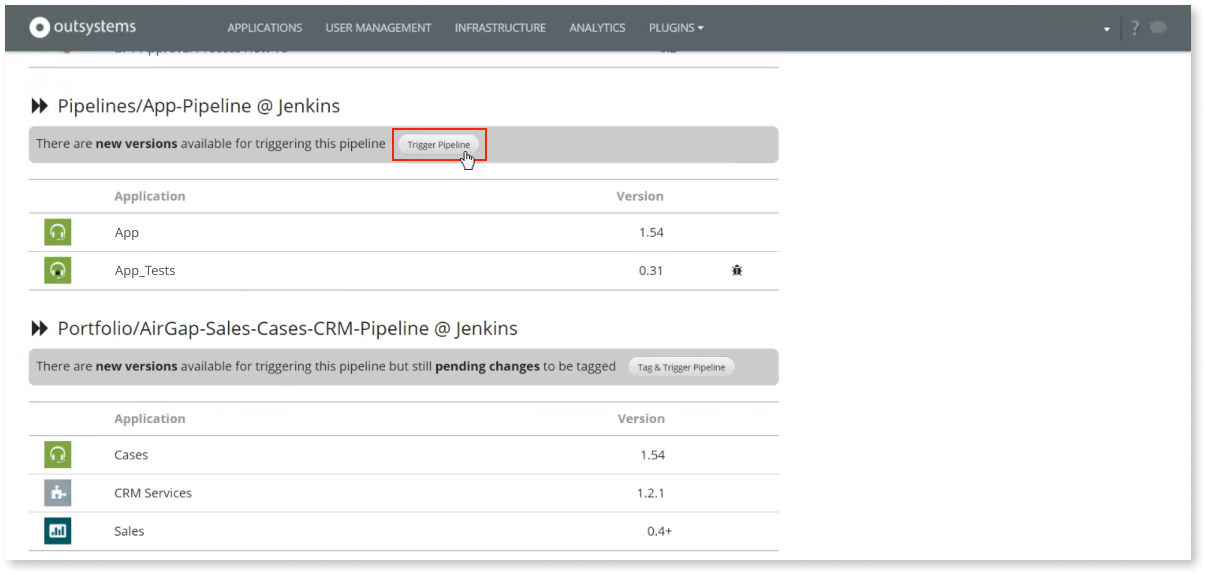
OutSystems unterstützt CI/CD. Eine Pipeline ermöglicht es Entwicklern, komplexe App-Portfolios zu vereinfachen und korrekt in verschiedenen Umgebungen bereitzustellen. Eine rollenbasierte Freigabe auf jeder Pipeline-Stufe und Applikationsschicht ist ebenfalls verfügbar.
Development to deployment FAQ
One-click deployment in OutSystems automates app deployment by compiling the application, validating dependencies, updating database schemas, and publishing changes to the selected environment. Automated deployment also handles generated database scripts behind the scenes, reducing manual work while helping teams deploy faster and with less risk.
Yes. OutSystems supports DevOps integration through APIs that connect with CI/CD tools and DevOps tools such as Azure DevOps, Jenkins, and other enterprise services. Teams can trigger deployment processes, align with existing governance workflows, and manage OutSystems as part of their broader delivery pipeline.
OutSystems supports role-based governance for deployment, including custom roles that control who can publish, promote, or deploy applications across environments. Teams can separate developer, QA, and deployment manager responsibilities, define environment-level permissions, and ensure only approved users move applications into production.
During the deployment process, OutSystems performs validation and impact analysis before promoting changes. If dependency conflicts, errors, or breaking changes are detected, deployment is blocked before reaching production. Teams receive notifications and guidance so they can fix issues in a non-production environment first.
OutSystems maintains version history and uses a metadata-driven approach to reduce rollback risk. Instead of immediately hard-deleting database elements, the platform can mark them inactive, helping preserve data if a rollback is needed. This supports faster recovery and reduces the risk of data loss after deployment.
Yes. OutSystems supports automated testing through behavior-driven development frameworks, Forge components, and integration with third-party testing tools. Teams can automate testing as part of the deployment pipeline, including unit, regression, load, security, UI tests, and agent evaluations, so quality gates are enforced before applications reach production.
OutSystems supports a multi-stage deployment pipeline across development, test, and production environments, with additional environments available when needed. Developers publish first to development, then teams can promote changes manually or automate movement through QA and production using CI/CD integrations and governance controls.
OutSystems provides multiple tools to continuously analyze applications for security, performance, maintainability, architecture, and best-practice violations. Teams can receive remediation guidance before release and also integrate third-party scanning tools such as Veracode or Fortify to support security, compliance, and quality requirements before deployment.
Yes. OutSystems supports deployment models for organizations with strict security, compliance, sovereignty, or data residency needs, including on-premises and private cloud options depending on the plan and architecture. These options allow organizations to retain full control over sensitive systems while still using OutSystems for governed application delivery.


Erstellen Sie, was in Ihrem Backlog ist
Das breiteste Angebot an Anwendungsfällen, Vorlagen und leistungsstarken Partnerlösungen hilft Ihnen, alle Applikationen in Ihrem Backlog zu realisieren.

Sehen Sie, wie OutSystems im Vergleich abschneidet
Erhalten Sie die neuesten Studien über Low-Code-Plattformen von globalen Branchenanalysten und erfahren Sie, warum OutSystems als führende Low-Code-Plattform gilt.

Steigen Sie tiefer in die Plattform ein
Weitere Details über OutSystems finden Sie in unserem Evaluierungsleitfaden.