
Workflow Builder
Ermöglichen Sie Business-Experten, Ideen innerhalb von Minuten in Apps zu verwandeln.
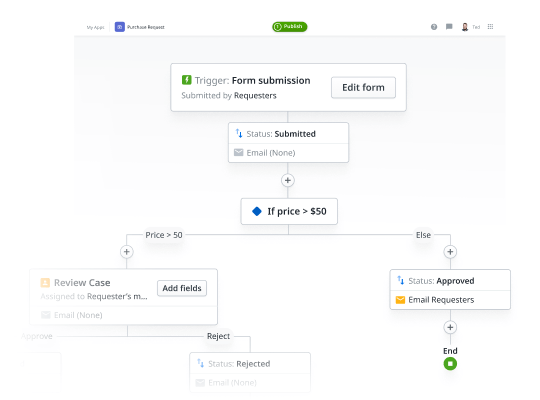
Nutzen Sie Talente. Liefern Sie Apps. Und reduzieren Sie Backlogs.
Ermöglichen Sie Business-Experten, Analysten und Prozessverantwortlichen, interne Produktivitätseinschränkungen selbst zu beheben – mit einem benutzerfreundlichen Assistenten, der den Entwicklungsprozess abstrahiert. Der Workflow Builder wurde speziell für Business-Anwender entwickelt und fördert die Zusammenarbeit in modernen, interdisziplinären Teams. Die IT-Abteilung behält dabei immer die volle Kontrolle.

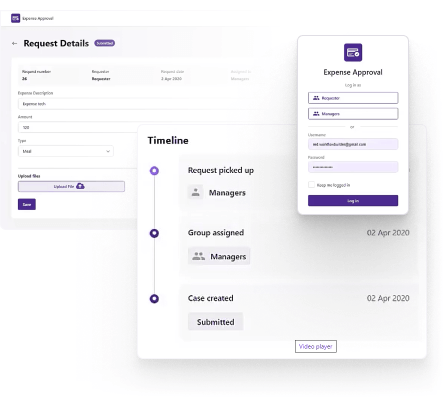
Create, iterate and launch business apps—fast
- Build and publish internal productivity apps with a single click and without writing a single line of code
- From expense approval to timesheet management, deliver simple-to-medium complexity workflow applications in minutes
- Workflow Builder auto-generates professionally-designed, frictionless user experiences

Fördern Sie die Zusammenarbeit von Business und IT
- Steigern Sie die Produktivität von Geschäftszweigen und entlasten Sie zugleich wertvolle IT-Ressourcen.
- Minimieren Sie Schatten-IT mit einem kollaborativen und kontrollierten Ansatz der Applikationsentwicklung.
- Reduzieren Sie den wachsenden IT-Backlog von Anfragen bezüglich interner Geschäftsapplikationen.


No limits as your apps grow
- Business experts and developers can further evolve Workflow Builder-generated apps in Services Studio
- Applications built with OutSystems rely on standard architectures and frameworks
- Manage technical debt from the start with AI Mentor
Workflow Builder FAQ
Workflow Builder is a low-code tool for business users, analysts, and non-technical teams that need to digitize simple processes. Users can create forms, add approval steps, and build workflows visually without coding. It’s best for straightforward departmental workflows, request management, case tracking, and form-based processes.
Workflow Builder is designed for simpler workflows, not complex enterprise applications. If you need API calls, external database connections, custom logic, decision tables, or advanced integrations, you’ll typically move to Service Studio. The benefit is that Workflow Builder apps can be converted to Service Studio as requirements grow.
Workflow Builder sits above the Case Management Framework and Business Process Technology in the OutSystems architecture. It gives business users a simpler interface for building workflows, while still providing a path to more advanced capabilities. When needed, workflows can move into Service Studio for deeper process, case, and logic control.
Workflow Builder has limited integration capabilities on its own. For external systems, APIs, data warehouses, or direct database connections, teams should use Service Studio. This gives developers access to REST and SOAP APIs, SQL connections, custom logic, and more advanced integration patterns while preserving the workflow foundation when converted.
Workflow Builder is ideal for digitizing simple manual or paper-based processes. Common use cases include approval requests, form submissions, permit intake, document review, basic case tracking, and departmental workflows with email notifications. It’s especially useful when business teams need to prototype or launch straightforward workflows quickly.
Yes. Workflow Builder can support file attachments and document handling, making it useful for workflows that require supporting materials. Users can upload documents, images, or PDFs for review as part of a process. This fits use cases such as permit applications, contract approvals, case reviews, and document-based requests.
Use Workflow Builder for simple forms, approval flows, and business-led workflow prototypes. Use Service Studio when you need APIs, external databases, custom UI, complex business rules, advanced logic, or enterprise-scale application control. A practical path is to start in Workflow Builder, then convert to Service Studio as complexity increases.