
あらゆる開発者向けのフルスタック開発
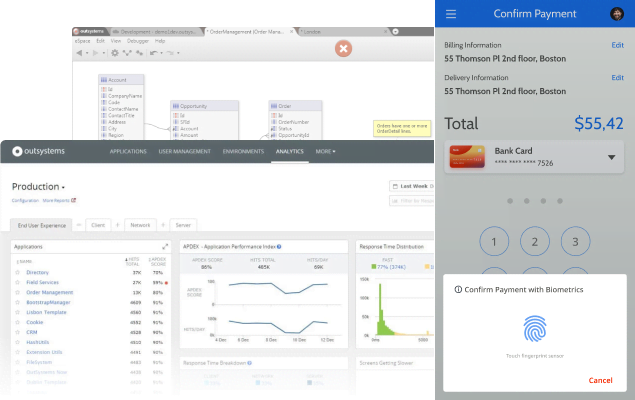
OutSystemsプラットフォームでは、誰もが新しい役割を担えます。バックエンド開発者がフロントエンドを構築することも、フロントエンド開発者がバックエンドを構築することも可能です。さらに、すべての開発者がワークフローを自動化することができます。分断も、行き詰まりも、ツールの切り替えもありません。堅牢で拡張しやすいクロスプラットフォームアプリを簡単に作成できます。










13個 3か月で開発した重要なアプリの数1 million hours to give back to the organization
14,000件 管理しているアセットの件数80+ operating companies to be digitized
1人 追加雇用した開発者

.svg)
フロントエンドを簡単に作成
OutSystemsのローコードプラットフォームを使用すると、チームに経験者がいなくても簡単にフロントエンドを作成できます。プラットフォームがデザイナーと開発者を取り持ち、Figmaとの連携を行い、ビルド済みのテンプレートを提供します。これにより、見栄えのよいアプリとシームレスなユーザーエクスペリエンスが実現します。

スキルレベルを問わずバックエンド開発が可能
新人開発者も専門開発者も、OutSystemsのローコードプラットフォームを使用すれば、API、Webサービス、データモデル、ワークフロー、ビジネスルールなどのバックエンドを構築できます。データベースとクエリ、ビジネスロジック、連携の作成や構築も簡単に行えます。
自動化で重複を防ぐ
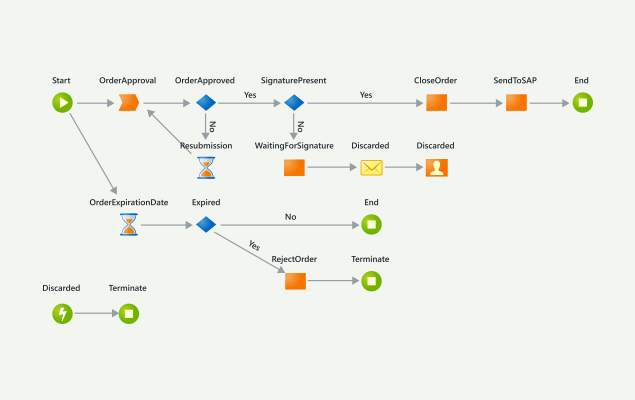
OutSystemsプラットフォームでは、新人開発者、ベテラン開発者、専門開発者が、独自の機能横断型のワークフローを自動化・連携しながらカスタムアプリケーションを作成・デプロイできるため、非効率なタスクや反復的なタスクを減らすことができます。
Need to extend an app? No problem
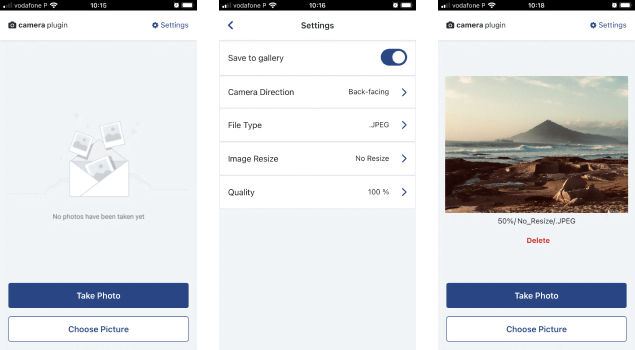
Extending or changing an app is a snap with the OutSystems low-code platform. Developers can add widgets, facial recognition plug-ins, pricing engine algorithms, and more as built-in visual elements in the OutSystems environment that you can easily add to your applications.
Application
development FAQ
Yes. OutSystems supports team development with built-in versioning, merge, and conflict resolution capabilities. Developers can work on the same application, compare changes, resolve conflicts, and publish updates through governed workflows. This helps teams collaborate without losing visibility or control across shared application development projects.
OutSystems generates standard backend and frontend code using widely adopted frameworks and languages. The backend is based on .NET and C#, while the frontend uses JavaScript, HTML, CSS, and React. Developers build visually, but the platform produces enterprise-grade application code aligned with modern web development practices.
Developers don’t directly edit generated code in the OutSystems IDE. However, OutSystems provides a detachment process that allows customers to export applications as standard .NET and React applications if they choose to leave the platform. This helps address code ownership and vendor lock-in concerns while preserving long-term flexibility.
Yes. OutSystems supports custom C#, JavaScript, and CSS when teams need capabilities beyond visual low-code development. Developers can also create .NET extensions for specialized requirements. This gives teams the speed of visual development while preserving flexibility for complex logic, integrations, and AI development use cases.
OutSystems supports many types of software, including AI agents, web apps, mobile apps for iOS and Android, progressive web apps, APIs, and microservices. Teams can build simple CRUD tools, enterprise workflows, customer portals, and complex mission-critical systems on one platform.
The default OutSystems database size is 100GB and can be increased at an additional cost. For document-heavy applications or very large datasets, teams can integrate with dedicated storage services such as AWS S3. This helps keep application data scalable while using the right storage model for each workload.
You don’t need specialized AI developers or a single mandated coding tool to build with OutSystems. Teams can use developers with object-oriented, database, and web experience, while tools such as Claude, Copilot, Koda, or Codex can support upstream work. OutSystems provides the governed AI development platform for building, integrating, and managing apps and agents.
OutSystems supports accelerated development by helping teams build applications up to 10 times faster than traditional coding. Simple applications can be delivered in days or weeks instead of months. OutSystems AI further speeds delivery with AI-assisted development, app generation, recommendations, and automation across the software development lifecycle.
OutSystems offers free online training, guided learning paths, certification programs, community forums, technical documentation, professional services, and technical support. Customers can also work with partners or Technical Success Managers for hands-on guidance. This support model helps teams ramp faster and build the skills needed for long-term platform success.
Yes. OutSystems is built for code reuse through modular architecture, reusable components, shared services, and UI elements that can be used across multiple applications. Reused components only count once in the licensing model, helping teams improve consistency, reduce duplication, and accelerate development across an application portfolio.
OutSystems handles complex business logic through visual workflows, conditional logic, data transformations, complex queries, and workflow orchestration. Developers can also extend logic with custom code when needed. This gives teams a structured way to build sophisticated enterprise applications without losing flexibility or control over business rules.
OutSystems includes app testing capabilities such as built-in debugging, visual step-through debugging, and support for behavior-driven development testing. Teams can also integrate with external testing tools such as Selenium and TestIM. This helps QA and development teams validate functionality throughout the development lifecycle.
Yes. OutSystems supports automated testing through its behavior-driven development framework and integration with third-party testing tools. Teams can use app testing, automation, and automated testing practices to validate functionality, reduce manual QA effort, and maintain quality as applications evolve across environments.


バックログへの対応
広範なユースケース、テンプレート、強力なパートナーソリューションを活用することで、あらゆるアプリケーションバックログに対応できます。

OutSystemsの評価
世界中の業界アナリストによるローコードプラットフォームの最新の調査結果や、OutSystemsがローコードプラットフォームのリーダーとされている理由をご覧いただけます。

プラットフォームの詳細
評価ガイドでOutSystemsの詳細をご確認いただけます。