
Maßgeschneidert für Entwickler
Eine Entwicklerumgebung mit vertrautem Look-and-Feel. Vorgefertigte Vorlagen. Wiederverwendbare Komponenten. KI-Anleitungen. Die Möglichkeit, eigenen Code hinzuzufügen. Neueste Technologie wie KI/ML, IoT, RPA und Microservices. All dies und mehr sorgt dafür, dass die Low-Code-Plattform von OutSystems bei jedem Entwickler gut ankommt.








„Alles war einfach sehr gut durchdacht.“


Neue und professionelle Entwickler: Go big or go ... bigger
Ihr Team kann leistungsstarke Apps entwickeln, ohne durch Technologie eingeschränkt zu werden, die Kontrolle über den Code zu verlieren oder Zeit zu verschwenden. Neue Entwickler haben alles, was sie für die Full-Stack-Entwicklung benötigen. Und Profis können sich auf die Entwicklung von Lösungen konzentrieren, für die es ihre einzigartige Erfahrung braucht.
Möchten Sie Details erfahren oder die Plattform Entwicklern vorstellen?

Reaktive Web, KI/ML, IoT, RPA, Microservices: Entwickler können neue Technologien ausprobieren
Warum sollten sich Entwickler auf das beschränken, was sie kennen? Mit der Low-Code-Plattform von OutSystems können Ihre Teams Reactive Web, künstliche Intelligenz, Output des Internet of Things, robotische Prozessautomatisierung und Microservices in ihren Apps verwenden. Anschließend liefert die Plattform den gesamten Code automatisch aus.
Entwickler können Applikationen mit Low-Code individuell erstellen
sodass Ihre Entwickler so viel oder so wenig Low-Code verwenden können, wie sie möchten. Außerdem lassen sich die erstellten Apps mühelos in bestehende Systeme integrieren – entweder über Open-Source- oder selbst erstellte Konnektoren.
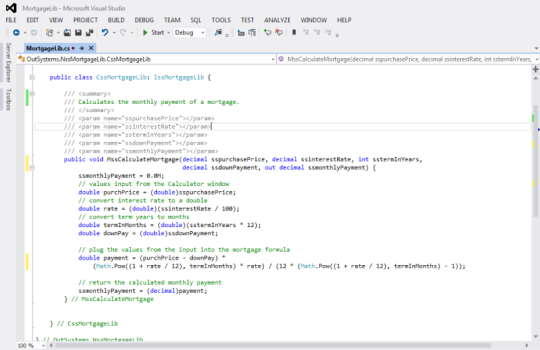

„Wenn Sie ein guter Entwickler sind, wird Low-Code Ihren Weg zum Endergebnis einfach beschleunigen.“
Arbeit reduzieren, wiederverwenden, recyceln: App-Assets aus Forge sparen Zeit
Reduzieren Sie den Arbeitsaufwand mit Tausenden wiederverwendbaren Modulen, Konnektoren und UI-Komponenten, die Sie recyceln können, um die Applikationsbereitstellung zu beschleunigen. Sie sind über die OutSystems-Entwicklungsumgebung oder ein zentrales Repository zugänglich und lassen sich einfach in Applikationen einfügen.
Developer FAQ
Developers build in a visual environment and don’t directly edit the generated source code inside the IDE. However, they can extend applications with custom C#, JavaScript, CSS, and external services when needed. If a customer leaves OutSystems, applications can be detached and exported as standard application code.
OutSystems generates standard backend and frontend code using widely adopted languages and frameworks. Backend logic is based on .NET and C#, while frontend experiences use JavaScript, HTML, CSS, and React. Developers work visually, but the resulting applications align with familiar enterprise development patterns and modern web architecture.
Experienced developers can typically become productive in OutSystems in one to two weeks, depending on their background and the complexity of the first project. Developers with experience in object-oriented programming, databases, APIs, and web development usually ramp fastest. Deeper architecture mastery develops through hands-on delivery and certification.
OutSystems development happens primarily in the OutSystems visual IDE, not in a third-party IDE. However, teams can integrate OutSystems with external development workflows, DevOps tools, APIs, testing tools, monitoring platforms, and custom code extensions. This gives developers a governed environment while preserving flexibility around supporting tools and processes.
OutSystems handles complex business logic through visual flows, conditional logic, loops, data transformations, workflow orchestration, and integrations with external services. Developers can also extend applications with custom code when needed. This allows teams to model sophisticated enterprise processes without losing control over performance, maintainability, or architectural design.
OutSystems supports deep UI and UX customization, including custom CSS, HTML, JavaScript, themes, reusable UI components, and design system alignment. Teams can build responsive, branded, pixel-perfect experiences while still benefiting from visual development. It can also support handoff from tools such as Figma or Adobe-based design workflows.
Multiple developers can work on the same OutSystems application through built-in team development capabilities. The platform tracks changes, supports versioning, detects conflicts, and allows developers to compare and merge work. Teams can coordinate publishing, review dependencies, and manage deployment through governed workflows across development, test, and production environments.
Yes. Developers can create reusable modules, libraries, services, UI components, and integration patterns that are shared across multiple applications. This reduces duplicate work, improves consistency, and makes maintenance easier. When a shared component is updated, teams can review dependencies and republish consuming applications through controlled lifecycle management.
OutSystems provides guided learning paths, certifications, documentation, hands-on labs, and community resources for developers. Most experienced developers can start building after completing foundational training, while advanced certifications support architecture, mobile, security, and delivery best practices. Teams can also use professional services or partners for deeper enablement.
Yes. The OutSystems AI development platform is designed for enterprise-scale applications, including large user bases, high-volume workloads, and mission-critical systems. It supports scalable architecture, performance monitoring, reusable components, and deployment governance. Cloud-native options add container-based scalability and resilience for applications with variable or growing demand.


Erstellen Sie, was in Ihrem Backlog ist
Das breiteste Angebot an Anwendungsfällen, Vorlagen und leistungsstarken Partnerlösungen hilft Ihnen, alle Applikationen in Ihrem Backlog zu realisieren.

Sehen Sie, wie OutSystems im Vergleich abschneidet
Erhalten Sie die neuesten Studien über Low-Code-Plattformen von globalen Branchenanalysten und erfahren Sie, warum OutSystems als führende Low-Code-Plattform gilt.

Steigen Sie tiefer in die Plattform ein
Weitere Details über OutSystems finden Sie in unserem Evaluierungsleitfaden.