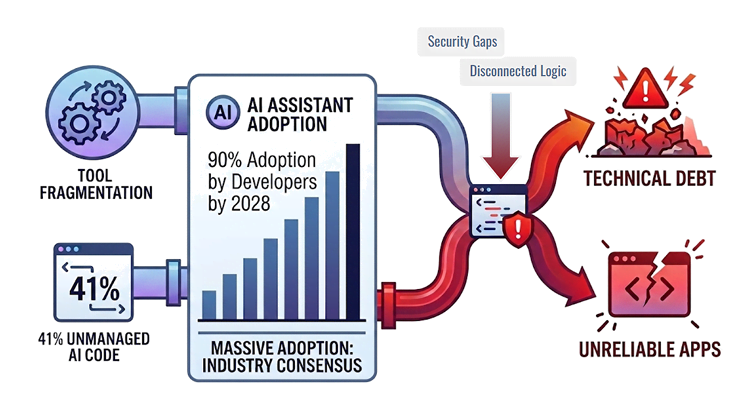
But this unmanaged velocity introduces a steep, hidden risk to system stability.
Today, 59% of developers are juggling three or more unmanaged AI tools simultaneously. This tool fragmentation feeds an unpredictable AI Chaos Pipeline. It’s an influx of unvetted, disconnected lines of code that will increase technical debt, cause severe governance failures, and lead to unstable production environments.
The AI Chaos Pipeline: Massive Adoption, Tool Fragmentation, and Unmanaged Code generation
To build reliable enterprise software, organizations have to steer toward Grounded Agentic Development. Think of it as having an AI Co-Developer who understands your company’s rules, systems, and coding style on day-one. It works safely within your guardrails, operating under constant human supervision, and always asking its human guide for final approval.
Enter OutSystems Mentor
OutSystems built Mentor to bring this level of speed and structural control to your entire delivery cycle across three operational pillars:
Grounded AI: Inherits complete system awareness via the Enterprise Context Graph to eliminate generic code guessing.
Built-in governance: Provides real-time quality gates and traceability to keep your developers in the driver's seat.
Unified experience: Merges app generation, evolution, and validation into a single platform.
The three layers of Mentor
Mentor wraps the raw speed of AI-assisted development into a controlled, enterprise-grade ecosystem across distinct operational layers:
Generate: App generation: Turns natural-language requirements into fully functional visual blueprints, scaffolding screens, logic, and data entities in minutes while you maintain full structural control.
Validate: Code quality - Conducts automated, real-time code reviews and sanity checks inside the ODC Portal to ensure all changes match your corporate baseline before deployment.
Embedding quality across the SDLC
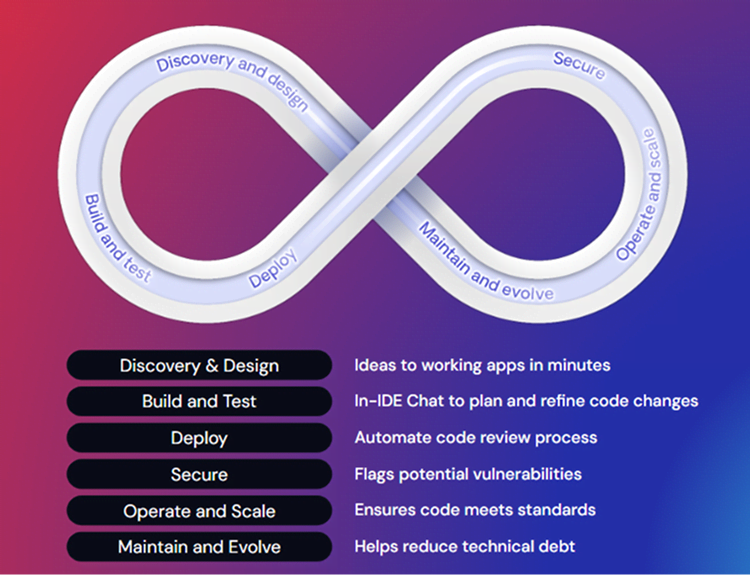
Many AI tools are little more than single-shot code widgets. By contrast, Mentor is an active advisor sitting on top of an enterprise application generation engine perfected over 25 years. Mentor embeds itself across every phase of the software delivery lifecycle as a continuous quality gate. It translates raw initial ideas into brand-aligned blueprints during discovery and automates code reviews at deployment. Mentor also systematically targets technical debt during maintenance. The system ensures that rapid delivery never comes at the expense of structural control throughout the process.
Mentor contributing to every step of the Software Delivery Life Cycle
To see exactly what this looks like in the trenches, let's look at a week in the life of a fictional lead developer, Danni Delonghi.
Meet Danni
Danni is a developer with over 12 years of experience. Working right at the heart of her company's software factory and Center of Excellence (CoE), she is the ultimate technical unblocker. She keeps several complex projects running smoothly while making sure nobody breaks the company's coding rules.
Meet Danni Delonghi, our Lead Developer
Danni’s week - Monday
The industry challenge: The requirements-to-code bottleneck
The journey from business requirements to a functional visual blueprint is commonly plagued by miscommunication. Traditional scaffolding gets teams halfway, but translating natural language business needs into standard, brand-compliant application flows takes days or weeks of manual work.
The situation
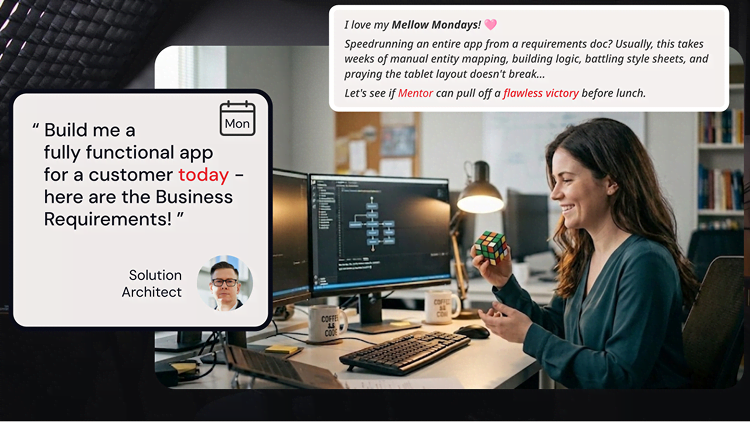
Danni is in the middle of a complex refactoring session, her fingers absentmindedly toying with a Rubik’s cube as she mulls over the structural requirements. A high-priority DM from the solution architect breaks her focus.
Danni is challenged to generate a full app from a Business Requirements document
The task: Conversational app generation and validation
Instead of manually dragging and dropping widgets in an IDE, Danni opens Mentor App Generator. Using this agentic experience, she can feed raw requirements or product specification documents straight into the platform.
Crucially, Mentor doesn't perform a blind, immediate generation. It operates through the following guardrails to proceed safely:
Conversational clarification: Instead of a single-shot prompt execution, Mentor engages Danni in a conversational loop, asking clarifying questions to resolve ambiguities before building.
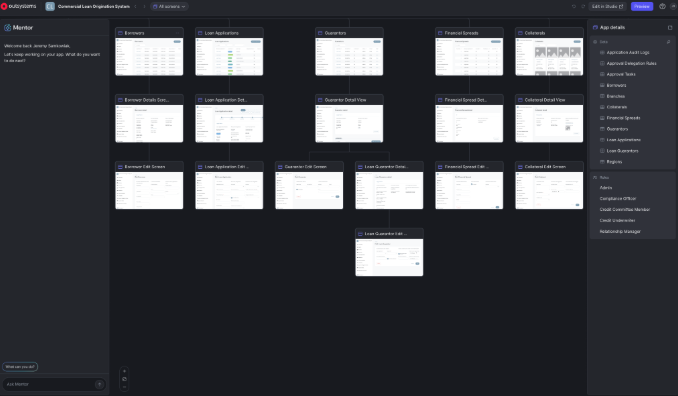
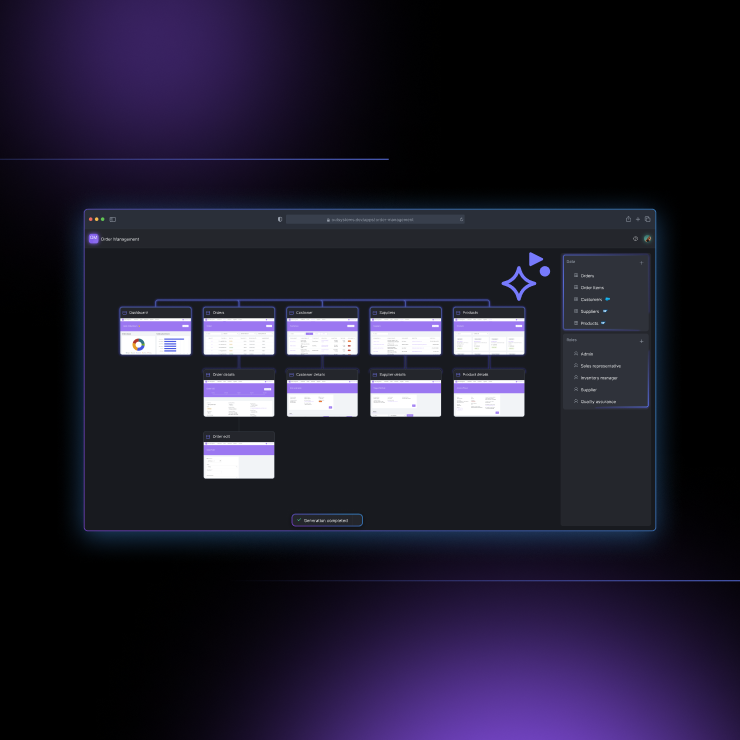
Pre-generation visual blueprints: Mentor displays a map of the proposed screens, data entities, relational dependencies, security roles, and workflows. Danni can adjust and optimize the blueprint before a single element is effectively generated.
Branding and theme matching: Mentor analyzes specifications to detect corporate styling parameters and dynamically constructs a tailored design theme out of the box. Danni can explicitly change and lock in her application Theme, and Mentor will validate Theme compatibility before generating to guarantee a flawless UI from day one.
Mentor - App Generation - quickly generates a blueprint you can validate and iterate
The takeaway
Mentor mapped out the intent, automatically scaffolding full-stack screens, server actions, data entities, and proper role-based permission settings across the active application layers in a matter of minutes.
By blueprinting the full application before generating any model, the engine guarantees that all logic flows, database entities, and screen layouts fit cleanly into Danni’s OutSystems factory on the first pass. Danni 1-Click Publishes the working MVP straight to her development environment before she can even finish solving her Rubik's Cube.
Danni’s week - Tuesday
The industry challenge: Tribal knowledge and onboarding friction
In large enterprise factories, onboarding developers to complex application architectures requires significant time and energy. Outdated documentation and hidden dependencies between modules create an immediate bottleneck. Teams lose velocity trying to map how data entities interact before creating their first flow of visual logic.
The situation
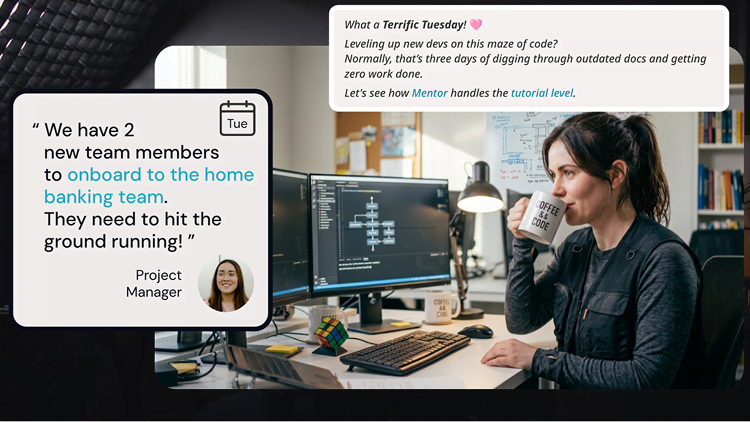
Danni takes a quick breather, coffee in hand, as she reviews the team’s latest architectural changes. The morning quiet is interrupted when her Project Manager pings her: "We have 2 new team members..."
Danni has to onboard 2 people with different backgrounds: 1 more technical, 1 more business-oriented
Danni looks at the core application modules. They contain an intricate maze of legacy aggregates, server actions, and deep entity relationships.
The task: Zero-time discovery
Danni uses Mentor's foundational context tracking. Because it houses a persistent understanding of the local factory dependencies via the Enterprise Context Graph, it can reverse-engineer a comprehensive architectural map on command.
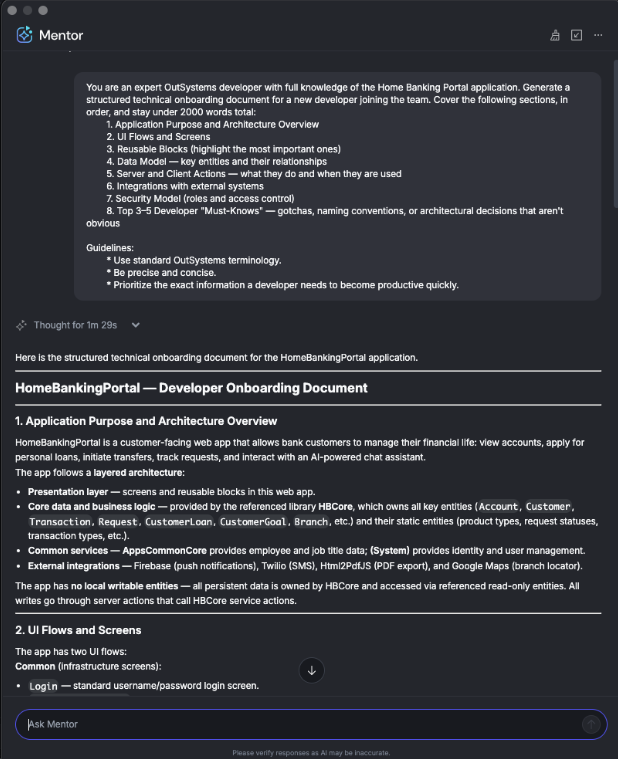
Instead of drowning in the visual model, Danni launches OutSystems Mentor directly in ODC Studio to establish immediate situational awareness. First, she uses Mentor's conversational discovery feature to create the Executive Blueprint of the app in plain language:
Prompt - Executive Blueprint: This prompt generates a concise, business-focused summary of the application’s purpose, features, and value.
You are an expert OutSystems developer and solution architect with deep knowledge of the [ApplicationName] application. Provide a concise executive summary of this application — its business purpose, the problems it solves, its main features, and the value it delivers to both customers and bank staff. Write in plain business language, avoid technical jargon, and keep the response under [NumberOfWords] words.
Next, she hands Mentor a strict template to output a comprehensive Technical Onboarding Blueprint for her new team members:
Prompt - Technical Onboarding Blueprint: This prompt compiles a structured technical guide to help new developers quickly understand the application's architecture, data models, and key flows.
You are an expert OutSystems developer with full knowledge of the [ApplicationName] application. Generate a structured technical onboarding document for a new developer joining the team. Cover the following sections, in order, and stay under [NumberOfWords] words total:
	1. Application Purpose and Architecture Overview
	2. UI Flows and Screens
	3. Reusable Blocks (highlight the most important ones)
	4. Data Model — key entities and their relationships
	5. Server and Client Actions — what they do and when they are used
	6. Integrations with external systems
	7. Security Model (roles and access control)
	8. Top 3–5 Developer "Must-Knows" — gotchas, naming conventions, or architectural decisions that aren't obvious

Guidelines:
	* Use standard OutSystems terminology.
	* Be precise and concise.
	* Prioritize the exact information a developer needs to become productive quickly.
Mentor inside your ODC Studio - with full context of your Apps - allows for limitless discovery
The takeaway
Mentor targets the core banking components, translating them into a precise, jargon-free breakdown that infers the underlying business context and user needs. In minutes, it highlights how primary data flows, deep entity structures, and reusable UI blocks map directly to actual business operations.
By matching the live factory dependencies directly against a predefined organizational template, the assistant eliminates manual navigation fatigue and ensures that the resulting architecture playbook maps out critical logic patterns with zero-time discovery overhead.
Danni drops the clean documentation file right into the team's onboarding channel, completely avoiding the typical multi-day hand-holding phase. She shows newcomers how easy it is to interact directly with Mentor to discover applications from both a high-level functional perspective and a deep technical level. They can start building immediately.
All before her morning coffee even has a chance to get cold.
Danni’s week - Wednesday
The industry challenge: The velocity vs. quality trade-off
When sprint windows constrict, quality assurance is often the first element sacrificed. Manual code reviews are inherently subjective and error-prone under the heavy pressure of deliveries. Subtle gaps slip past to other environments, resulting in production glitches later.
The situation
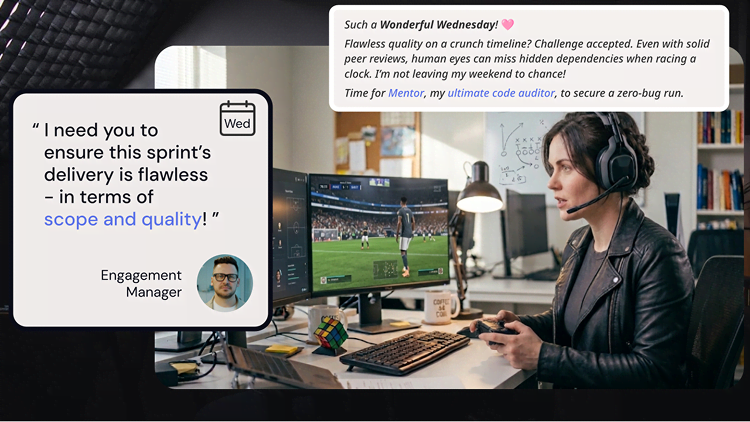
Danni has just pushed the Core Services for the loan submission process to a staging environment. She takes a deserved and necessary breather from a high-intensity sprint and grabs a controller to decompress. Suddenly, her email alerts her to an urgent message from the Engagement Manager: "I need you to ensure this sprint’s delivery is flawless."
Danni needs to validate the quality and scope of the implementation
The pressure to check the running application quickly and mark the task as complete is high.
The task: The in-IDE pair programmer and diff review
Danni opens Mentor in ODC Studio. Mentor acts as her conversational pair programmer, fully inheriting the systemic context from Monday's app generation loop. She never has to explain her baseline logic goals from scratch.
She targets her active action flows with a User Story Verification prompt, matching her visual logic and variables directly against the functional user story acceptance criteria:
Prompt - User Story Verification: This prompt directs the AI to audit the code against the user story's acceptance criteria and flag logic errors.
You are a Senior OutSystems Technical Lead performing a formal implementation review. Your job is to protect the business from shipping defects. You have full knowledge of the [ApplicationName] application and its [Screen/FeatureName] implementation — including all screen aggregates, data actions, screen actions, JavaScript nodes, client variables, widget tree, and configuration details.

Do not re-read or re-discover the application. Work from what you already know. Focus exclusively on functional correctness. For each issue:
* Verify it is real: Confirmed against actual logic, widget properties, or action flow. Do not report theoretical or speculative issues.
* Classify it: Is it missing (not implemented at all), wrong (implemented but produces incorrect output), or partial (implemented but breaks under specific conditions)?
* Assess customer impact: Would a real customer see incorrect data, be blocked, or lose trust in the feature?

Report exactly the top 3 issues, ranked by severity (Critical first, then Major). Within the same severity, rank by customer-facing impact. Use exactly this format for each issue — no deviations:

==
- Issue: [AC number] — What is wrong and why it violates the AC. State whether it is missing, wrong, or partial.
- Description: One or two plain-English sentences explaining what the customer experiences. No technical jargon.
- Fix: The exact change needed, in OutSystems terms — name the screen action, node, widget, or expression to change and what to change it to.
- Evidence: The exact location (screen action name, node name, widget name) and one concrete runtime step to reproduce it.

Hard Rules:
1. One issue per == block. Never combine two problems into one entry.
2. No preamble, no positives, no summary, no closing remarks. Start output directly with the first == block.
3. Every Issue line must cite the AC number it violates.
4. Every Fix must be actionable in OutSystems — name the exact node or widget.
5. Every Evidence must include both a static location (where in the app) and a runtime reproduction step (what to do in the browser).
--------------------------------------------------
# User Story & Acceptance Criteria
[Insert your User Story, Context, and ACs here]
Mentor acts as a precise code auditor, validating her actual implementation directly against her original intention (the User Story and its Acceptance Criteria). This instantly shifts quality assurance to the left, flagging a critical edge-case discrepancy much sooner than the traditional QA process would. Her data submission flow lacks an explicit If condition for zero-value credit assessments.
To repair it safely, Danni issues a Direct Remediation prompt right within the chat panel:
Prompt - Direct Remediation: This prompt instructs the AI to apply the necessary code fixes automatically while ensuring existing logic and visual elements remain intact.
Fix issue 1 from the review above.
Before making any changes:
* Read the current implementation in full — all relevant actions, variables, widgets, and logic that produce or consume the affected values.
* Identify every location in the app that needs to change.

While implementing:
* Do not modify any existing UI element values, labels, or formatting.
* Search for and add references to any public elements needed before using them.
* Remove any references, filters, or variables that become unused after the fix.

After implementing:
* Check for validation errors and resolve any that were introduced by the fix.
Mentor calculates a localized structural update and generates a visual diff (Proposed Changes vs. Current Canvas). Danni inspects the new conditional branches, accepts the changes, and 1-Click Publishes the app. She watches the platform safely update the visual logic with absolute deterministic accuracy.
Note: If you want to see exactly how Mentor does it, check out this cool demo. Danni declined to be in this video because she was getting ready for the ONE Neo Party at HEINEKEN in Amsterdam, so co-author Jeremy stepped in for her.
The takeaway
Mentor injects the validation branches in the ODC Studio editor smoothly, resolving the unhandled zero-value edge case without breaking dependent logic flows or generating deployment errors.
By analyzing the active variables alongside the user story's acceptance criteria, Mentor acts as a deterministic quality gate right inside the IDE. It eliminates the subjectivity of human reviews and catches hidden defects before anyone even publishes.
Danni accepts the proposed changes, hits 1-Click Publish, and flags the task as officially complete. She’s pushed a thoroughly vetted, production-ready build to her development environment with absolute peace of mind, all before she even finishes the first half of her match.
Danni’s week - Thursday
The industry challenge: Technical debt tax
Functional features are only one side of the coin. Scaling an enterprise footprint means injecting baseline compliance:
CRUD abstraction layers
Unified exception handling
Clear documentation
Logging
Automated testing
Implementing these standards directly into the Factory Foundation Layer delivers a massive bang for the buck. It creates an exponential ripple effect where every downstream app and library inherits elite reusability, security, and architectural consistency out of the box.
Enforcing these standards manually, however, requires hundreds of repetitive clicks, significantly reducing velocity.
The situation
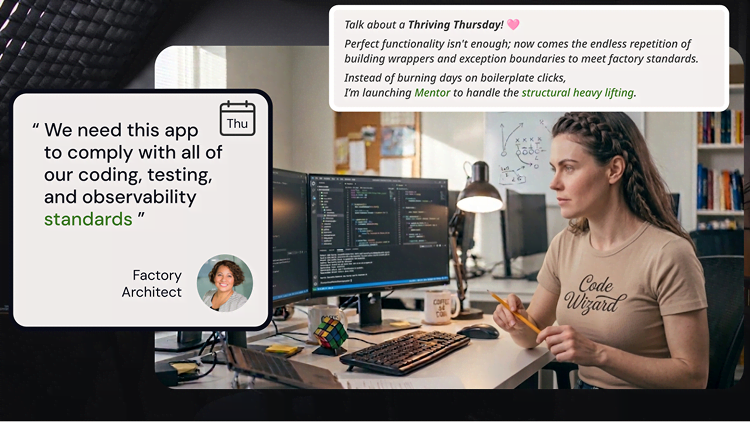
Danni is deep into a library audit, organizing the Factory modules to clean up dependencies. The Factory Architect pings her, ready to kick off the governance enforcement session.
Danni needs to ensure Technical Foundations are consistent and follow best practices
Danni needs to ensure Technical Foundations are consistent and follow best practices
Data access isolation
Goal: Enforce a Zero Trust data layer, preventing direct table writes/reads to protect data integrity and multi-tenancy boundaries.
Directive: Build secure CRUD wrapper actions (Data Abstraction Layer) for all local Entities, restricting direct database access.
Logging and errors
Goal: Build a resilient, fault-tolerant architecture that isolates global failures automatically and prevents cascading application downtime.
Directive: Inject standardized Exception Handler flows and Global Exception Handlers into all custom logic.
Observability and telemetry
Goal: Achieve full-stack proactive monitoring, streaming real-time performance metrics and transactional contexts directly to operations dashboards.
Directive: Wire up custom Log Actions and structural instrumentation inside long-running Processes (BPT) and heavy server actions.
Test automation
Goal: Shift-left testing with full regression coverage, ensuring continuous integration pipelines can validate core logic with zero manual overhead.
Directive: Build automated test suites utilizing BDD frameworks and expose secure REST API endpoints specifically for integration validation.
The task: Factory Standards Batch Automation
She initializes the Factory Standards Batch Automation prompts, using Mentor to methodically apply her governance requirements - Data Access Isolation, Standardized Logging & Errors, and Test Automation suites - across the application
Prompt - Data Access Consistency Wrappers This prompt builds structural abstraction over local storage or entities to guarantee uniform transaction logic and logging execution.
Batch 1 — CRUD Wrappers
Create CRUD wrapper server actions for all local entities that do not have them, in a folder
named "CRUD".
IDEMPOTENCY RULES:
- Before creating the CRUD folder, check if it already exists; if so, reuse it.
- For each wrapper action (CreateClients_W, UpdateClients_W, DeleteClients_W,
GetClients_W, etc.), check if it already exists; if so, delete it and recreate it from scratch.
Each wrapper action must follow this exact pattern:
1. Start node
2. GenerateGuid node (call the referenced GenerateGuid server action) →
assign result to local variable OperationGuid (Text)
3. Assign node: set OperationGuid = result of GenerateGuid
4. JSONSerialize node (for Create/Update: serialize the input record; for Delete/Get: skip, use Id
as text)
5. Call TEMPLATE_LOG_MESSAGE with Category="[Prefix/AppName]-CRUD",
Message="[START]  | GUID=" + OperationGuid + " | " +
6. Call the corresponding entity action (CreateClients, UpdateClients, DeleteClients, GetClients,
etc.)
7. Call TEMPLATE_LOG_MESSAGE with Category="[Prefix/AppName]-CRUD",
Message="[END]  | GUID=" + OperationGuid + " | Completed"
8. Assign node: set IsSuccess = True, StatusMessage = "Success"

9. End node
Each wrapper must have:
- Input parameters matching the underlying entity action (Source record for Create/Update, Id
for Delete/Get)
- Output parameters: IsSuccess (Boolean), StatusMessage (Text), plus the entity action's native
outputs (Id for Create, Record for Get)
- Local variable: OperationGuid (Text)
- An AllExceptions exception handler that sets IsSuccess = False, StatusMessage = "Failure: " +
ExceptionMessage
Prompt - Standardized Logging and Exception Handling
This prompt infuses programmatic error defenses and unified logging hooks into all non-scaffolded elements of your logic
Batch 2 — Logging + Exception Handling + Message Consistency
Apply the following three patterns to every non-scaffolding server action in the application. Non-scaffolding means: skip any action whose name is TEMPLATE, TEMPLATE_ACTION_REPLACE_ME, TEMPLATE_LOG_MESSAGE, or TEMPLATE_WITH_LOG_MESSAGE. Include the CRUD wrapper actions created in the CRUD folder.

IDEMPOTENCY RULES:
- Before adding output parameters (IsSuccess, StatusMessage), check if they already exist; if so, leave them.
- Before adding local variable OperationGuid, check if it already exists; if so, leave it.
- Before adding an AllExceptions exception handler, check if one already exists; if so, leave it.
- Before adding GenerateGuid_, LogStart_, LogEnd_ nodes, check if nodes with those name prefixes already exist; if so, skip adding them.

PATTERN 1 — Logging:
At the very beginning of each action's flow (immediately after Start):
1. Add a call node named "GenerateGuid_" that calls the referenced GenerateGuid server action.
2. Add an Assign node named "Assign_OperationGuid" that sets OperationGuid = GenerateGuid_.GUID (or equivalent output).
3. Add a call node named "LogStart_" that calls TEMPLATE_LOG_MESSAGE with:
   - Category = "[Prefix/AppName]-AutoLog"
   - Message = "[START]  | GUID=" + OperationGuid + " | " +
At the very end of the happy-path flow (immediately before End):
4. Add a call node named "LogEnd_" that calls TEMPLATE_LOG_MESSAGE with:
   - Category = "[Prefix/AppName]-AutoLog"
   - Message = "[END]  | GUID=" + OperationGuid + " | Completed"

PATTERN 2 — Exception Handling:
Add an AllExceptions exception handler to each action (if one does not already exist). The handler flow must:
1. Add an Assign node that sets IsSuccess = False, StatusMessage = "Failure: " + ExceptionMessage (using the built-in current exception message expression).
2. End the handler flow with an End node.

PATTERN 3 — Message Consistency:
On the happy path, immediately before the LogEnd_ call:
1. Add an Assign node that sets IsSuccess = True, StatusMessage = "Success".
Prompt - Self-Documenting Layouts and Comments
This prompt transforms hard-to-read code into clean, self-documenting visual logic blocks with consistent layout spacing
Batch 3 — Descriptions, Flow Comments, Node Comments, Layout
Apply the following documentation and layout patterns to every non-scaffolding server action. Non-scaffolding means: skip TEMPLATE, TEMPLATE_ACTION_REPLACE_ME, TEMPLATE_LOG_MESSAGE, TEMPLATE_WITH_LOG_MESSAGE.

IDEMPOTENCY RULES:
- If a Description is already set on an action, overwrite it.
- If a comment node already exists at HorizontalPosition ~6000, VerticalPosition 0 in the flow, delete it and recreate it.
- If a comment node already exists beside a given logic node (at that node's HorizontalPosition + 3000, same VerticalPosition), delete it and recreate it.
- Do not add comment nodes beside Start, End, or existing Comment nodes.

STEP 1 — Descriptions:
For each action, generate and set a Description in this exact format:

Input:  -  (one line per input parameter)
Output:  -  (one line per output parameter)
Event:  (only if the action triggers events)
Transaction:  (only if the action contains explicit commit nodes)

Set this same text on both:
(a) The action's Description property.
(b) A Comment node placed at HorizontalPosition=6000, VerticalPosition=50 in the action's flow.

STEP 2 — Node Comments:
For every node in the flow that is not a Start, End, or Comment node, add one Comment node connected to it:
- HorizontalPosition = that node's HorizontalPosition + 3000
- VerticalPosition = that node's VerticalPosition
- Comment text: one plain-language sentence describing what that node does.
- The comment must be connected to its corresponding node

STEP 3 — Layout:
Verify that no two nodes in any action's flow have overlapping positions. If any nodes overlap (same or nearly same HorizontalPosition and VerticalPosition), reposition them so the flow reads top-to-bottom or left-to-right with at least 1500 units between consecutive nodes. Do not move Comment nodes that were just placed in Step 2.
Prompt - Automated Telemetry Instrumentation
This prompt automatically drops structured instrumentation checkpoints directly into workflows to seamlessly stream platform logs to external tools such as Datadog, Splunk, or Azure Monitor.
Batch 4 — Telemetry
Add telemetry hooks to the application for all non-scaffolding server actions. Non-scaffolding means: skip TEMPLATE, TEMPLATE_ACTION_REPLACE_ME, TEMPLATE_LOG_MESSAGE, TEMPLATE_WITH_LOG_MESSAGE.

IDEMPOTENCY RULES:
- Before adding any telemetry node or variable, check if it already exists by name; if so, skip it.

For each non-scaffolding server action, add the following telemetry instrumentation:

1. At the start of the action (after the existing GenerateGuid_ and LogStart_ nodes), add a call to the platform LogMessage action (the referenced system action) with:
   - Message = "[TELEMETRY]  started | GUID=" + OperationGuid
   - Module Name = "[ModuleName]"
   - (Use MessageType = Information)

2. At the end of the happy path (after the existing LogEnd_ node, before End), add a call to LogMessage with:
   - Message = "[TELEMETRY]  completed | GUID=" + OperationGuid + " | Success=" + IsSuccess
   - Module Name = "[ModuleName]"

3. In the AllExceptions exception handler (after the existing Assign that sets IsSuccess/StatusMessage), add a call to LogMessage with:
   - Message = "[TELEMETRY]  failed | GUID=" + OperationGuid + " | " + StatusMessage
   - Module Name = "[ModuleName]"
Prompt - Automated Testing Harness and REST Endpoints
This prompt generates regression frameworks - including test server configurations, REST endpoints, and UI runners
Batch 5 — Tests (Server Actions, Screens, REST Service)
Create a full test harness for every non-scaffolding server action. Non-scaffolding means: skip TEMLES, TEMPLATE_ACTION_REPLACE_ME, TEMPLATE_LOG_MESSAGE, TEMPLATE_WITH_LOG_MESSAGE.

IDEMPOTENCY RULES:
- Before creating the Tests server action folder, check if it exists; if so, reuse it.
- Before creating each _TEST action, check if it exists; if so, delete and recreate it.
- Before creating the Tests UI flow, check if it exists; if so, reuse it.
- Before creating each test screen, check if it exists; if so, delete and recreate it.
- Before creating the TestAPI REST service, check if it exists; if so, reuse it.
- Before adding each POST method to TestAPI, check if it exists; if so, delete and recreate it.

PART A — _TEST Server Actions (in a folder named "Tests"):
For each non-scaffolding server action , create a server action named _TEST with:
- Input: TestCsvData (Text)
- Outputs: TestResultsJson (Text), AllPassed (Boolean)
- Logic:
  1. Call  with default/empty inputs.
  2. Build a TestResult record with fields: ActionName (Text), Passed (Boolean), Message (Text).
  3. Set Passed = IsSuccess output of the called action, Message = StatusMessage output.
  4. Serialize the TestResult list to JSON and assign to TestResultsJson.
  5. Set AllPassed = True if all records in the list have Passed = True.

PART B — Test Screens (in a UI flow named "Tests"):
For each _TEST action, create a screen named _TestScreen with:
- A textarea input widget bound to a local variable TestCsvData (Text).
- A "Run Tests" button wired to a screen action that calls _TEST(TestCsvData) and stores outputs in local variables TestResultsJson and AllPassed.
- An Expression widget that displays TestResultsJson.

PART C — TestAPI Exposed REST Service:
Create (or reuse) an exposed REST service named "TestAPI". For each non-scaffolding server action , add a POST method named _Test with:
- Input: TestCsvData (Text) from the request body.
- Output: returns the TestResultsJson text from calling _TEST.

PART D — Create Test Harness for Test API Endpoints
- Create a page that has a button on it that says Start Tests.
- Once the button is pressed, all of the test rest api end points are hit with proper input.
- The output is received and displayed on the screen in a human-readable tabular format.
Prompt - Verification of changes
This prompt verifies that the desired changes have been implemented in the application.
Batch 6 — Verification
Run a verification pass and print a summary report. Do not make any changes — read only.
Check the following and print the result of each check:

1. CRUD folder: Does a folder named "CRUD" exist under server actions? Count the actions inside it. Expected: exactly 4 actions per entity (Create/Update/Delete/Get for each of the entities. As an example, if we have entities of Clients, ClientLoans, LoanOfficers, LoanOfficeClients, there would be 16 CRUD actions created). List any missing or extra actions.

2. Per-action checklist: For every non-scaffolding server action (skip TEMPLATE, TEMPLATE_ACTION_REPLACE_ME, TEMPLATE_LOG_MESSAGE, TEMPLATE_WITH_LOGGING), verify each of the following and print PASS or FAIL per action per check:
   - Has IsSuccess (Boolean) output parameter
   - Has StatusMessage (Text) output parameter
   - Has OperationGuid (Text) local variable
   - Has an AllExceptions exception handler
   - Has a node with name prefix "GenerateGuid_"
   - Has a node with name prefix "LogStart_"
   - Has a node with name prefix "LogEnd_"

3. Tests folder: Does a folder named "Tests" exist under server actions? Count the _TEST actions inside it. Expected: one _TEST action per non-scaffolding server action. List any missing ones.
Pro-tip: The "all-in-one" execution pattern
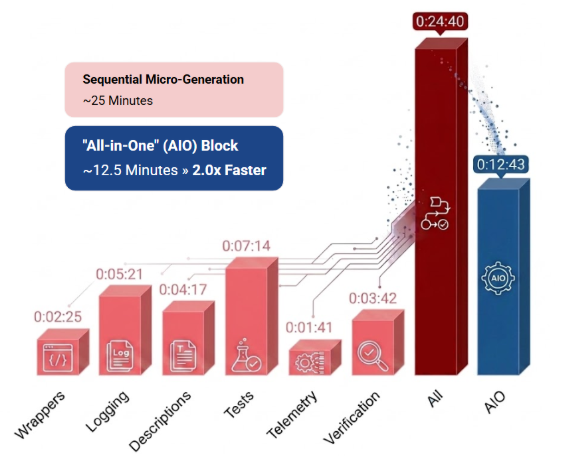
Instead of running separate prompt cycles for each governance domain (which racks up unnecessary back-and-forth latency), Danni uses an optimization. This is a single, unified compliance run.
She drops the entire blueprint criteria right into the chat panel in one go. Mentor parses her application model holistically. It simultaneously wraps her Entities, cleaning up the Exception Handler flows, wiring up custom Log Actions, and generating the required REST endpoints for test automation concurrently.
After fine-tuning individual foundation best practice prompts, merging them into a single one will save you time
The takeaway
Mentor applies the corporate compliance blueprint consistently across the application, refactoring a massive foundation layer in under 13 minutes.
By evaluating her Entity schemas, Exception Handler flows, and custom Log Actions simultaneously rather than running individual updates in linear isolation, the engine reduces processing overhead and visual staging steps.
Danni completes an otherwise brutal, day-long manual configuration checklist in a fraction of the time, keeping her software factory fully compliant while setting her schedule up beautifully for a day of focused work.
Danni’s week - Friday
The industry challenge: The late-week deployment roulette
In traditional software delivery models, Friday afternoon is practically synonymous with high anxiety. Even with meticulous planning, manual governance checklists can easily create bottlenecks under tight deadlines. As a result, delivery teams either rush their deployment pipelines or brace themselves for a weekend of hotfixes when hidden bugs slip into production.
The situation
It’s 3:30 PM on Friday. Right at her desk, Danni is already mashing mint leaves and preparing an office-hours mojito while her application finishes passing through the deployment pipeline and concludes its automated test suites.
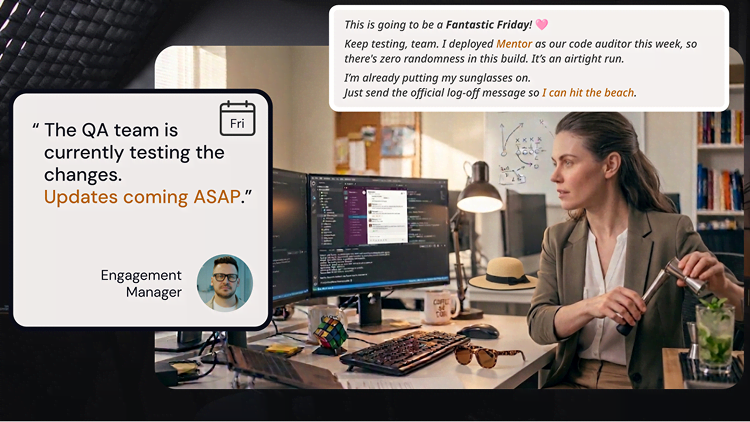
She drops a handful of ice into the glass just as her phone pings with an unexpected notice from the Engagement Manager:
Danni is confident that her work with Mentor was flawless - the weekend will begin shortly
Danni is confident that her work with Mentor was flawless - the weekend will begin shortly
The task: Automated verification alignment
Instead of spending her final office hours sweating over deployment logs or micro-managing test scripts, Danni relies on the rigorous automation gates she set up earlier in the week. Because Mentor systematically audited her visual logic on Wednesday and batch-executed factory compliance rules on Thursday, her application is airtight. She’s in calm standby mode while the platform handles the heavy lifting.
The takeaway
Minutes later, the definitive project management sign-off lands in her inbox:
Danni’s work is done for the week - she is now OOO and living her best life
Danni’s work is done for the week - she is now OOO and living her best life
The Agentic Systems Engineering lifecycle
By looking at Danni’s week, we can see how an intentional framework of Agentic Systems Engineering operates across the entire software delivery lifecycle:
Monday (conversational app generation): Turned raw text requirements into a production-ready application with a built-in enterprise theme—allowing Danni to validate the visual application model before a single element was even published.
Tuesday (context-aware app discovery): Eliminated tribal knowledge by instantly reverse-engineering an intricate legacy application into clear onboarding blueprints.
Wednesday (conversational co-development): Acted as an objective, shift-left quality gate inside ODC Studio, catching unmet acceptance criteria and edge cases during development time.
Thursday (batch automation): Bundled complex factory rules (CRUD isolation, exception flows, telemetry) into a single, unified compliance run to upgrade the Factory Foundation Layer at double the speed.
Friday (Continuous quality gate lifecycle): Paid off completely, clearing final deployment pipelines with zero defects and securing a seamless weekend release.
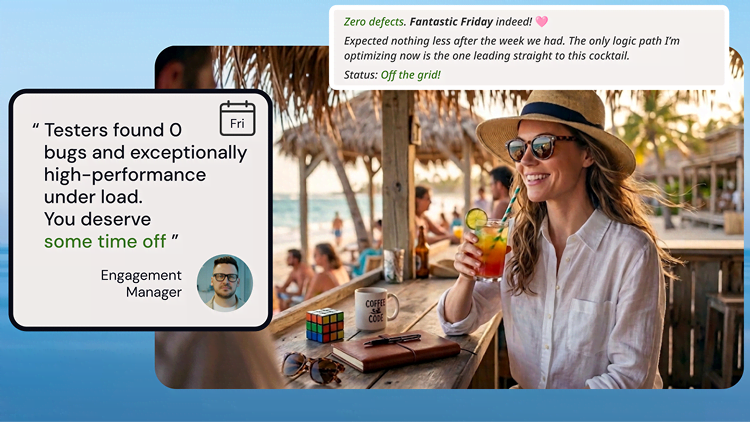
Because Mentor handled the heavy lifting, 3:30 PM Friday doesn't find Danni trapped at her desk fighting hotfixes. Instead, she’s already at a beach bar, after trading her office attire for casual clothes and shades.
With a cocktail in hand, looking completely happy and rested, Danni is officially OOO!
Closing thoughts
Scaling delivery speed must not come at the expense of quality and governance. To implement a successful, reliable AI-assisted development process across your technical teams, anchor your approach with these core pillars:
Eliminate discovery friction: Leverage context-grounded summaries via the Enterprise Context Graph to reduce application onboarding times from days down to minutes.
Enforce objective quality gates: Mandate thorough Mentor-assisted reviews of implementation vs intended functionality (Code vs User Story) to catch logical gaps right inside the IDE before anyone ever clicks publish.
Automate structural governance: Pass repetitive factory compliance requirements to automated batch routines to ensure secure CRUD wrapper actions, standardized exception flows, and telemetry configurations across your Factory Foundation Layer.
Optimize processing efficiency: Consolidate multiple discrete rules into unified, holistic evaluation cycles to maximize model processing efficiency and dramatically reduce execution latency across the visual application model.
Share this article with your team to help them understand how to achieve speed with control using Mentor!
Hope you enjoyed the read!
Next Steps: Moving from chaos to control
To explore how you can empower your teams with context-aware automation while enforcing structural compliance across your pipeline, take your next step today:
For Developers and Tech Leads
OutSystems Developer Cloud - Explore the cloud-native, high-performance low-code foundation that unifies rapid application generation with automated safety gates.
Disclaimer: These prompt design patterns were introduced and validated live at the OutSystems ONE 2026 Conference. Because every enterprise architecture has unique requirements, you should always test, adapt, and refine these prompts within a development environment before running them within your production agentic apps.
Hernâni is the Director of the Professional Services' Technical Solution Delivery, an amazing community of OutSystems Tech Leads & Developers! He joined OutSystems 10 years ago and hasn't looked back since! His mission is to help people grow while using this amazing technology to wow customers and users all around the globe. His wife, 2 daughters, and their little dog Mia are his world - but his eyes also shine when he's playing Final Fantasy!