
開発からデプロイまでを驚きの速さで
リードタイムを心配せず、アプリ関連の依頼を引き受けることができます。ワンクリックでのデプロイ、ビルトインガバナンス、アプリケーションライフサイクル管理、DevOpsを備えたOutSystemsのローコードプラットフォームにより、開発からデプロイ、変更まで手順を高速化できます。








ワンクリックでのデプロイ
専門的なスキルがなくてもアプリを本番に移行することができます。ワンクリックでスクリプトを使用せず自動的にデプロイを実行できます。OutSystemsプラットフォームではアプリポートフォリオ全体の依存関係も管理できるため、デリバリーを高速化し、リスクを最小限に抑えることができます。

ガバナンスの自動化で迅速にエラーなくアプリを変更可能
ビジネス要件の変化にアプリケーションをすばやく適応させることができます。開発者が変更を行うと、OutSystemsプラットフォームに組み込まれた自動ガバナンス機能によって影響の分析やバグの確認が実行され、パフォーマンスがリアルタイムで監視されます。ロールバックや開発の統合も簡単に行うことができます。

LifeTimeだけで完結するライフサイクル管理
OutSystems LifeTimeは、AIを活用した自動化によってアプリケーションライフサイクル管理(ALM)を簡単かつ迅速にします。バッチジョブのスケジュール設定、Webサービスエンドポイント、ビジネスプロパティ、バージョンなどのランタイム構成を、すべて1箇所で完了できます。
DevOpsによる堅牢なデプロイ
OutSystemsのローコードプラットフォームでは、デプロイにDevOpsが最初から組み込まれています。依存関係の分析、インフラやアプリケーションの監視が行われるため、あらゆる問題を未然に防げます。独自のDevOpsツールを使用することも可能です。Union Bank of the PhilippinesがOutSystemsでのDevOpsをどう評価しているかをご覧ください。
継続的統合と継続的デリバリーのパイプライン
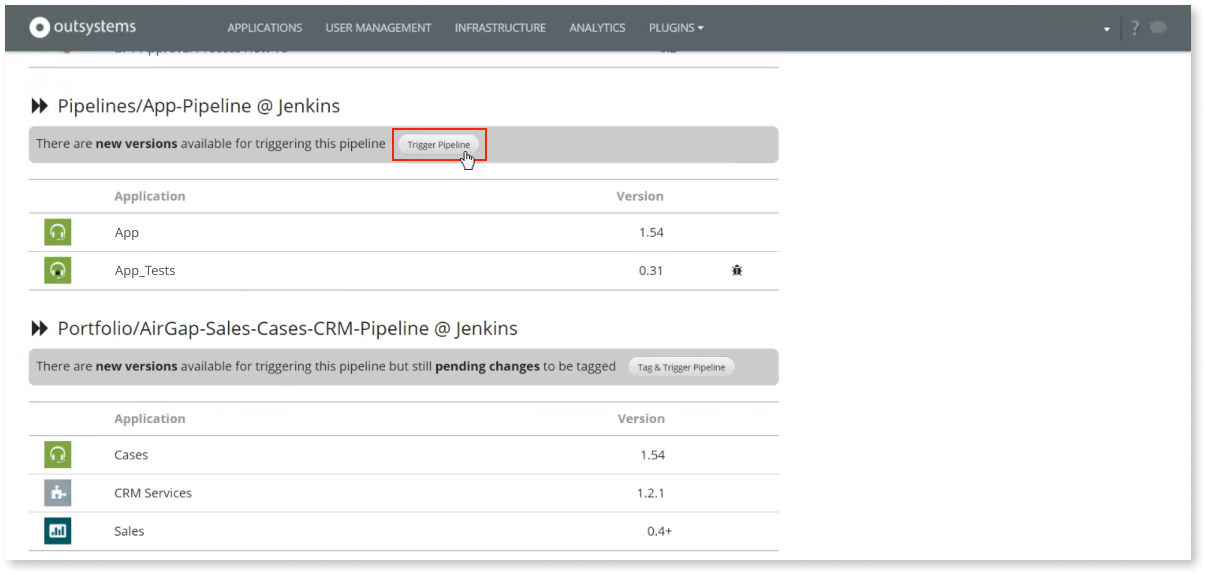
OutSystemsはCI/CDをサポートしています。複数の環境にわたる複雑なアプリポートフォリオのデプロイも、パイプラインがあることでシンプルかつ適切に行えます。パイプラインのステージごとに、またアプリケーションのレイヤーごとに、ロールベースの承認も実装できます。
Development to deployment FAQ
One-click deployment in OutSystems automates app deployment by compiling the application, validating dependencies, updating database schemas, and publishing changes to the selected environment. Automated deployment also handles generated database scripts behind the scenes, reducing manual work while helping teams deploy faster and with less risk.
Yes. OutSystems supports DevOps integration through APIs that connect with CI/CD tools and DevOps tools such as Azure DevOps, Jenkins, and other enterprise services. Teams can trigger deployment processes, align with existing governance workflows, and manage OutSystems as part of their broader delivery pipeline.
OutSystems supports role-based governance for deployment, including custom roles that control who can publish, promote, or deploy applications across environments. Teams can separate developer, QA, and deployment manager responsibilities, define environment-level permissions, and ensure only approved users move applications into production.
During the deployment process, OutSystems performs validation and impact analysis before promoting changes. If dependency conflicts, errors, or breaking changes are detected, deployment is blocked before reaching production. Teams receive notifications and guidance so they can fix issues in a non-production environment first.
OutSystems maintains version history and uses a metadata-driven approach to reduce rollback risk. Instead of immediately hard-deleting database elements, the platform can mark them inactive, helping preserve data if a rollback is needed. This supports faster recovery and reduces the risk of data loss after deployment.
Yes. OutSystems supports automated testing through behavior-driven development frameworks, Forge components, and integration with third-party testing tools. Teams can automate testing as part of the deployment pipeline, including unit, regression, load, security, UI tests, and agent evaluations, so quality gates are enforced before applications reach production.
OutSystems supports a multi-stage deployment pipeline across development, test, and production environments, with additional environments available when needed. Developers publish first to development, then teams can promote changes manually or automate movement through QA and production using CI/CD integrations and governance controls.
OutSystems provides multiple tools to continuously analyze applications for security, performance, maintainability, architecture, and best-practice violations. Teams can receive remediation guidance before release and also integrate third-party scanning tools such as Veracode or Fortify to support security, compliance, and quality requirements before deployment.
Yes. OutSystems supports deployment models for organizations with strict security, compliance, sovereignty, or data residency needs, including on-premises and private cloud options depending on the plan and architecture. These options allow organizations to retain full control over sensitive systems while still using OutSystems for governed application delivery.


バックログへの対応
広範なユースケース、テンプレート、強力なパートナーソリューションを活用することで、あらゆるアプリケーションバックログに対応できます。

OutSystemsの評価
世界中の業界アナリストによるローコードプラットフォームの最新の調査結果や、OutSystemsがローコードプラットフォームのリーダーとされている理由をご覧いただけます。

プラットフォームの詳細
評価ガイドでOutSystemsの詳細をご確認いただけます。