







Unified data for smarter agents and apps
Whether you're building agents or apps that draw from multiple sources, Data Fabric provides a single, trusted layer for smarter decisions, faster execution, and easier adaptation—without the pain of manual integration.

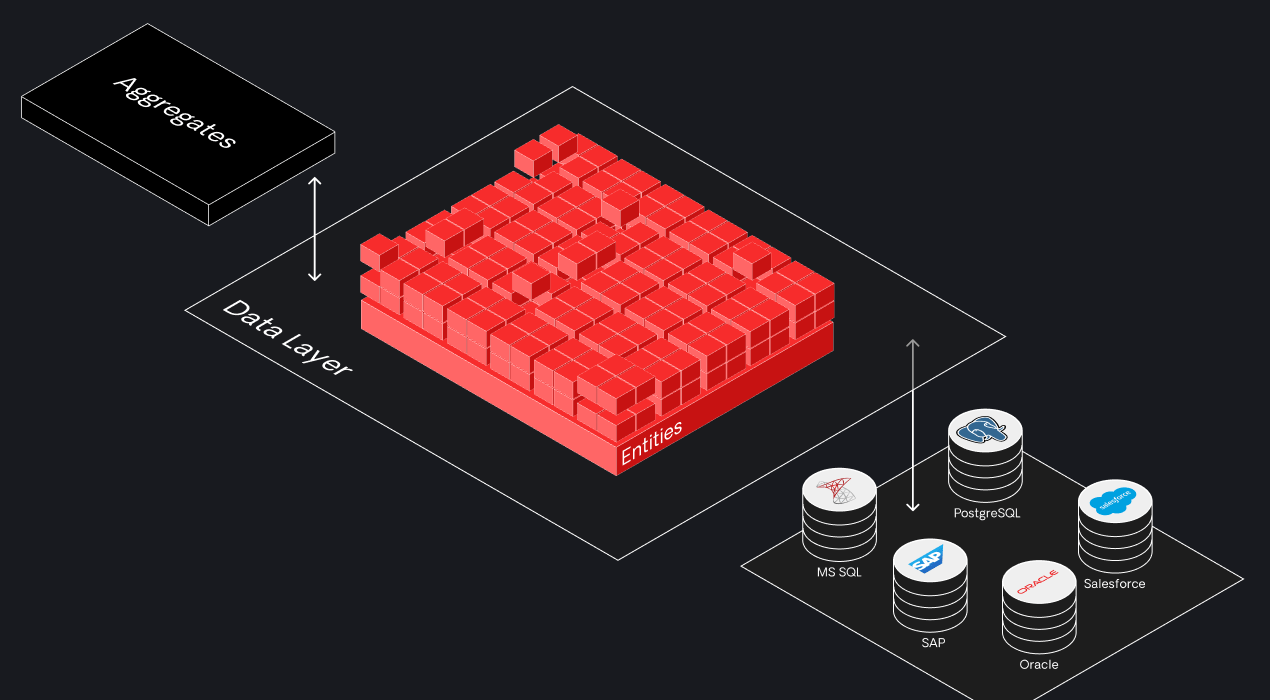
Pre-built connectors to 400+ systems out-of-the-box
Developers can add pre-built connectors to the most common systems of record like SAP, databases like MongoDB and PostgreSQL, and SaaS solutions such as Paypal and Salesforce to logic and workflows. Then, they can securely configure them for connectivity.

SAP
Connect your apps to SAP systems and share common data to optimize and automate business processes.

Salesforce
Build strategic apps for enterprises that turbocharge your Salesforce investment.

ServiceNow
Use your ticketing data in apps to improve user experiences.
Accelerate complex integrations with existing systems
In the OutSystems platform, complex systems integration is easy with plug-and-play elements. Plus, it generates the code necessary for calling an external system. If business requirements change, your team can easily adjust existing integrations.
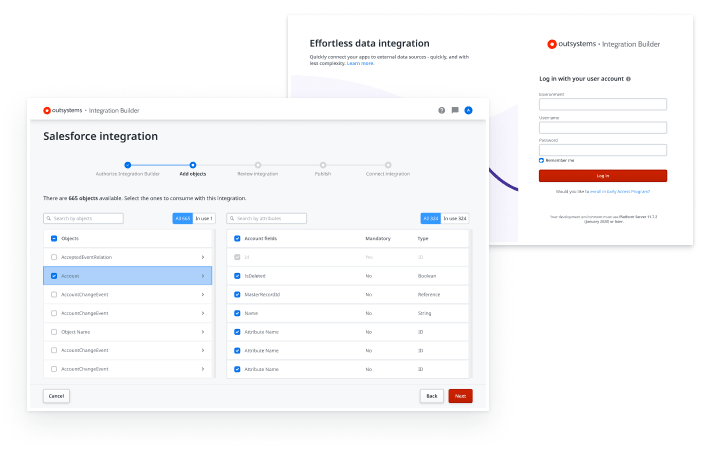
High-performance data access in a few clicks
Applications are nothing without data. The OutSystems agentic systems platform makes it easy for developers to build scalable backend services with certified SAP OData and ABAP connectivity to deliver the low latency needed to support the most demanding consumer apps.

“By combining SAP with add-ons and custom applications, developed using OutSystems, we can exploit the full potential of SAP and still make all our data applicable for web and mobile."

Make building custom connectors easy
Using the OutSystems platform, devs can create reusable connectors to API management, integration platforms, and even the most homegrown of systems. A simple drag-and-drop is all it takes to expose or consume a web service or API.
.gif)
Integrations FAQ
OutSystems integrates with existing systems through REST and SOAP APIs, database connections, prebuilt connectors, and custom integration services. Teams can connect to SAP, Salesforce, Oracle, ERP platforms, and legacy systems without replacing their current infrastructure. This helps extend enterprise systems while keeping data and processes connected.
Yes. OutSystems can consume external REST APIs and expose APIs from applications built on the platform. This lets teams connect to existing services, data sources, and third-party applications using standard integration patterns. REST API support is central to building connected enterprise applications across modern and legacy environments.
OutSystems supports common API authentication methods, including OAuth, tokens, API keys, bearer tokens, and custom headers. Teams can configure secure authentication when consuming external APIs or exposing services from OutSystems applications. This helps maintain enterprise security standards while integrating with internal and third-party systems.
Yes. OutSystems can connect to external databases such as SQL Server, Oracle, and other relational databases. Teams can work with existing data sources without migrating all data into OutSystems. This is especially useful for organizations with established database investments, compliance requirements, or large operational systems.
OutSystems can connect cloud applications to on-premises databases through secure network connectivity, such as VPNs, private gateways, or approved enterprise connection patterns. This allows teams to access data that must remain behind the firewall while still building cloud-based applications that interact with on-premises systems securely.
Yes. OutSystems provides prebuilt connectors for major enterprise systems, including Salesforce, SAP, and other widely used platforms. Teams can also use connectors from Forge or create custom integrations when needed. These connectors reduce development effort and help applications connect to business-critical systems faster.
Yes. OutSystems can integrate with ERP systems such as SAP, Oracle ERP, NetSuite, Microsoft Dynamics, and custom ERP platforms. Integration can happen through APIs, database connections, connectors, or custom services. This allows teams to extend ERP workflows, surface data, and build modern applications around core business processes.
Yes. OutSystems integrates with existing SSO and identity providers such as Azure AD, Okta, and SAML-based systems. It can connect to enterprise identity standards so users authenticate through centralized access management. This helps organizations maintain consistent security, governance, and user access policies across applications.
OutSystems can support data migration and ETL-related processes through integrations, APIs, database connections, and external data tools. While it is not positioned as a dedicated ETL platform, teams can connect OutSystems to existing ETL tools or build controlled data movement processes as part of application workflows.
OutSystems can support large data volumes and batch processing through optimized queries, asynchronous processing, timers, integrations, and scalable architecture patterns. For very large datasets, teams should design data access carefully and use appropriate storage, indexing, and processing strategies to maintain performance across enterprise workloads.
Yes. If a prebuilt connector doesn’t exist, developers can build custom connectors using APIs, custom code, and integration services. OutSystems supports extending applications with C#, REST, SOAP, and JavaScript when needed, so teams can connect to proprietary, niche, or legacy systems without waiting for an official connector.


Build what’s in your backlog
The broadest range of use cases, templates, and powerful partner solutions help you tackle everything in your application backlog.

See how OutSystems stacks up
Get the latest research on AI platforms from global industry analysts and see why OutSystems is known as AI development platform leader.

Go deeper into the platform
Get more details about how your team can build mission-critical applications fast. Browse our evaluation guide.