
Legacy application modernization: Revitalizing business infrastructure
Legacy systems still power critical business operations, but outdated architectures can make even small changes costly and complex. Legacy application modernization helps organizations overcome these limitations, reduce technical debt, and introduce new capabilities without unnecessarily replacing systems that still deliver value.
TL;DR: A successful legacy modernization strategy starts with assessing existing applications, choosing the right approach using the six Rs (rehost, replatform, refactor, rebuild, replace, and retire), and developing a phased roadmap. By prioritizing integration, governance, and business continuity, organizations can reduce migration risk while improving long-term flexibility and performance.

What is legacy modernization?
Legacy modernization is the process of updating older applications, systems, and infrastructure to meet current business and technology requirements. Legacy application modernization can involve changing an application's architecture, improving integrations, moving workloads to newer infrastructure, or rebuilding functionality while preserving essential business processes and data.
A legacy system isn't necessarily obsolete. Many continue to perform critical functions reliably but become difficult to maintain, integrate, or adapt.
Maintenance keeps an existing system operational, modernization improves how it operates or evolves, and replacement substitutes a different application or system for the original.
The modernization of legacy applications can involve any combination of these approaches, depending on the system's business value and technical condition.
The importance of legacy system modernization
Legacy system modernization becomes important when maintaining existing technology starts to constrain business performance, security, or operational flexibility. Warning signs include rising support costs, outdated infrastructure, limited integration capabilities, and slow delivery of new functionality. Addressing these limitations can reduce risk while making critical applications easier to maintain and improve.
In the 2025 State of Application Development report, OutSystems found that 73% of surveyed organizations considered legacy modernization significant or central to their application development strategies.
What are the risks of delaying legacy modernization?
Legacy systems can remain operational for years after their technology becomes difficult to support. The following signals help determine when modernization is necessary and what benefits it can deliver.
Modernization benefits become clearer when they address a defined operational problem. For example, CGI modernized a legacy insurance reconciliation application originally built with Oracle Forms. The company used OutSystems for a new frontend and Microsoft Azure for backend infrastructure, making the application easier to maintain and adapt to changing customer requirements.
Legacy modernization approaches
Organizations can modernize legacy software through six established approaches, commonly called the 6 Rs: rehost, replatform, refactor, rebuild, replace, and retire. Each legacy modernization approach balances implementation effort, technical risk, business disruption, and long-term value differently. The right choice depends on the application's condition, dependencies, and importance to business operations.
Which legacy application modernization strategies should you consider?
The six approaches offer different levels of change. Some preserve most of the existing application, while others fundamentally change or eliminate it.
Effort, risk, and disruption are directional assessments, not fixed benchmarks. Actual outcomes depend on application complexity, dependencies, and migration design. Risk refers primarily to implementation and transition risk.
These legacy software modernization strategies aren't mutually exclusive. An organization might rehost one application, refactor another, and retire several redundant tools while rebuilding a critical system.
Choose the least disruptive approach that meets each application's long-term requirements.
How to choose a legacy modernization strategy
An effective legacy modernization strategy evaluates business value alongside technical health, integration requirements, regulatory exposure, cost, and acceptable risk. Not every application needs to be rebuilt, and replacing a system can introduce more complexity than maintaining it. The decision should reflect both the benefits of modernization and the consequences of changing existing operations.
Should you rebuild, extend, or leave legacy applications in place?
Before committing to an implementation approach, determine how much change the system actually needs.
Extending an existing application can be useful when its underlying business logic remains valuable. Instead of replacing the core system, teams can introduce modern interfaces, automate workflows, or expose functionality through APIs.
Leaving a system in place should also be an intentional decision, supported by regular assessments rather than postponed indefinitely.
How can modernization work alongside existing ERP, CRM, and core systems?
Legacy modernization doesn't require organizations to replace every connected system.
Existing ERP, CRM, SAP, mainframe, and legacy database environments can continue supporting critical operations while teams modernize the applications and processes around them.
Integration approaches include:
- APIs and service layers: Expose existing functionality and data to modern applications without directly changing core systems.
- Data integration: Connect modern applications to legacy databases while maintaining appropriate access controls and data consistency.
- Event-driven integration: Allow applications to exchange updates as business events occur, where the underlying systems support this model.
- Process orchestration: Connect workflows across existing and modern systems without consolidating all functionality into one application.
For mainframe environments, including those running COBOL applications, business rules and data dependencies may need to be documented before functionality can be safely extracted or rebuilt.
Green Cargo's incremental modernization utilized this approach seamlessly. Rather than immediately replacing its mainframe logistics system and SAP ERP environment, the company adopted OutSystems and Microsoft Azure to introduce new digital capabilities while continuing to use existing core systems.
Is phased modernization better than a big-bang replacement?
Phased modernization is generally better suited to complex environments where business continuity, dependencies, and migration risk require careful management.
An incremental approach modernizes applications or components in stages. Teams can validate functionality, gather user feedback, and retire older components as replacements become operational.
A big-bang approach moves from the legacy environment to its replacement through a single coordinated transition. It may be appropriate for smaller, self-contained systems, but interconnected enterprise applications can make the transition difficult to validate and reverse.
Phased delivery introduces its own challenges, including temporary integrations, parallel operating costs, and coordinating multiple versions of a system. Consider these trade-offs when selecting a migration approach.
How should you evaluate modernization costs and risks?
A modernization business case should compare the cost of changing a system with the cost and risk of continuing to operate it.
Consider the full financial picture:
- Current operating costs: Infrastructure, licensing, maintenance, specialist support, and technical debt
- Implementation costs: Assessment, development, integration, testing, migration, and training
- Transition costs: Parallel environments, data synchronization, cutover preparation, and contingency planning
- Future operating costs: Platform subscriptions, ongoing enhancements, security, monitoring, and support
- Expected business value: Improved productivity, faster delivery, reduced operational exposure, and improved customer or employee experiences
Use a consistent evaluation period and make assumptions explicit. Include the cost of retiring old technology, not simply deploying its replacement.
Risk assessments should address data integrity, regulatory requirements, user adoption, business continuity, and recovery procedures.
A strong business case connects specific modernization investments to measurable operational improvements rather than relying on generalized promises of faster development or lower costs.
How to assess your legacy application portfolio
A legacy application modernization assessment identifies which applications exist, what they support, how they connect, and where modernization will create the most value. It should combine technical analysis with business input, exposing dependencies that may not appear in architecture diagrams or documentation. The result is a prioritized inventory that informs modernization decisions.
What should a legacy application assessment include?
Start by establishing an accurate inventory of the application portfolio. For each system, document:
- Business purpose and ownership: Core functions, users, stakeholders, and accountable teams
- Technical architecture: Languages, frameworks, databases, infrastructure, and deployment environments
- Dependencies: Connections to other applications, APIs, ERP systems, mainframes, and shared services
- Business criticality: Operational importance, usage, service expectations, and outage impact
- Technical health: Maintenance history, known vulnerabilities, support status, and technical debt
- Data and compliance requirements: Sensitive information, retention policies, access controls, and audit obligations
- Cost and resources: Licensing, infrastructure, support effort, and specialist knowledge
Existing architecture repositories, configuration management databases, source code, integration logs, and stakeholder interviews can help establish this inventory.
However, documentation alone may not reveal every dependency. Systems that share databases, exchange files, or rely on undocumented business rules require additional investigation.
How do you prioritize applications for modernization?
Prioritization should balance business value, urgency, technical complexity, and implementation risk.
A practical method is to group applications into three categories:
- Modernize first: Applications with clear business value, pressing technical needs, manageable dependencies, and committed business ownership.
- Plan for later phases: Complex or highly interconnected systems that require additional architectural work, dependency mapping, or migration preparation.
- Maintain or retire: Stable systems that don't currently justify modernization, along with redundant applications that can be decommissioned safely.
The best first candidate isn't always the oldest or most expensive system. An application with manageable complexity and a measurable business outcome can provide a useful opportunity to establish development standards and validate the modernization approach.
For example, a pharmaceutical company's application portfolio assessment identified 25 legacy applications requiring replatforming in 2021. The company prioritized a customer quotation system because it offered meaningful business value without excessive complexity, allowing its team to gain experience before tackling additional applications.
Step-by-step legacy modernization roadmap
A legacy modernization roadmap translates portfolio assessment findings into a sequence of manageable activities, from discovery and planning through development, migration, and continuous improvement. The modernization of legacy applications works best when each phase has clear ownership, measurable outcomes, and defined validation criteria. The roadmap should also account for integration, security, governance, and business continuity.
What are the steps in legacy system modernization?
The sequence may vary depending on architecture and regulatory requirements, but validation should occur throughout the process rather than only before launch.
For mission-critical applications, establish rollback procedures, data reconciliation checks, and acceptance criteria before migration. Parallel operation can support validation when the architecture allows it, though it adds temporary cost and complexity.
A successful pilot should demonstrate more than technical feasibility. It should also confirm that the team can support, govern, and improve the application after deployment.
The role of agentic AI in legacy modernization
Agentic AI can support legacy modernization by helping teams analyze existing code, document dependencies, generate application components, and coordinate development or testing activities. Unlike conventional automation, agentic systems can use tools and execute defined sequences of tasks. However, human oversight remains essential for validating business logic, security, performance, and the accuracy of modernized applications.
Where can AI help modernize legacy applications?
AI-powered app modernization can reduce the manual effort involved in understanding complex application environments, particularly when documentation is incomplete or outdated.
Potential uses include:
- Code and dependency analysis: Examine legacy source code, identify relationships, and help document business rules or integration points.
- Requirements extraction: Translate existing application behavior into specifications that architects and business stakeholders can review.
- Application generation: Assist with producing new application components, interfaces, and workflows based on validated requirements.
- Testing: Generate test cases, identify potential inconsistencies, and support regression testing against existing behavior.
- Documentation: Create or update technical documentation as applications and integrations change.
AI in app modernization can be particularly useful when organizations have accumulated years of custom logic across systems that are difficult to understand or maintain.
For example, legacy system modernization with AI may involve analyzing COBOL or other older source code to identify business rules before rebuilding functionality in a modern environment.
What still requires human review?
AI-generated specifications and code should be treated as inputs to the modernization process, not as verified replacements for the original system.
Architects, developers, security teams, and business stakeholders must validate:
- Whether extracted business rules accurately reflect existing behavior
- Whether generated functionality meets business and regulatory requirements
- Whether data migration preserves accuracy, completeness, and integrity
- Whether integrations meet security and performance requirements
- Whether testing covers critical workflows, edge cases, and failure scenarios
Agentic AI can also introduce additional governance considerations, including tool permissions, access to sensitive code and data, traceability, and human approval of consequential actions.
Using AI for app modernization doesn't eliminate integration complexity, undocumented requirements, or migration risk. Its value depends on accurate enterprise context, controlled execution, and reliable validation.
Legacy modernization examples show how organizations adapt their strategies to different business environments. Banks may prioritize transaction continuity and regulatory compliance, while manufacturers focus on operational systems and integration. Healthcare, education, and government organizations must also consider data protection, service availability, and specialized workflows. Real customer outcomes help demonstrate how these priorities translate into modernization projects.
Banking and financial services
Financial institutions often need to modernize customer-facing services while protecting core transaction processing, data integrity, and compliance controls.
Santander Consumer Portugal faced a complex architecture shaped by mergers and acquisitions, making it difficult to introduce new financial products and services.
Working with OutSystems and KPMG, the bank modernized its architecture and introduced new digital channels. According to the Santander Consumer case study, the bank had replaced 70% of the processes in its legacy core systems by the beginning of 2020.
Insurance
Insurance modernization often involves complex business rules, document-heavy workflows, and integrations across policy, claims, and brokerage systems.
Tysers needed to digitize traditional insurance brokerage processes and standardize workflows across business lines. The company developed Tconnect with OutSystems, integrating with core insurance systems and using robotic process automation where legacy APIs were unavailable.
Following its 2021 launch, Tysers reported savings of 400 staff hours per week and a 60% reduction in average customer query resolution time.
Gen Re faced a different challenge: modernizing a complex portfolio that included mainframe systems, Lotus Notes applications, and packaged software.
After adopting OutSystems in May 2021 and establishing reusable architecture and development standards, Gen Re delivered 30 applications in its first nine months.
Transportation and logistics
Logistics organizations depend on interconnected systems for scheduling, inventory, operational data, and customer services. Modernization must account for these dependencies and the need for continuous operations.
Green Cargo chose incremental cloud migration over a large-scale replacement of its legacy mainframe logistics and SAP ERP environments. Using OutSystems and Microsoft Azure, the company introduced modern applications and services while maintaining access to existing systems.
Its modernization experience demonstrates how a phased approach can preserve investments in core technology while enabling new capabilities.
Manufacturing
Manufacturers often rely on custom systems supporting production, distribution, supply chains, and internal operations. Replacing these applications requires careful consideration of dependencies and operational disruption.
Mazda needed to address an aging Java development environment and a portfolio of approximately 500 legacy applications targeted for migration.
After adopting OutSystems in 2018, Mazda established reusable architectural standards, integration interfaces, and a center of excellence to support application redevelopment.
The Mazda legacy migration case study describes how this foundation supported a more repeatable modernization process and improved developer productivity.
Healthcare and pharmaceuticals
Healthcare modernization requires particular attention to sensitive data, access controls, system interoperability, and the availability of critical services.
A pharmaceutical company's Israeli subsidiary needed to replace local applications built with SharePoint and InfoPath as those technologies approached decommissioning.
After identifying its modernization priorities, the company used OutSystems and a co-delivery approach to rebuild its customer quotation process. Its pharmaceutical modernization case study describes how the team delivered the first application in less than two months in 2021 while building internal development capabilities.
Education
Educational institutions may need to modernize student information systems, administrative applications, learning services, and departmental tools.
Modernization planning should account for academic calendars, student data privacy, accessibility, and integrations between systems. A phased approach can help institutions improve individual services while minimizing disruption to enrollment, teaching, and administrative operations.
Government and public sector
Government organizations must balance modernization with accessibility, information security, public accountability, and continuity of essential services.
The Crown Prosecution Service, the public prosecution agency for England and Wales, needed to rebuild legacy applications to support the UK government's cloud-first direction.
Without an established in-house development team, the agency adopted OutSystems and developed internal capabilities to deliver replacement applications and new services.
The Crown Prosecution Service case study shows how modernization can support both technology renewal and the development of internal skills.
How to evaluate a legacy modernization platform or vendor
Choosing a legacy modernization platform requires evaluating more than development speed or initial implementation cost. Enterprise buyers should examine how well each option integrates with existing systems, supports phased delivery, preserves business logic, and governs applications throughout their lifecycle. Long-term maintenance requirements, code portability, migration evidence, and total cost of ownership are equally important.
How do different modernization routes compare?
Organizations commonly evaluate custom redevelopment, AI-assisted code conversion, and development platforms with visual or low-code capabilities.
These approaches can also overlap. For example, an organization may use AI-assisted analysis to inform redevelopment on an enterprise development platform.
What should a modernization platform evaluation checklist include?
Use the following criteria when comparing vendors:
- Enterprise integration: Compatibility with existing ERP, CRM, SAP, mainframe systems, legacy databases, APIs, and integration patterns
- Phased delivery: Support for modernizing applications incrementally while maintaining existing operations
- Development capabilities: Customization, reusable components, AI-assisted development, testing, and support for complex business logic
- Security and governance: Role-based access, audit trails, compliance controls, architecture standards, and application lifecycle oversight
- DevOps compatibility: Integration with existing development workflows, testing processes, deployment pipelines, and monitoring
- Code portability: Transparency around generated code, source code access, export options, runtime dependencies, and migration requirements
- Customer evidence: Documented examples involving comparable legacy technologies, business complexity, and modernization approaches
- Cost model: Implementation expenses, subscriptions, infrastructure, training, maintenance, support, and potential exit costs
What questions should you ask modernization vendors?
Before selecting a platform or implementation partner, ask:
- How will the platform integrate with our existing systems while we modernize in phases?
- How will you identify, document, and validate business rules embedded in legacy applications?
- What evidence can you provide from customers with comparable technical and regulatory requirements?
- What testing, rollback, and recovery capabilities help protect business continuity during migration?
- What security, governance, and monitoring capabilities are available throughout the application lifecycle?
- What happens to our applications, source code, and data if we change platforms or vendors?
- What costs should we expect during implementation, parallel operation, and long-term maintenance?
- Which modernization activities can AI support, and which require human validation?
A vendor should be able to demonstrate these capabilities against realistic application scenarios rather than relying solely on feature descriptions.
For complex environments, a proof of concept that includes representative integrations, business rules, security controls, and deployment requirements can expose limitations before a larger commitment.
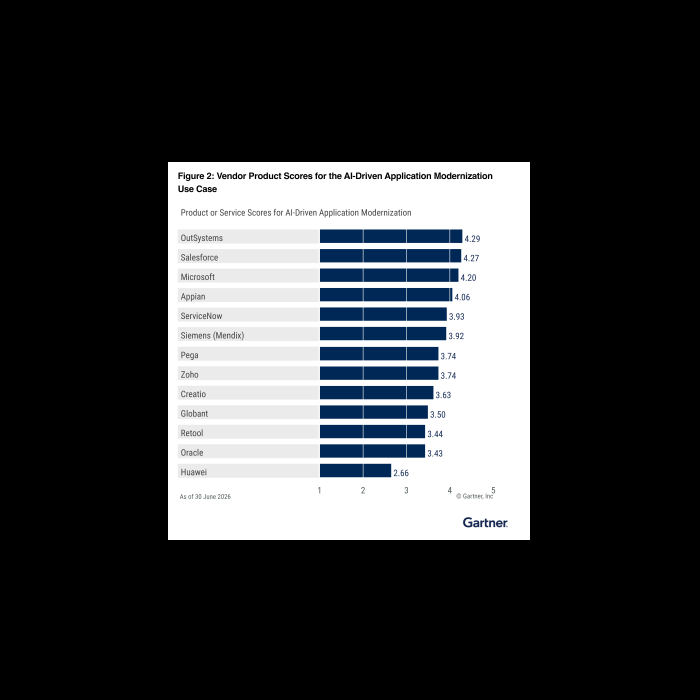
OutSystems supports legacy modernization through visual and AI-assisted development, enterprise integration, reusable components, and application lifecycle governance. Organizations can rebuild outdated applications, extend existing systems, and introduce new interfaces or workflows without treating every modernization initiative as a complete replacement. Its approach supports phased delivery while maintaining connections to essential systems and data.
The OutSystems legacy modernization initiative describes an AI-assisted process where legacy source code is analyzed to produce human-readable specifications, architects validate the resulting business logic, and teams rebuild and modernize applications in controlled phases.
The platform also supports integrating modern applications with existing enterprise architecture and applying governance across development, deployment, and ongoing management.
Successful customer use cases, such as Gen Re, Green Cargo, and Mazda, highlight different approaches to modernizing complex application portfolios.
For organizations planning their modernization strategy, the IT leaders guide for core systems modernization provides additional guidance. Teams evaluating a specific use case can also schedule a demo to explore integration, application development, and governance capabilities.
Useful resources
Legacy modernization helpful resources

Learn the fundamentals of modern development


Frequently asked questions
Legacy modernization timelines depend on application complexity, dependencies, development requirements, and the chosen approach. Rehosting a relatively self-contained application generally involves less redevelopment than rebuilding a complex core system.
A portfolio-wide initiative may require multiple phases. Establish realistic timelines through application assessment, dependency mapping, pilot delivery, and validation rather than assuming one timeframe applies to every project.
Legacy modernization costs depend on the number and complexity of applications, integration requirements, technology choices, and migration approach.
Budgets should account for assessment, development, infrastructure, licensing, data migration, testing, training, and ongoing support. Include temporary expenses such as parallel environments and the costs of maintaining existing systems until retirement.
A total cost of ownership comparison helps evaluate modernization against continued maintenance or full replacement.
Rebuild a legacy application when its business logic remains valuable but its architecture is unsuitable for future needs. Replacement may be appropriate when an existing product can satisfy requirements without extensive customization.
Before deciding, compare functionality, integration complexity, migration effort, long-term maintenance, and business risk. Some applications are better extended than rebuilt or replaced.
Minimizing downtime requires a migration strategy that accounts for system dependencies, data synchronization, testing, and cutover procedures.
Phased deployment, parallel operation, and carefully planned transitions can help maintain service availability. However, zero-downtime migration shouldn't be assumed or guaranteed without validating the specific architecture and operational requirements.
Reducing vendor lock-in starts with evaluating code portability, data access, open standards, integration options, and contractual exit terms.
Ask vendors whether applications and data can be exported, what runtime dependencies remain, and what would be required to migrate to another environment. Assess ongoing licensing and maintenance requirements alongside initial development capabilities.
Prioritize applications using business value, technical health, risk exposure, dependency complexity, and modernization cost.
Start with applications that have clear business outcomes and manageable implementation requirements. Highly interconnected or mission-critical systems may need additional preparation before migration.
A portfolio assessment helps distinguish applications that should be modernized immediately from those that can remain operational or be retired.
AI can accelerate parts of legacy modernization, including code analysis, requirements extraction, application generation, documentation, and testing.
Legacy modernization with AI still requires portfolio assessment, architectural planning, integration design, and human validation. AI-generated outputs must be checked against actual business rules, security requirements, and expected application behavior before production deployment.
Legacy modernization projects can fail when organizations underestimate dependencies, lose critical business logic, select an unsuitable technology approach, or neglect testing and stakeholder involvement.
Other risks include unclear ownership, unrealistic budgets, inadequate data migration planning, and insufficient governance.
Reducing these risks requires a documented modernization strategy, realistic business case, phased implementation where appropriate, and defined acceptance and recovery criteria.