
Low-code apps & app builders: Accelerating app development
Delivering modern apps fast is now table stakes. Customers expect seamless digital experiences, your teams are juggling complex backlogs, and traditional software development can’t always keep up. That’s why more IT and digital leaders are turning to low-code apps built on low-code app builders—platforms that give you visual tools, automation, and built-in governance to move faster without sacrificing control.

With the right enterprise low-code app builder, your teams can design, build, and ship secure, scalable applications in weeks instead of months—while reusing components, integrating existing systems, and layering in AI where it makes the most impact.
What is a low-code application?
A low-code application is a web, mobile, or desktop app built using a visual development platform instead of hand-coding everything from scratch. Developers and business experts work together in a drag-and-drop environment that generates the underlying code and handles a lot of the complexity for you—like data models, UI components, and integrations.
Low-code apps are still real software. They can connect to your core systems, follow your governance rules, and scale to thousands of users. The main difference is how they’re built: instead of stitching together frameworks and libraries, teams use a low-code application builder or low-code app development platform to design, assemble, and deploy apps much faster.
By definition, every low-code app is created on top of a low-code app builder. The platform provides the building blocks, guardrails, and automation that make low-code app development so efficient.
How do low-code apps work?
Low-code apps are powered by a few core concepts:
- Visual development environment
Teams build screens, workflows, and data models using visual designers—dragging and dropping components instead of writing boilerplate code. The platform translates these designs into optimized application code. - Reusable components and templates
Common building blocks—login screens, dashboards, forms, integrations—are packaged as reusable components. This cuts down repetitive work and keeps UX and behavior consistent across apps. - Built-in integrations
Low-code app builders provide connectors to databases, SaaS tools, and legacy systems. Instead of hand-coding APIs, teams configure integrations visually and reuse them across applications. - Automated workflows and business rules
Business processes are modeled as visual workflows. Rules, approvals, and automations are configured once, then reused and audited centrally. - One-click deployment and lifecycle management
The platform handles builds, deployments, versioning, and environment promotion. Dev, test, and production are managed with repeatable pipelines instead of ad hoc scripts. - Governed, monitored runtime
Low-code platforms centrally enforce low-code app security, governance policies, and performance monitoring so you can manage many apps at scale.
What is a low-code app builder?
A low-code app builder (or low-code development platform) is the environment you use to design, build, integrate, deploy, and manage low-code apps. It provides the visual tools and runtime needed to handle everything from UI and workflows to data, integrations, and security—so teams can focus on solving business problems rather than wrestling with infrastructure.
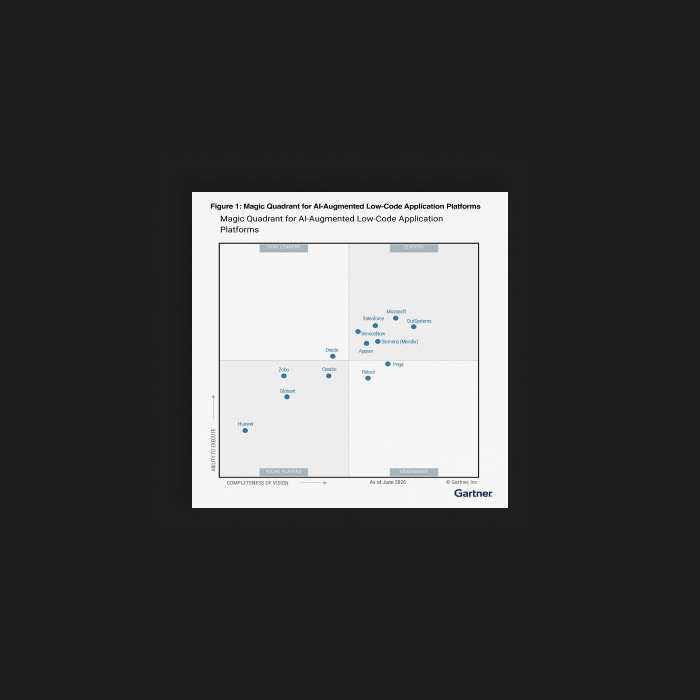
Most buyers researching low-code app development will encounter a mix of platforms. Widely recognized low-code app builders include:
- OutSystems: An enterprise-grade low-code app builder for mission-critical web and mobile apps, with deep integration capabilities, strong governance and security, and advanced AI and agentic features to support complex, large-scale portfolios.
- Mendix: An enterprise low-code platform focused on complex, multi-experience apps with strong collaboration and governance features.
- Microsoft Power Apps: A low-code app builder tightly integrated with the Microsoft ecosystem (Power Platform, Dynamics 365, Microsoft 365) for rapid line-of-business apps.
- Appian: A platform that combines low-code, process automation, and case management for end-to-end business workflows.
- Retool: A development environment geared toward internal tools and dashboards, using prebuilt components connected to databases and APIs.
- Appsmith: An open-source low-code app builder that helps teams assemble internal apps and admin panels using a library of widgets and connectors.
What differentiates an enterprise low-code app builder like OutSystems is the ability to handle mission-critical apps with enterprise-grade security, scalability, governance, and extensibility—without losing the speed and simplicity that make low-code so compelling.
What are the benefits of a low-code app builder?
A modern low-code app builder gives you more than just a faster way to create forms. It provides a complete environment for low-code app development that can evolve with your business.
Key benefits include:
- Accelerated development and delivery
- More value from your development talent
- Cross-platform experiences by default
- Built-in governance, compliance, and security
- Scalability and performance at the platform level
- Faster modernization and integration with core systems
- AI-ready foundation for the future
Explore our guide to low-code benefits for a deeper dive
Low-code app builders, for AI-powered apps
AI is increasingly central to digital products—from personalized customer experiences to automated decision-making. A low-code AI app builder helps you bring AI into real applications faster by:
- Embedding AI assistants inside the development environment to suggest logic, optimize queries, and generate UI scaffolds.
- Integrating with popular AI models and services so teams can add language understanding, recommendations, or anomaly detection without reinventing the wheel.
- Orchestrating agentic AI—collections of AI agents that can plan, act, and learn across your app landscape—to automate more complex, end-to-end workflows.
With OutSystems, you can use Agentic AI Workbench to design and manage AI agents as part of your low-code app development strategy, making it easier to realize the benefits of low-code tools for building AI apps without compromising on governance or security.
Learn more about OutSystems Agentic AI Workbench
Key features of a low-code app builder
While every platform is different, most enterprise low-code app builders share a core set of capabilities. When you’re evaluating options, look for features like:
- Visual UI designers
Drag-and-drop layouts, responsive components, and reusable design systems that help teams build consistent experiences across apps and channels. - Workflow and process automation
Visual workflow editors for modeling approvals, routing, SLAs, and exception handling, with clear visibility into how work flows across the organization. - Data modeling and integration tools
Centralized tools for defining data models, connecting to databases and external APIs, and synchronizing data across systems without manual integration code. - Security and access control
Built-in authentication, authorization, encryption, and policy enforcement so every low-code app inherits the same low-code app security standards from day one. - Scalability and performance management
Platform-level features for clustering, load balancing, and monitoring that ensure your low-code apps stay fast and reliable as usage grows. - DevOps and lifecycle management
One-click deployment, environment promotion, version control, and rollback capabilities that support modern DevOps practices and multiteam collaboration. - Extensibility with custom code
The ability for developers to extend the platform with custom code, libraries, or services when needed—without losing the speed and governance benefits of low-code.
Securing applications built with low-code app builders
Security is often a top concern when organizations evaluate low-code platforms. The good news: when done right, low-code app security can be equal to—or stronger than—traditional app development, because security is managed at the platform level instead of being reinvented for every project.
Enterprise low-code app builders like OutSystems offer:
- Standardized authentication and authorization patterns
- Centralized secrets management and encryption
- Built-in protections against common vulnerabilities (such as injection and XSS)
- Fine-grained role-based access control and audit logging
- Governance policies that span all apps running on the platform
That means every new low-code app inherits a hardened security posture by default, rather than relying on each team to implement its own controls.
To evaluate enterprise low-code apps from a security perspective, look for:
- Independent security certifications and attestations
- Secure-by-design development and runtime architecture
- Built-in compliance support for your industry
- Transparent documentation of how the platform handles data, identity, and access
Explore the OutSystems Security Evaluation Guide for a deeper look at how our platform addresses application and platform-level security.
Low-code app builder vs traditional development
Low-code and traditional development aren’t enemies. In most organizations, they work side-by-side. Low-code app builders shine when you need to deliver business applications quickly, keep pace with change, and empower cross-functional teams. Traditional development may still be the better fit for highly specialized, low-level, or infrastructure-heavy use cases.
Here’s a side-by-side comparison to help you differentiate between the two:
For many organizations, an enterprise low-code app builder becomes the default choice for business applications, with traditional development reserved for specialized components, services, or infrastructure work.
Low-code use cases
Low-code apps show up everywhere—from customer-facing portals to the systems that keep operations running smoothly behind the scenes. Because low-code app development speeds up delivery without sacrificing quality, it’s especially powerful when you need to modernize processes or launch new services under time pressure.
Customer portals: The front door for modern businesses
Customer portals are one of the most common low-code web app use cases. With a low-code app builder like OutSystems, organizations can quickly stand up modern, secure portals that give customers and partners always-on access to the services they rely on.
Examples include:
- American Integrity Insurance: Claims self-service in weeks, not months
Ahead of hurricane season, American Integrity Insurance used OutSystems to build a First Notice of Loss (FNOL) claims portal in about eight weeks. The portal lets policyholders submit, review, and track claims 24/7 from any device, automatically triages claims by severity, and significantly eases pressure on the call center during catastrophic events.
Read the full case study
- Duvel Moortgat: Multi-portal experience for distributors and partners
Belgian brewer Duvel Moortgat relies on OutSystems to support a network of seven portals and two mobile apps, including multiple sales order portals for distributors, a safety portal, and a complaints portal. With a small IT team, Duvel now delivers portal enhancements in weeks instead of months, improves order visibility, and responds faster to changing market and customer needs across regions.
Read the full case study
- AXA: Broker and customer access to claims data, anytime
AXA built its eServe insurance portal with OutSystems to give more than 3,000 brokers real-time access to customer claims data from any device. Developed in roughly half the time of traditional methods, the portal integrates with AXA’s legacy systems, reduces call center dependency, and has since been extended with a customer-facing version for policyholders.
Read the full case study
Together, these low-code customer portals show how organizations use OutSystems to modernize their digital “front door,” reduce call volume, improve customer and broker experience, and create a foundation for future enhancements like predictive insights or AI-driven support.
Core systems: Streamlining business operations
Low-code isn’t just for front-end experiences. Many organizations use enterprise low-code apps to modernize core systems and processes:
- Extending legacy policy administration, banking, or ERP systems with modern interfaces and workflows.
- Building orchestration layers that consolidate data from multiple systems of record into a single, governed experience.
- Incrementally replacing brittle legacy modules with low-code services, reducing the risk of big-bang migrations.
By wrapping and gradually re-platforming core systems using a low-code app builder, enterprises can streamline operations and reduce technical debt while keeping the business running smoothly.
Employee applications: Making life easier for your team
Employees want tools that help them work smarter, not harder. This means applications that simplify workflows and enhance productivity without the frustration of handling outdated systems.
This is where low-code comes in—to provide organizations with the opportunity to build employee apps that are intuitive, simple, and customizable. It’s ideal for employee-facing apps that improve productivity and employee experience, including:
- Branch and relationship manager tools for banks like KeyBank, which use low-code apps to give frontline staff a unified view of customer data and next-best actions.
- Field and operations apps for organizations like Medtronic, providing employees with mobile access to the data, workflows, and status updates they need to do their jobs effectively.
- Internal apps for HR, IT, and finance that digitize manual processes, automate approvals, and give employees a single place to submit requests.
These apps are often where low-code app builders deliver the fastest ROI—closing gaps that have historically been handled by spreadsheets, email, and manual workarounds.
Practical examples of low-code apps
Low-code apps span industries and functions, but many use cases fall into a few recognizable categories. Below are examples organized by audience and purpose, plus how a low-code app builder supports each.
Customer-facing low-code apps
Customer-facing apps are all about making it easy for people to interact with your brand on their terms.
Examples include:
- Citizen service portals: One-stop portals where residents can submit permits, pay fees, or request services, powered by workflows built in a low-code app builder.
- Mobile banking apps: Account views, money movement, and secure messaging built on top of core banking systems using low-code app development to speed delivery.
- Insurance portals: Policy, claims, and billing portals that give customers real-time visibility and self-service options.
- Virtual care experiences: Appointment booking, telehealth visits, and patient monitoring tools that integrate EMR systems with low-code APIs and workflows.
- Digital lending platforms: Online loan origination, underwriting, and decisioning workflows orchestrated through a low-code platform.
- Claims management interfaces: Digital experiences for filing and tracking claims, often connected to multiple back-end systems.
In each case, a low-code app builder helps teams rapidly iterate on UX, integrate with core systems, and ensure strong low-code app security for sensitive customer data.
Operational and field low-code apps
Operational and field apps focus on efficiency, visibility, and control across complex processes.
Examples include:
- Field service apps: Mobile tools that guide technicians through jobs, capture data, and sync with back-office systems in real time.
- Supply chain visibility systems: Low-code apps that centralize supplier data, shipments, and inventory status across multiple partners.
- Internal case management: Workflows that manage tickets, investigations, or exceptions across departments, built with configurable case types and SLAs.
- IT service management portals: Self-service IT portals and back-office tools for incident, change, and request management.
Low-code app builders are particularly useful here because they can orchestrate workflows across multiple systems, enforce governance, and adapt quickly as processes change.
Employee and office apps
Employee and office apps improve the day-to-day experience for people inside your organization. Examples include:
- Employee onboarding apps: Coordinating tasks, documentation, and approvals for new hires across HR, IT, and facilities.
- Self-service employee portals: A single place for employees to submit requests, access FAQs, and manage HR and IT tasks.
- Office and facilities management apps: Room booking, maintenance requests, and asset tracking consolidated into user-friendly interfaces.
- Performance and objectives management: Tools for setting, tracking, and reviewing goals that integrate with your HR systems.
- CRM and ERP enhancements: Custom screens and workflows that sit on top of CRM/ERP data to better reflect how your teams actually work.
Because these apps often cut across departments, low-code apps built on an enterprise low-code app builder can enforce consistent UX, security, and governance while evolving with your organization.
Who can build low-code apps?
One of the biggest advantages of low-code app development is that it opens participation to a wider range of people—while still keeping professional developers in the driver’s seat for architecture, security, and complex logic.
Various teams can benefit from the right low-code app builder:
- Business users (non-technical)
Business analysts, operations specialists, and subject-matter experts can help design screens, define workflows, and configure rules using visual tools. They bring domain knowledge directly into the development process instead of handing off static requirements documents. - Developers (technical)
Professional developers use low-code to move faster, focus on the hardest problems, and ensure apps are well-architected. They extend the platform with custom code and integrations where needed, and set standards for performance, security, and reuse. - Architects and IT leaders
Enterprise architects and platform owners govern how low-code app builders are used across the organization—defining patterns, reference architectures, and guardrails so that apps are scalable, maintainable, and secure.
Low-code app builders are also used across different organization types:
- Large enterprises: To modernize core systems, consolidate tech stacks, and scale app delivery across many teams.
- Mid-sized organizations: To digitize key processes and avoid the cost and complexity of custom development.
- Start-ups and entrepreneurs: To get to market quickly with MVPs and iterate without building a large engineering team upfront.
For teams who are new to low-code app development, structured learning paths and certifications can accelerate adoption.
Explore the OutSystems Learn resources to build skills and guide your low-code learning journey.
How to choose a low-code app builder
Choosing the right enterprise low-code app builder starts with your project and portfolio goals. Instead of comparing platforms in isolation, evaluate them based on how well they support the apps and outcomes you care about.
Key criteria to consider:
- Type of apps you need to build
Are you focused on web apps, mobile apps, internal tools, external portals, or a mix of all four? Make sure the platform supports your primary use cases—customer-facing experiences, operational workflows, employee apps, or all of the above. - Scale and complexity
Consider whether you’re building small departmental apps, high-volume transactional systems, or mission-critical enterprise low-code apps. Look for proven references at a similar scale and complexity. - Technology requirements and extensibility
Check how easily the platform integrates with your existing systems, cloud providers, and data sources. Evaluate whether it fits your strategy around open-source vs. proprietary tooling, and how it handles custom code when you need it. - Security and compliance
Ensure the platform’s low-code app security model aligns with your regulatory and industry requirements—data residency, identity and access management, encryption, auditing, and certifications. - Governance and life cycle management
Look at how the platform handles environment promotion, change control, DevOps, and environment management across multiple teams and projects. - Support, ecosystem, and community
A strong partner network, active community, and comprehensive documentation can significantly reduce risk and accelerate time to value. - Total cost of ownership
Beyond licensing, factor in infrastructure, training, maintenance, and the opportunity cost of slower delivery with alternative approaches.
The ultimate low-code app builder
Theory is one thing, but real-world applications provide clarity. The “ultimate” low-code app builder is the one that balances speed with the control you need for your most important applications.
Key benefits of using OutSystems low-code to build web and mobile apps include:
- Rapid app development
OutSystems accelerates low-code app development with visual modeling, reusable components, templates, and AI-assisted development, helping teams deliver production-ready apps in weeks instead of months. - Enterprise-grade applications
The platform is built for enterprise low-code apps, with robust, secure, and scalable architecture that supports high-volume, business-critical workloads across industries. - Flexibility and deep integration
OutSystems provides extensive integration options—prebuilt connectors, APIs, and extension points—so you can connect to core systems, cloud services, and custom code while still benefiting from a governed low-code app builder. - Security and governance by design
OutSystems embeds low code app security, governance, and life cycle management into the platform, so every app inherits consistent security controls, DevOps pipelines, and compliance-ready patterns. - AI and agentic capabilities
With OutSystems Agentic AI Workbench and AI-assisted development features, teams can design and orchestrate AI-powered and agentic experiences as part of their low-code app development strategy. - Community, ecosystem, and support
A global community, rich marketplace of reusable components, and dedicated support and services give your teams best practices, patterns, and guidance to scale low-code adoption with confidence.
Together, these capabilities make OutSystems a powerful choice for organizations that want a single, future-ready low-code app builder to drive their digital transformation and AI initiatives.
Useful resources

Related resources

Learn the fundamentals of modern development


Frequently asked questions
Modern low-code platforms like OutSystems are built with security as a core design principle. They centralize critical controls like authentication, authorization, encryption, input validation, and logging so every app inherits the same security posture. With an enterprise low-code app builder, you can align platform-level security and compliance with your organization’s policies and regulatory requirements.
Yes. Low-code app builders, including OutSystems, are designed to connect to databases, SaaS applications, on-premises systems, and APIs. They typically offer prebuilt connectors and tools for custom integrations, so you can extend or wrap existing systems rather than replacing them all at once.
Look for a platform with visual UI and workflow designers, robust data modeling and integration tools, strong low code app security features, DevOps and life cycle management, scalability, and the ability to extend with custom code. If AI is a priority, consider whether the platform offers AI-assisted development and support for building AI-powered apps and agentic workflows.
Scalability depends on the underlying architecture of the platform, but enterprise low-code app builders are designed to support high user volumes and transaction loads. Because performance and scalability are managed at the platform level, you can apply optimizations and infrastructure scaling across many apps at once.
Low-code doesn’t replace developers—it amplifies them. Developers spend less time on repetitive plumbing and more time on complex logic, integration patterns, and architecture. They also gain a common platform for collaboration with business experts, which helps reduce rework and misalignment.
By replacing large amounts of manual code with visual design, reusable components, and automation, low-code significantly shortens the time from idea to production. Many organizations see initial releases in weeks rather than months, and can continue iterating quickly based on feedback.
Yes. Large enterprises use low-code to modernize core systems, standardize app delivery, and reduce technical debt. The key is choosing an enterprise low-code app builder that offers the governance, security, performance, and extensibility needed for mission-critical workloads.
No. Low-code app builders change how developers work, but they don’t eliminate the need for them. You still need developers to design architectures, implement complex logic, ensure quality and security, and extend the platform. Low-code simply helps teams deliver more value in less time.